How to: Searching and finding Community Posts
Pinned Featured
Hi everyone! Following on from the enhancements update a few weeks back, we’ve put together some refresher tips on how to find existing posts that might already have the answer you need, or where you can add your question.
When you make a search in the Help centre, the search results will show both Help articles and Community posts with matching words by default. You can then select if you'd like to just see results from Help or Community on the left-hand side of the page:

From the front page of Community, you can also browse for posts rather than searching. By default, it will show the Topics on Community, so you can open up just the most relevant topic for you and see the posts there.
Alternatively, you can select to browse by posts, which will show the list of most recent posts:

At the bottom of the Posts you can select to “View all” which will take you to this page, where you have the option to sort the posts, on the left under 'Show all' you can sort by status, all, fix / update in progress, confirmed bug, resolved, answered and no status. On the right you can sort by recent activity, highest number of votes, highest number of comments, or the default of most recently posted.
If you have any questions, comments or tips of your own about searching on Community, let us know below.
-
 mmeEdited
How do I start a new topic on here? Thanks
In case you can't how do you delete your listings from your Unsold page that you've relisted?
How can you relist more than 1 thing at a time?
You used to be able to list several things at the same time.
It makes it very hard & it's frustrating now.
0 -
 Michelle
Trade Me staff - Community team
Kia ora Victoria, to create a new post you go to the related topic, click "See posts" and from there there is a blue "Create post" button.
The bulk relist feature is temporarily unavailable as we are rolling out upgrades the site. You might want to look at My Products as a way to easily manage relists, lots of members love it and there's loads of help and support on Community if you need it.
Listings are automatically deleted from your My Trade Me folders after 45 days, so lots of members just wait for them to drop off. If you do want to delete them it will be different depending on how you're accessing the site. On the desktop site go to your unsold items, at the top right is an 'Edit' button, click that and you can select listings and actions.
0 -
 S Community SuperuserEdited
Kia Ora Victoria,
The system upgrade has seen a few Listings in some categories not have the Fixed Price Offer feature available However this is one of the features due to be reinstated on the new platform - TradeMe haven't given us a timeframe for when we can expect to see it implemented at this stage.
Casual Sellers of general items are able to use the Make an Offer feature on their Live Listings - this is found, on the Desktop site, on the Price & Payment page whilst creating your Listing, as below... which may be of benefit to you. Otherwise you have to Relist your item. - Cheers.
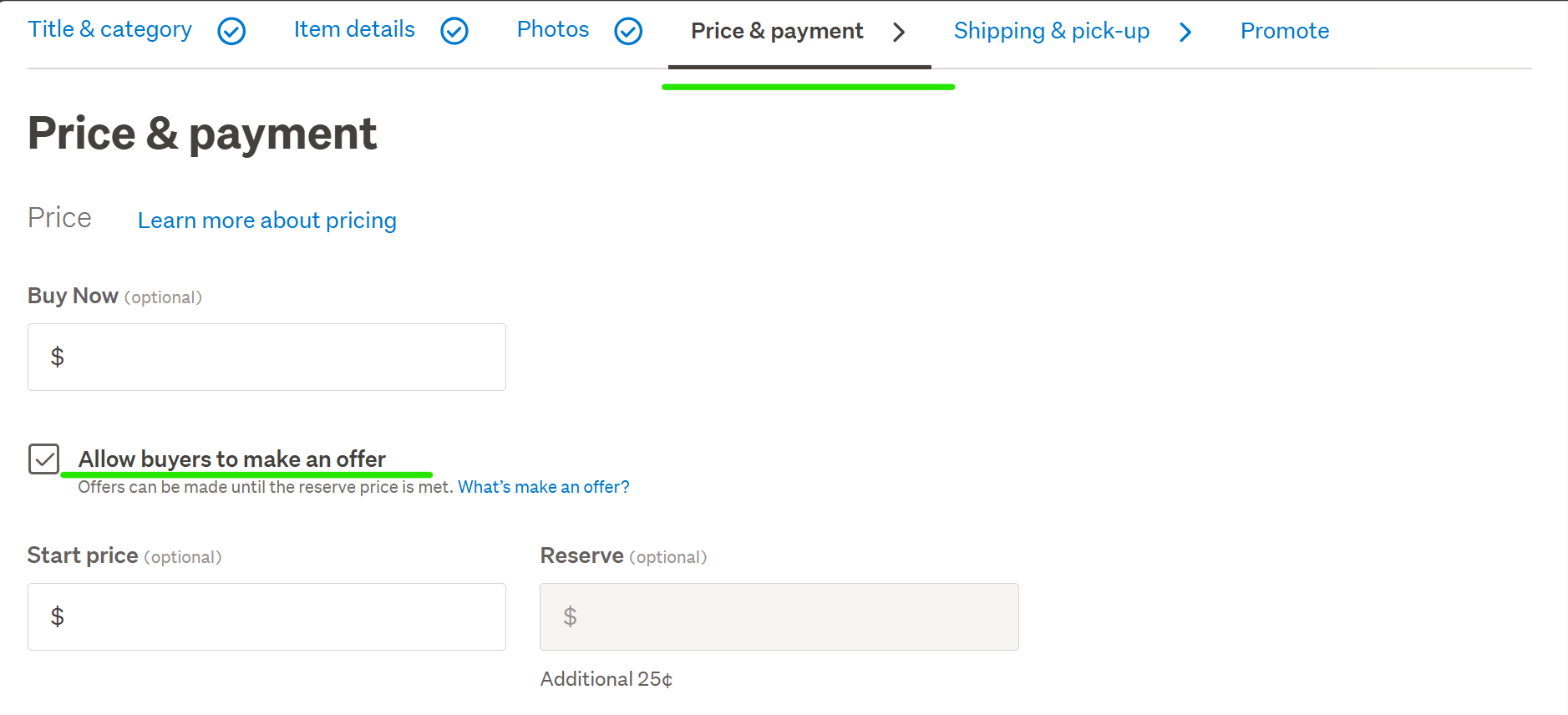
Reference: Make an Offer – Help - Trade Me
0 -
hi having used trademe for over 7 years, i have found my sold items recorded in my sold folder in my trademe phone app, but not my desktop trademe. Some of my sold, won items and questions arent going through to my email as of 2 days ago. Ive checked settings notifications, so dont think anything has changed. i suspect its all the upgrades from trademe...i tried using the chat help but cant get the bot to speak to a real person despite saying 'talkto a person' ....... sigh, help!!!!
1 -
Why can’t I see my unanswered question I asked on an auction ?
0 -
S Community Superuser
Kia Ora Jan,
I've had the exact same thing happen, I used the 'Tell us what you think' Link on the New Look Desktop site to put a message through to the Tech Team - this was resolved inside of 24hrs for me therefore I suspect it's a minor glitch in the system. - Cheers.
0 -
Things used to be so easy and uncomplicated with very few issues on TM but at the moment make sure you have the right ticks unticked rather than ticked and if you untick them for some reason they can become ticked again without your knowledge. A tick box was created to be ticked if you wanted something and not untick a permanent tick box.
I want a permanent unticked box for something I don't want .
Ah well , nearly lunch
1 -
If you asked a question on some other auction then you wont see it until the person answers it or until the auction finishes. TBH, those questions ought to appear the moment they are asked if transparency is the key. If they are inappropriate then take action then because as it is they show up one way or the other but why hide a question which goes unanswered and some poor buyer wins and realizes there's an issue they never thought of.
0 -
S Community SuperuserEdited
Kia Ora Rich,
Sorry to read you're having difficulty there,
Listings which were created on the New Look system are only viewable on the Apps & the New Look Desktop site, if you are using the Classic (Old) Desktop scroll to the Bottom of your page & select the word Mobile - this should return in the New Look site for you where you should be able to view these.
Run a check of the Email Troubleshooting steps in the Link below...
Not getting Trade Me emails – Help - Trade Me
To contact a staff member directly for assistance if you select 'Contact us' at the very bottom of any TradeMe page the Live Chat Bubble will Pop up in blue at the bottom Right of your Landing page screen, enter in the Chat window Talk to person below the Bot text suggestions, next to the paperclip icon, to be transferred through to the staff line.
The Live Chat manned hours weekdays are 8:00am - 5:30pm and weekends 9:30am - 4:pmAfterhours you can leave a detailed message through the same path and a staff member will email you back during manned business hours.Example: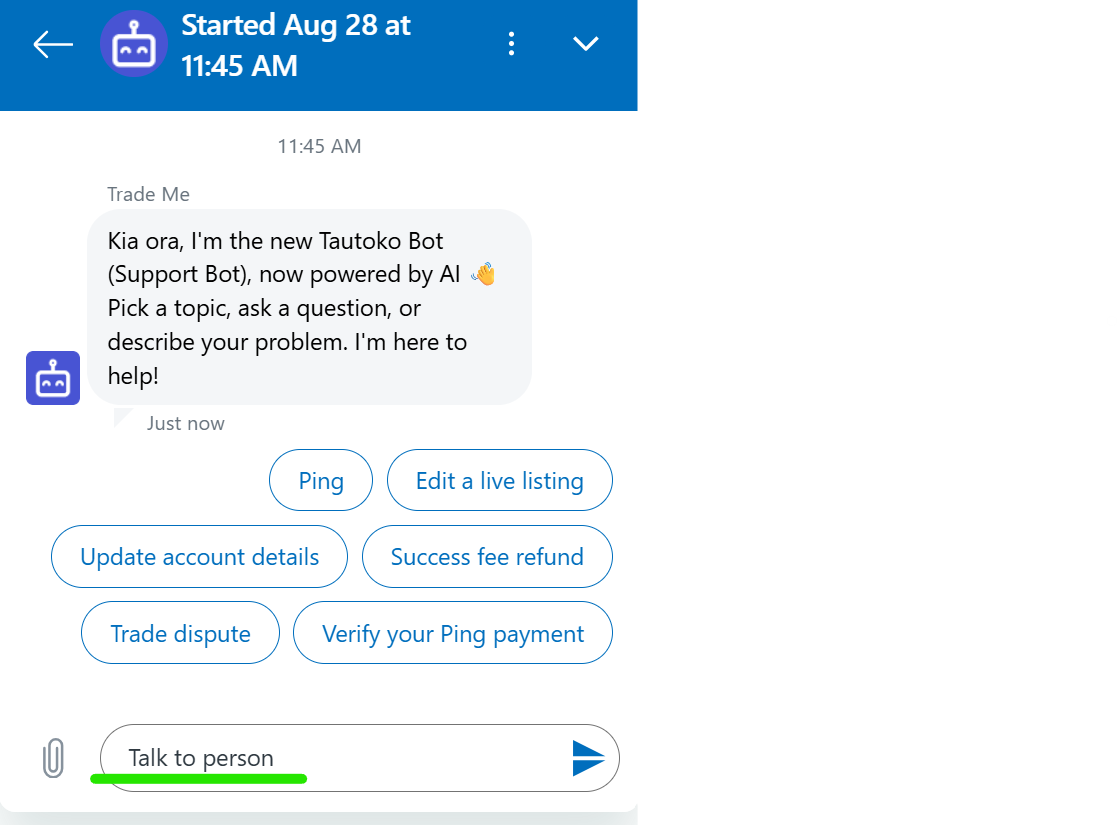 Let us know how you get on - Cheers.0
 -
Am I reading this correctly...
"Listings which are created on the New Look system are only viewable on the Apps & the New Look Desktop site,"
Are you saying that some people may create a listing which viewers cant see? Serious?!0 -
S Community SuperuserEdited
Cheers Robert,
To clarify - Listings created through the New system are only viewable on the New Look Desktop site & on the Apps therefore Members using these sites can view the Listings - Desktop site users can select 'Mobile' at the Bottom of the page & are returned in the New Look Desktop site.
0 -
Read carefully Robert ,Why can’t I see "my" unanswered question I asked on an auction ?
I am well aware that you can only see the answer on your question if answered by that trader .
I could not see if my question was even recorded
0 -
Rob,
The scenario. Wife asked question on auction, goes and does some gardening , talks to the neighbour etc.
Much later that day went to check if "her" question was answered and all she saw was " one question not answered and her question nowhere to be seen as it always does since in our case 2003, she thought , oops my mistake so again asked the same question again with the same result . it has now happened a number of times and I am getting sick and tired spending time sorting out problems not of our making.
There was a message from TM to contact something somewhere but good could not be bothered .
0 -
S Community Superuser
Cheers Robert,
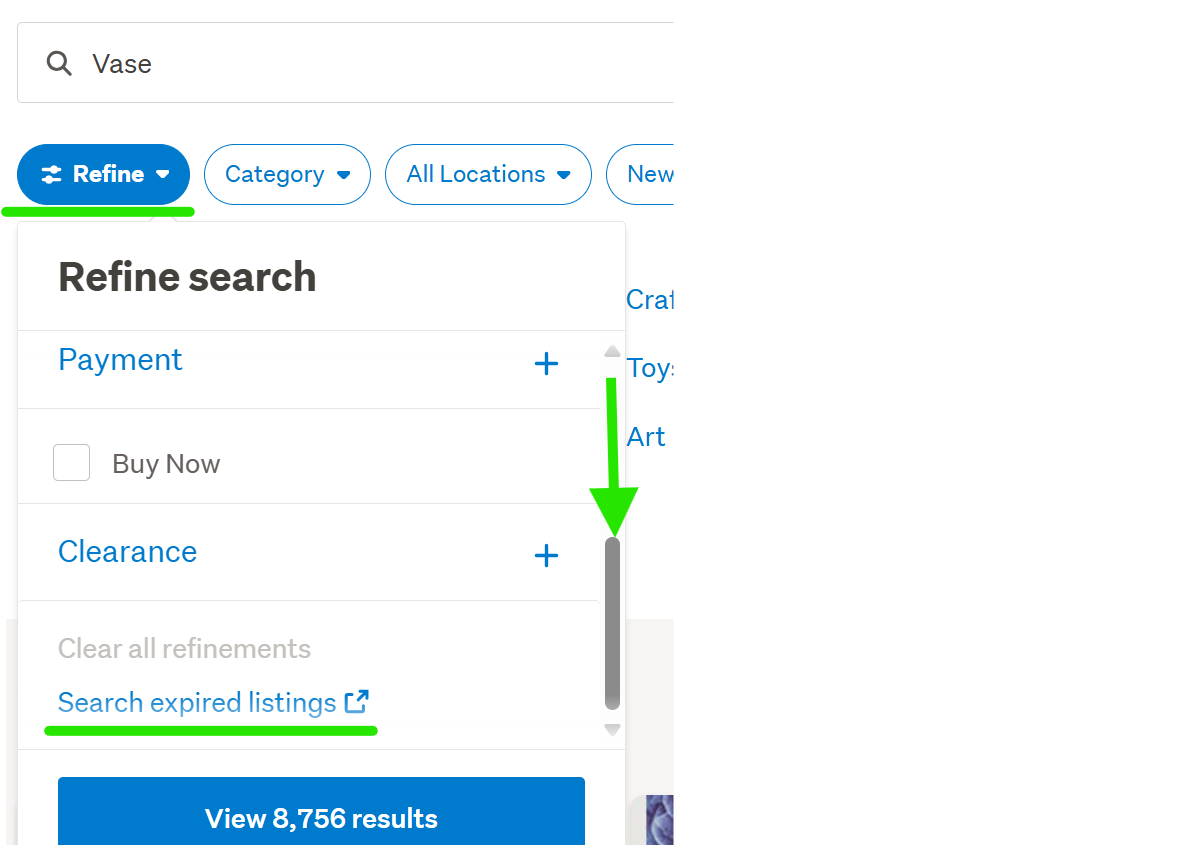
Do you know the Blue Refine Tab above the categories opens a sub-menu which has the 'Expired Listings' link at the bottom taking you through to the search box's.
Example:
 0
0 -
for some reason all of my messages have been deleted from this page....obviously wasn't very keen on what I was saying !!!!!
0 -
Michelle
Kia ora Glynis, Community is part of Help and is a place for members to ask and answer questions and seek advice on Trade Me related matters. Where posts or comments aren't in line with our guidelines we remove them to keep things tidy and make it easy for people to find the content they need.
-1 -
I realized a while ago that an item a CD I had on watchlist that I wanted to bid on had dissappeared & it's not in my lost items list either.
Is this yet another TM glitch?
0 -
Michelle
Kia ora Victoria, Sorry this caused confusion – we’re upgrading some background systems that power Trade Me, and while we do this some features are temporarily unavailable for listings in certain categories.
Listings that go through our new system can only be viewed in My Trade Me on our app and new-look website.
If you're on our 'classic' site and can't see the listing in your account, you can select the 'Mobile' option at the bottom of the page to get to our new-look site. Alternatively, you can search the listing number and it'll bring up the listing for you.
0 -
hello there
I have requested an account summary which are only covers items I had sold before but not including items I have bought from... can I please request items I have purchased from 2019 until now
Thank you
0 -
S Community SuperuserEdited
Kia Ora cherry-chen,
The help file below shows you how to obtain your Ping purchase transactions. - If you select the Link to 'Request an account summary' at the Bottom of the help file, your landing page is the Request form which gives you an itemised select box to tick for your Bought items by Afterpay, Bank transfers and cash. - Cheers.
0 -
Is it possible to change the catagory of a listing after you have posted a listing?
0 -
Michelle
Kia ora vogonm, it depends on the listing, some categories have attributes that prevent listings from being moved, what was the listing number? If you've tried to edit the listing and the option to change the category isn't available, we might be able to do it for you. Alternatively you can withdraw the listing and create a new one in the correct category and let the team know, and they can refund the withdrawal fee.
0 -
I bought five Pump (reference # P246755255.)But This Pump is not what I need,So I want to return it now.However,he hasn't replied to my email or amswered my phone calls. So far 10 days passed and No one has contacted me. I'm confused and don't know what to do.
0 -
S Community SuperuserEdited
Kia Ora yanfeng1,
Sorry to read you have purchased unwanted items,
Sellers aren't obligated to have 'Change of mind' goods returned for a refund, unless otherwise stated on the Listing as purchased, in the hope your Seller is understanding and willing to accept the pumps back you can continue to attempt communicating through both email and by phone and await a response though depending on how long ago your purchase was you may be best to on sell the unwanted pumps yourself. - All the Best.
0 -
Hi,
When I list books and get to the shipping costs page I cannot add the options:
"Price required for combined post after first: $0.00 "
or: "Shipping to be arranged with seller: N/A "
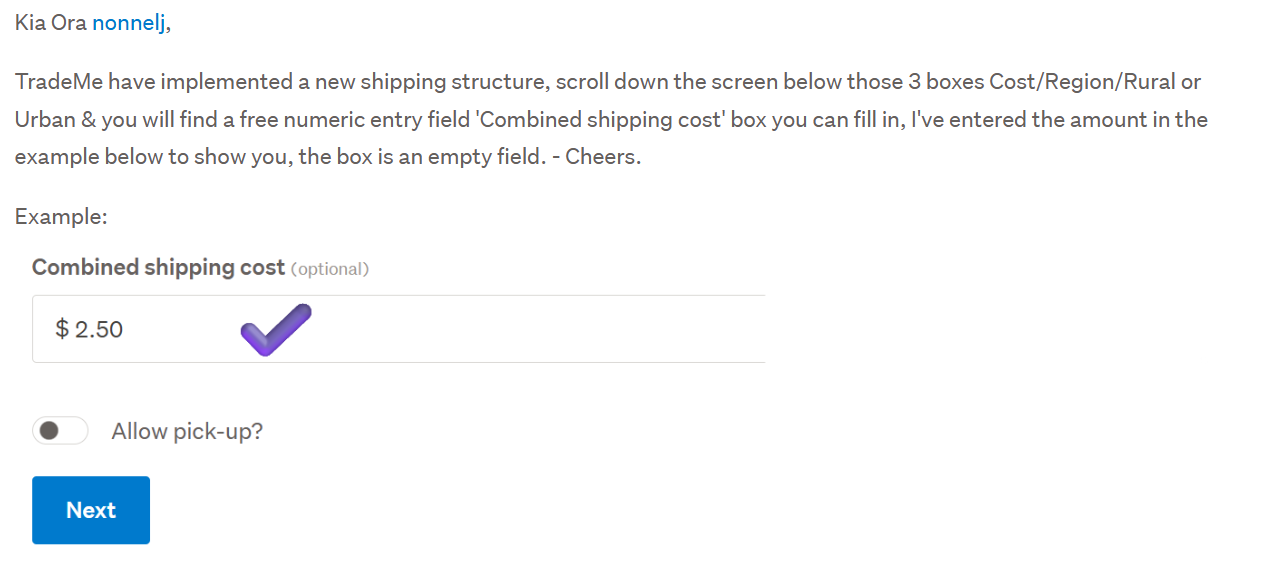
as I have seen in Listing #5972923981 and Listing #5971703982I only get 3 boxes to fill: Cost/Region/Rural or Urban
If I click to add another option, I get the same 3 boxes to fill.
Why is this?
I used to be able to state: Request quote for combined shipping/ $0.00
as well as state costs for urban or RD delivery...I cannot have "Free pick-up" as my property is only accessible when I am home, which is not often at times...
Thanks for your help.
(nonnelJ)0 -
S Community SuperuserEdited
 0
0 -
Thanks S.
J-P
0 -
Hi again,
Sorry, but I have relisted a book, found the new box and entered: "Quote required for combined post after first purchase".
However, the option does not appear on the new listing (Listing #5980594664 )...!!??
Is it only for NEW listings?
Cheers.
J-P
0 -
 Gary-NZStocked Community Superuser
Unfortunately Mike, you are not helping you case here. This a publicly viewable forum, not a contact trademe system by posting your email address in multiple identical posts you are again making it easier for scammers to access you account and details. Click the icon to the right of your posts and either delete or edit to remove your email address. To contact Trademe, use the contact us link at the bottom of any page here.
2


59 comments
Date
Votes