New Shipping Templates

I attempted to use the new shipping template this afternoon. I can't see how to put urban shipping only. I have been in touch with Trade Me through Chat and await their email. In the meantime has anyone else figured it out?
-
I'm going to start using the new template for the "benefits" of the new user experience, but I'm going to put a disclaimer on all listings regarding that delivery estimates, just so that I don't get accused of breaking that promise when a parcel got delayed.
0 -
What would be cool is if TM's system tracked your order once shipped, and just automatically set the eta, depending on real world data. Then it'll be more realistic when things slow down due to covid or whatever.
Also prevents people from saying they ship faster than they really do.
3 -
 Callum Community Superuser
Like already mentioned currently under this new system I also will have the problem of not being able to specify a $0.00 combined, nor provide a Rural Delivery rate. Well technically I can list them, but I can't say WHAT they are for, so I dunno how the buyer will know what to select.
I do like the idea behind it. Finally we can have a true "search by lowest price incl. postage." I will like this as a buyer, and it should generate more sales for me as a seller.
Yvonne: TM explained to me about emails once. It's a matter of logistics. When you or I hit send on a single email to someone it gets there in nanoseconds. When TM send an email to potentially millions of people, it can take 8-10 hours for everything to churn through the system and actually arrive after they hit the send button. They had this problem in the first days of Covid. An email could be outdated by the time everyone received it.
0 -
Hi Lucy
Could we please have another option added to the shipping template. $2.00 - NZ Post - Nationwide - This item only Envelope 1-5 days
Cheers
3 -
 Lucy
LucyTrade Me staff - Community team
I can pass that on Robyn. It will be most helpful if you can go here to pop that request in, so we have it from you and against your Trade Me membership.
1 -
I was pleased to see we finally get an option to include a combined shipping option in a structured way with the new templates.
I offer free combined shipping on all additional purchases, but yet the shopping cart still allows a buyer to purchase only one item and choose this combined option.
Lucy, is there a plan to finish the job and make this work correctly so a buyer can't purchase without paying any shipping at all?
1 -
I've finally got the email this morning. However, it doesn't attack 2 of my biggest problems:
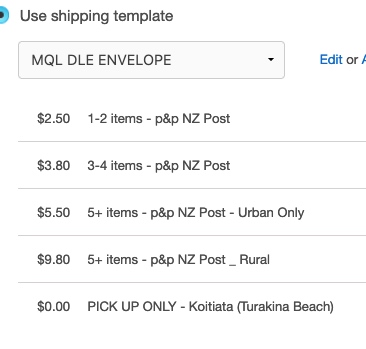
1) Many of my listings are MQLs, so shipping costs vary depending on how many a booyer chooses. I had my templates set up so that the description very clearly stated how many could be sent for what price, but I am unable to do that with this system. In fact, no description of any kind seems possible so even basic info like urban or rual, or for larger items NI or SI can be listed but I can't say what the different prices cover.
2) I allow local buyers to Pick-Up their purchase(s), so I have always included a $0.00 - PICK UP ONLY option in the shipping details, now I can't as with no description to make it clear that it is only for items the buyer will collect, I can see many buyers choosing that option regardless of whether they will pick up or not.
0 -
 0
0 -
 cuserEdited
@Kate, do you need the pickup only option? At least for me with the free shipping template, the pickup option still shows on the listings, I don't need to add anything to the new shipping template for that.
It looks like the pickup option is seperate from this new shipping system, from what I can tell. Unless I'm miss understanding your issue.
0 -
Yes, I do. I've sold items locally at the occasional market etc so I'm known to a local customer base, and I quite regularly get locals who will buy an item on TM and arrange to pick up after work or on a weekend. It's convenient for them, and works well for me. I've also had buyers use it on smaller items when they've already purchased a larger one, and that's fine with me.
I also really need that range of shipping prices on MQLs, and I dread the kind of fuss and complaints there will be when buyers opt for the wrong shipping price because they don't understand what the various prices are for.
I don't do free shipping as it just doesn't work to have a "one price fits all" with my range of products. I'm not prepared to take the hit when a buyer lives rural, and IMO it's not fair to make urban buyers cover part of the cost of rural when they buy. Increasing my prices to include the shipping (we all know there's no such thing as "free" shipping) would make my prices uncompetitive, and honestly, there's not enough margin for me to absorb the costs.
0 -
 Gary-NZStocked Community SuperuserEdited
Export - edit - import - Bulk update shipping templates.
I did this myself this morning to several hundred listings in a few minutes, so thought I'd share in case anyone else wants to convert a whole lot of MQL MP products/listings to the new shipping templates in bulk rather than one by one and hasn't used the csv export/import procedure before..
This may seem lengthy, but it's quite quick. Once you have done this, it give you some confidence to maybe try other bulk edits to save you lots of time.
I've already had sales that have used the new shipping templates after I did this.1. Create new templates using the Shipping tab in My Products.
For trouble-free handling and to differentiate betweek old templates and new, name each template without spaces. eg new_3.95 , new_5.40 etc. You don't have to use the underline but it helps to clarify.2. In MP, clear all filters so all products are displayed. then click the Select all box here....

3. Click the Export button as here...

4. Depending on your browser setup, choose to save the exported csv file somewhere on your computer you remember eg your Documents folder.5. For easy trouble-free editing of CSV files, I have always used Openoffice, not Excel, not Libreoffice. Oppenoffice is a free to use office application including Calc, which is their spreadsheet and csv handler. You can download Openoffice by searching on google. I have used the others mentioned, but have had occasional format problems so stick to Openoffice.
6. Locate the csv file where you saved it in step 4. and right-click to then choose Open With Oppenoffice Calc. You may be able to simply double click the csv to open it also, but you may have other programs associated with csv, so the right click "Open with" gives you the choice.
Open office will open and bring up the csv import tool.
!IMPORTANT - Pay particular attention to the settings below as you MUST change settings so all the options look like this, ie Character Set, Separated by Comma, Text delimiter " and all other boxes unticked.
Click ok to import.
7. You'll see a screen similar to this. Not much info and too much white sapce, so click the select all box as below, so everything is highlighted as in 2nd pic. You can also choose Select all from the Edit menu.
Then, with everything highlighted like here
, click the Format menu and choose Row, then Row height. Change row height to 0.5cm or 0.45cm so more is shown on screen.
8. From the menu choose File Save as to save a copy before you make any edits. Give it a memorable name eg 14012022-newtemplates. You'll get a warning for format - choose Keep Current Format as here.

9. While everything is highlighted still, click on menu - Data - Sort, then click the Options tab and put a tick in the box that says Range contains column labels, then click back to the Sort criteria tab.
In the Sort by dropdown, choose is_sold_in_multiple_quantities and click the Decending option.
Then BEFORE you click ok, in the secondary sort dropdown choose Delivery price (either ascending or descending doesn't matter). Now click ok.10. Click in to any cell and move to the right till you get to the is_sold_in_multiple_quantities column. You will see the top items will be TRUE ie these ones are MQLs so can use the new shipping templates. Non MQLs will be further down the list and will in this column say FALSE, so those ones are non MQL auctions that can not use the new templates.
Scroll down the list until you come to the last row that has TRUE in it and take not of the number of the row at left. This will be needed as an indicator when we start editing. Scroll back up to top so you are in row 2 (row Seller says in the auction... being the column header labels).11. So we can see the full shipping options we need to shrink the width of the column. To do this go to Menu - Format - Column - Width. Change width to 10cm and click ok. If you can now see the column to the right which is the payment_bank_deposit column, then all good, else change column width to another number. You can adjust this at any time to give you a better view of the columns and fine tune using the - and + buttons or the slider bottom right, or you can grab the line at the top beween AG and AH that separates the columns and hold and drag that to adjust the column width.
12. In the cell on row 2, you will see the current shipping options that are setup for that product, or, if you have an existing old template, you will see the name of that template there. As we have sorted by delivery price, you should see items that share the same or similar options under each other to make editing easier.
13. Editing. If for example you have 10 rows that have the same options, go to the first one, and type in the name of the new shipping template you want to replace the existing option with.
Go to the next one and repeat. Once you have chenaged 2 and you have more to make the same, you can drag over the 2 cells that contain the new template name, then release mouse button and while the 2 of them are highlighted, drag down the small black square to the bottom right of the highlighted cells. Drag down to all the cells you want to change, then release mouse button. You'll then see the name of the new template repeated down in those cells.
If you've made a mistake, Menu - edit - undo, else continue on with your edits in this same manor.
You may want to move to the left now and again to check what products you are changing shipping on, then just return to this column to continue. Keep checking the row number you noted down earlier of the last MQL product to edit.14. Once finished with all your edits, Menu, File Save, or save as if you want to take yet another copy in case you want to go back to the previous one. Close Openoffice.
15. Updating products in My Products live on Trademe.
We now need to import the new changes to MP.
Go to MP page on Trademe and click on Import photos & products just to the right of the Create a new product blue button.16. Click on Step 2 - Import CSV file button. A chooser box will come up asking you which csv file to upload. Locate and choose the latest edited file you want to import.
The import process will begin.
Once the import is finished, the changes will show in your My Products products.
The changes are not in your live listings yet.
Click in to a couple of products and check they are correct with the new shipping template names.17. If you are happy to simply leave current listings as they are until they close and relist with the new templates, then you need do no more.
Updating live listings.
18. If you want to upgrade all your current listings to the new templates you have set up in the products, you can do this.
The most simple way to do this is to use the bulk edit - listing footer method.
If you currently have a common listing footer shared across all your listings, then it's a simple process to clear all filters in MP, Select all, Choose Bulk edit then Listing footer in the dropdown as here...
All you need to edit is to just add even a comma or a full stop, if you have no other edits to make.
If you don't currently use a listing footer, it might be a good time to start, else just put a single full stop in.
So, after you have brought up the Edit Listing footer, click Edit.
Make your changes, Save, then make sure to PUT A TICK in the box Update current listings for selected products (where possible).
Note - Listings with bids, or listings that have longer than the allowed number of chars will not be changed. Any failures will be shown on screen and you can manually update those if reqd or leave them to just update as the close and relist.Finish.
If you have done something majorly wrong in your editing and updating process, you can always re-import the very first csv you exported from the beginning of this process to revert your products back how they were, but anything you have manually changed in MP or sales made in the interim will need to be adjusted for manually again.
That about does it.
1 -
Gary, why not just bulk edit in My products, and select the "Shipping" drop-down to apply the shipping template to all listings (or to any chosen subset of listings) in one go, then you don't have to do an export/import? That was a much quicker and easier way for me.
0 -
Gary-NZStocked Community Superuser
Yes, you can do that if you have a limited number of different shipping options, and you can easily identify which items use the existing different templates, but depends on your products as to how easy it is to identify which ones use what existing templates from several hundred or thousand items and possibly dozens of existing templates. I suppose if you were starting from scratch you could have put products that use the same shipping template in to different matching folders in MP, it would make it easier to select them, but unfortunately I have never done that.
0 -
Kate, it does look like you'll have to think of ways to use the new template (or specify your own shipping options in each individual listing and forego all the "benefits" of the new template). Trade Me is trying to limit the number of options available so they could use them for filtering. Having too many arbitrary options defined by the seller is going to make the searching and sorting algorithm too complex, maybe to the extent of it stop working. It's really a strange decision to not include the option to have rural postage, hopefully they change that.
0 -
Arthur, I know I'm not the only seller who works this way, after all the purpose of having MQLs was so a buyer could decide how many "widgets" they wanted or needed. Now making that impractical with this new shipping system is just nuts! It says to me that whoever designed it has not factored in their thinking a very frequently used listing feature, and possibly other ones that we haven't stumbled across yet. We also know that there will be inevitable "adjustments" that will need to be made to this system, which will be even more confusing to buyers and sellers alike.
0 -
Kate, I'm also having a Pick Up "shipping option" as I charge for pick up (pick ups incur a different set of costs vs. shipping). That's is not going to work with the new template.
It's understandable that the team implemented this feature have no clue about how things should work, they are afterall a group of full time employees who can't be full time sellers on Trade Me at the same time (probably casual sellers), only full time sellers have the visibility of how this feature should work. Doesn't look like Trade Me consulted any professional seller on here before making the changes.
It does look like Trade Me is moving to making use of the "community" to provide free labour, eg. the aim of this "community" board is to have members help other members, so Trade Me can save on the support resources. Now, when they implement new changes, again, they appear to be relying on the "community" to help test the feature and provide feedback on how the system should be working (full time professional software testers are expensive!). All these for free, because if not, the feature will cripple the in-trade traders who rely on these features working properly in order to earn a living, so they have no choice but the provide feedback and be the free testers.
Regardless of how it's done, I hope these features eventually get sorted out, so I can start using them...haha
0 -
Arthur, I've been buying and selling on here for 17 years this March (back before In Trade" accounts were ever heard of), and TM using sellers as free sources of advice is nothing new! And having them release unthought-out and problematic software is nothing new either. It would be nice if they could actually seek advice at the development stage instead of launching a thoretically good idea that has been very poorly designed and implemented. Actually, what would be really good would be having them fix the bugs and problems that still exist from previous "good ideas' before launching another set of problems. Dreams are free, I guess.
I'm going to have a wee dram (and toast some memories of TMD FNHH - some around here will still remember that) and put off thinking about shipping problems until Monday. Cheers :>)
0 -
 123kitchensEdited
I've found other options that TM haven't taken into account with these changes.
I only have one rate on each listing plus the $0 combined rate. My one rate covers Urban, PO Boxes AND Rural. I can't see where you can have just one rate without it saying either Urban OR Rural. I suppose I'll have to put $5.50 urban and then another line as $5.50 rural.
Another problem is that you can't specify PO Boxes are okay.
I don't use BAC so the words economy, express, standard are meaningless for me. All my shipping is 1-3 days but there isn't an option for that without using one of those words that only TM has defined.
These changes have been designed for a seller who:
a) uses BAC only,
b) only uses one courier company,
c) has urban and rural options and nothing else,
d) doesn't need to put more info for their buyers ie 1-4 items are x price, 5-8 items are y price.
Seriously TM have you not learnt by now that you need to consult with a good selection of traders BEFORE you implement major disruptive changes like this!
PS: I'm confused by the option for 0-1 days?? Something that is delivered can't take 0 days, it just NOT possible. What about an option that says 1-2 days, now that would be more logical.
HANG ON JUST A MINUTE... there is NO word urban, it is nationwide or rural??? WTF!!
0 -
As Lucy mentioned, they are just "estimates". So I guess the best way to get ranked higher is to over promise and risk under delivering in terms of shipping, ie. select the shortest time possible in the shipping template, as Lucy highlighted, they are just estimates not promises, so we won't be faulted for under delivering. Will have to experiment a bit to understand how the search algorithm works and how to take advantage of the algorithm to get ranked higher in the search results...haha
0 -
Callum Community Superuser
Arthur I think the higher ranking and preferential search results will just apply to everyone who has any official shipping template set. Rather than individual shipping times getting a different ranking within the search.
Although I guess there could be scope to add a 0-1 day express or other filters I guess?
0 -
Callum Community Superuser
123kitchens There is a 1-2 day option there already.
Local items with NZpost courier can be delivered same day. I find if I get a 9 or 10am pick-up items sent within 150km of me often get a same day delivery. I assume this would occur in most larger cities. I would probably be confident enough to use the 0-1 day option for those ones.
They do also have a guaranteed express same day service. You pay for it of course! But those would also be considered delivered in "0" days.
0 -
Callum, not sure how that's going to work, Trade Me only mentioned in their email, "boosting any listings with shipping transparency in search results", there's still not enough users and data at the moment to see that in action. Can't see any differences now when doing a search randomly, those using the shipping template do not necessarily show up higher in the search results. If a buyer sort by prices for example, shipping options do not seem to affect the ranking, which makes sense, since the results are sorted by prices. Unless they eventually add a sorting preference by shipping time or shipping cost, etc (which I think are not there now). So, if I want something cheap and fast, can I combine these 2 criteria in the sorting? Or do I only have a choice of finding the cheapest OR the fastest (which is a useless "improvement", if any).
I just hope this "boosting" of search results do not ultimately disadvantage buyers who do not look further down the search results that do not get "boosted" but are really better deals in some sense, that will be a disaster IMHO....haha
0 -
Callum I am in a large city and I have never had anything delivered in the same day and my courier picks up between 8-9am mostly. When I put in the details as if I was filling in the template for real I never got a 1-2 day option.
Lucy can we please get a definition of economy, express and standard as per these new templates. I haven't been able to find one in the help pages.
0 -
Callum Community Superuser
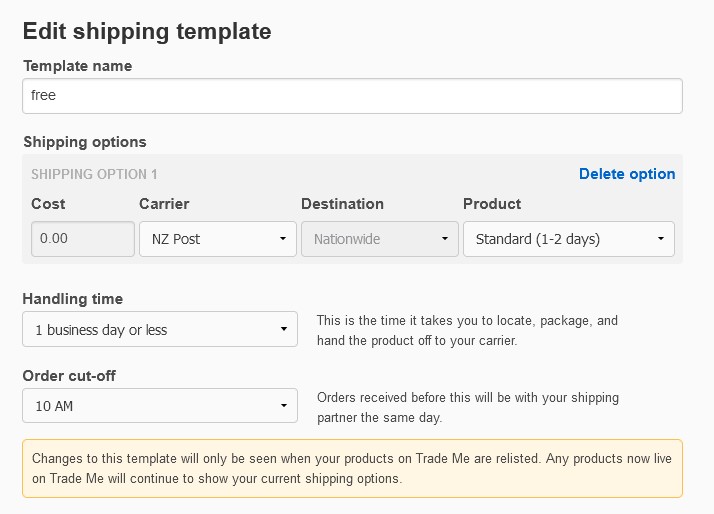
123kitchens The options change depending what courier you put in the first field. The only one that doesn't have a "Standard 1-2 day" option is Aramex. So I guess that is who you use? While the wording of them is not something we are used to here it does give the target delivery times. So that is probably all the definition that is needed.
Attached picture of "Standard 1-2" days using NZ Post from the template.
 0
0 -
Gary-NZStocked Community Superuser
Also, if using the new templates, the estimate for delivery shown under the item title in searches is the Handling time + the shipping estimate, so a 2-4 day courier and a 1 day or less Handling time will show as Delivery 3-5 days.
eg
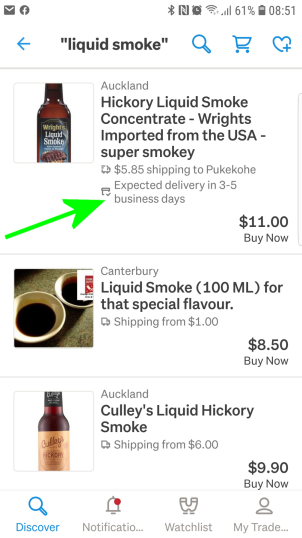
You can see how the delivery estimate shows vs other listings that don't use the new templates.
0 -
Yes the new shipping details show on my listings but only on the mobile app so far, not showing on my desktop. BUT they actually put me at a disadvantage as it is only showing the cheapest and longer option.
I offer a 1-2 day courier or express as they label it and also a 3-4 day standard Parcel Post. When customers look at my auction list they are only seeing the lesser priced option of 3-4 days and that would cause a lot to keep on scrolling as most customers want the 1-2 day delivery. Yes if they click into the auction details the options are all there but I thought this new template idea was supposed to make it more informative for the buyer with the best option. NOPE
Can anyone come up with a solution.
0 -
Gary-NZStocked Community Superuser
Hi Robyn. Have you asked customers what they see or are you just basing on what you see. The shipping estimates displayed are meant to be shown based on the buyers location. Unfortunately though, if you use a nationwide rate, it won't change.
0 -
123kitchens I don't use BAC either, even though I do send parcels with a tracked service. I live rural, so a 50+ km round trip to town each day to send parcels via Courier is just not practical, and no couriers pick up from rural addresses. So I use NZ Post, which offer an excellent service to rural customers - 6 days a week mail delivery and 5 days a week parcel collection. I can buy shipping online as and when I need it (no need to invest in a stock of Courier bags), and their pricing structure is probably cheaper than some Courier companies. It has annoyed me that because I use NZ Post I don't qualify for the much-promoted Gold Rebate, even though it is a tracked service. There will be many other sellers like me for who will not fit the arbitrary criteria TM have chosen.
Arthur Trade Me may say that these delivery times are only estimates, but we both know buyers are going to treat them as promises, and there's going to be grumpy buyers putting up red faces when their item took 4 days to get there, not the "promised" 2 days.
As others have said, the problem is less about having a range of shipping options to suit different buyers, it's about letting buyers know what those different options are for. I honestly can't see how not allowing sellers to enter any text into the shipping options is going to be good for buyers - how on earth do they let buyers know which option to chose if there are no details? Surely that's a no brainer!
0 -
Gary I'm doing a browse through the product area I sell in and what I see there is what the customers see. I only use a Nationwide charge as the size of bag I use is the same cost nationwide. BUT I would prefer if the Delivery time showed the: 1. quickest time frame choice and 2. the cheapest time frame choice. This is surely more informative to customers which is the purpose of this template upheaval.
A Free text area is still the ideal option for us sellers to inform buyers of real information.
0 -
Gary-NZStocked Community SuperuserEdited
Yes, Robyn, a free text area is nice and something I use for a lot of listings too, but unfortunately you can't do that on the new templates so need to stick to the other options.
I think you missed my point though about customers seeing different things. Supposedly, the option a customer sees is based on THEIR location, eg if a seller from the South Island offers a North Island rate and a South Island rate, a buyer from the North Island will see a different rate in the listings compared to a buyer from the South Island. If that same seller is looking at listings in the same way, they will see the South Island rate. Anyway, the Nationwide rate by itself, won't show any differently. Theoretically, "Rural" buyers should only see "Rural" rates, but we all know what's rural for one carrier is not necessarily rural for others, so not sure how that part is going to work in practice.
In fact, I just did a check and yes, I can confirm the rate and delivery time estimate shown does change based on buyer location. ie I added an Auckland rate in addition to my usual Nationwide option and when browsing I see the Auckland rate now.
0


228 comments
Date
Votes