Relist now not working
Resolved
Relist now has not been working properly for days now. I couldn't relist multiple items at the weekend. Today it let me do t hree, but for the other 15 it's just greyed out.
-
 Callum Community Superuser
Hello declutterqueen. Yes, a very well known issue.
Quick relist is not working for all items because some items in some categories are created in the "new" Trade Me.
For these you will have to do them individually.
1 -
 S Community SuperuserEdited
Kia Ora Callum,
TradeMe have started moving Live Listings through to the new system, these Listings which weren't created in the new system aren't relisting in bulk either as they don't have that new structured shipping set up applied in the background, there should be no change to the shipping, just a manual one by one listing page process through to activation for each listing to get it relisted on the new system. - Cheers.
0 -
Callum Community Superuser
Gotcha thanks S.
To confirm declutterqueen, are these standard created listings, or through My Products?
0 -
S Community Superuser
Cheers Callum,
Michelle's update on the shipping came through here...
https://help.trademe.co.nz/hc/en-us/community/posts/16184011914127/comments/16232529893519
0 -
I was told that if I updated the shipping option, my items would quick relist with no issues.
This is not true in any way.
Using this platform has become the epitome of annoying for many of us. We're told the issues are temporary, but nothing seems to get resolved.
I'm down to half my usual listings, primarily because I can't be bothered sitting there relisting things one by one - even that doesn't work and I've noticed items that I have already relisted, popping up again in my 'items I can relist' list so you're in danger of relisting items more than once.
3 -
Created one by one. Not in my products.
1 -
Tell me, if I manually relist each one, when the auction finsihes can I then use bulk relist? I don't sell that much. It takes weeks or months sometimes for my stuff to sell [but it sells eventually]. So I just use relist now each week.
0 -
declutterqueen
Manually relisting each one doesn't seem to help with bulk relisting the next week. I have tried it two weeks running now - I just get errors.
3 -
S Community Superuser
Sorry for the confusion,
From the Help file...
Quick relist or relist in bulk
Quick relist isn’t available on all listings
If it isn't available, relist each listing individually by going to your Unsold folder and opening the listing.
Learn more about why this feature isn't available and how we're upgrading some of our systems.If you're listings aren't being relisted due to the new shipping structure this may give you an error, in this case open each Listing and manually process it through to activation, the Listing is expected to pick up the new structured shipping set up in the background - this should only need to be done once, on the new system relisting should go through fine.
You may not be able to Bulk/Quick relist due to the current upgrades.
1 -
declutterqueen,
Thanks for posting that information.
However, the first week I went through each item and updated them to the new shipping yet it still wouldn't quick relist my items in bulk when they expired. I had the same shipping-error notice.
2 -
S Community Superuser
You may not be able to Bulk/Quick relist due to the current upgrades.
With that shipping error you're getting have you opened each listing one by one, selected each of the one Listing pages through to the listing being activated without changing anything?0 -
S
Thinking about it I've tried 3 times now.
First time I relisted individually without changing anything.
The second time, I opened each listing one by one and went through updating a bit of my blurb and also the shipping.
Third time I chose to 'relist similar item' just before the auctions closed, also updating the blurb and the shipping.
Nothing helped and I still can't do a quick relist on bulk items once the auctions have expired.
1 -
 flossy63 Community Superuser
Last night I was doing bulk listings from folders in My Products, started off good all listing within minutes, but then I had well over an hour with them all backed up active & nothing listing, as I always check latest listings on other browser on personal account, as all in same category, making sure they look ok, photos on them etc. so checked my account was in credit as a negative balance will stop them listing, yes all good there, plenty of $$,
so started listing them Manually, opening and saving, then all of a sudden they all started listing and all listed with 5 minutes,
But well over an hour, never been that long before,
0 -
S Community Superuser
You are reporting 2 faults,
1. You can't do a quick relist on bulk items once the auctions have expired.
2. You have the same shipping-error notice.
Answers:
1. You may not be able to Bulk/Quick relist due to the current upgrades.
2. If you are still showing the shipping error you will need to give TradeMe staff your Listing numbers so they can investigate why this shipping error is still there for you on those listings.
0 -
S
Well it's the shipping message error ithat stops the bulk relist so is it two faults or the same fault?
It says 'you must enter shipping details for each entry' every time. All auctions have updated shipping details.
Happens even if you only select two items to relist.
Still lets you relist individually.
0 -
S Community Superuser
To move forward with your issue send a report through to TradeMe staff so they can take a look into what's happening for you. Take a screenshot of that error message you're getting of the shipping, include those affected Listing numbers. - Select the blue speech icon bottom right of your screen to 'Leave a message for the team' - All the Best.
0 -
 L Community Superuser
Hi retrocentric. This is happening to others too. Exactly the same scenario. So it doesn't appear to be a one off or just your auctions. Hope you have some luck in reporting it to trade me :)
1 -
S
Perhaps I will, thank you.
L
Very good to know this, thank you.
0 -
Just a bit of a Monday morning thing here - I reckon ALL TM features are up the creek now and we will never return to the old days of happy selling.
Uploading photographs, quick relist, pick up only option ... the latter doesn't even exist these days, recieving or refunding any differences in shipping cost between what's listed and actual costs, watchers disappearing, little old mum and dad auctions not getting viewers .... For people who have anxiety issues, this platform is not a healthy place to be.
I figure that any of our older auctions will NEVER quick relist either, no matter how many times we update them. Even the newer ones will have issues if you use a PC, because it wants you to use an app. Have just spent the better part of half an hour trying to add some photographs to a 'new' auction. It used to be a 5 minute job. Take a chill pill perhaps and brace ourselves??
2 -
 Michelle
Trade Me staff - Community team
Kia ora retrocentric, can you reach out to the team with the listing numbers you are getting the shipping error messages for and screenshots of the error message, someone will take a look for you.
0 -
L Community Superuser
So still no answer on this issue. Don't want to create new listings that will fall into a confirmed bug scenario and then have to re create them all over again. Is there a fix in sight?
0 -
Michelle
Kia ora L, sorry for the inconvenience. The team are currently working on this, I'll pop any updates here.
0 -
To those suggesting I notify TM of all these issues ...
If I had the time and inclination, I might be so swayed but in my thinking, Trade Me know these issues so should be fixing them for everyone - you broke it, you fix it seems fair!
Also, this morning all of my trades ended. The 'unsold' page has reverted back to the desktop view - the view I prefer by the way and which seems to switch by itself to the awful 'new look' ... well the auctions that just eneded, don't even appear anywhere in the unsold list. New auctions that I started under TM 'new system' have just disappeared. The only auctions in my unsold list are the ones that closed in May and every single one of them says 'already relisted'. Fancy that.
To relist at this point, I have to select an auction that says 'already relisted' open each auction and fiddle around with it to get it to list again - this is obviously going to take me a while.
So .... to report the problem would be beyond the scope of my sanity. In fact, the problems are so multiple and so many that I wouldn't even know where the heck to start!
I shake my head in disbelief. Over to you Trade Me!
0 -
Callum Community Superuser
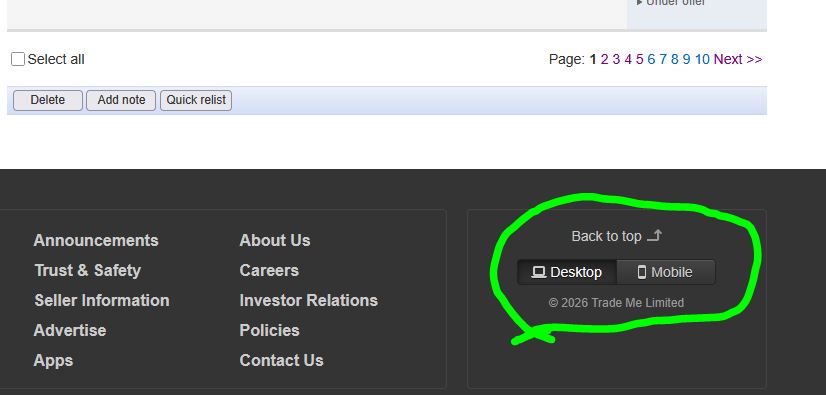
Hello retrocentric. I think I may have mentioned this before. But if you find yourself in unsolds in the old desktop look, then hit "mobile" at the bottom, you will see all the disappeared items reappear. Items created in the new look system don't appear on the classic desktop view. That's why you can't see them there. You have to switch over to the new Trade Me (which is confusingly called mobile)
 0
0 -
Callum
Thanks for that and although I still need to relist indivually, that option certainly makes it less time consuming.
Cheers
1 -
L Community Superuser
Just noticed a resolved badge has popped up on this post. Anyone able to test it ? Be a big Woo Hoo! if it's working.
0 -
L
I just had a go at relisting my auctions that expired Sunday. They all relisted without any warning.
The same auctions have repeatedly been declined by the way.
0 -
L Community SuperuserEdited
That's great retrocentric. What a difference it makes to have that function restored. Maybe it is taking a while to roll through though. quick relist didn't work for one item in antiques for my family.
0

28 comments
Date
Votes