Pick up location in ad is my old address - unable to edit

I am selling an item but even after updating my address the pick-up location remains the old address.
How to change this?
-
 Callum Community Superuser
Hello Marc. Silly question perhaps, but are you sure you are changing your membership address (Not your delivery address)
You can access your membership address at the link below.
https://www.trademe.co.nz/MyTradeMe/ContactDetailsEdit.aspx
-1 -
Yes Callum, I changed my membership address and updated it accordingly, to no avail.
I just did it once more for the 3rd time, using the link you posted but it doesn't help.
The delivery address doesn't get updated....and just imagine...this will result in less interest in the electric mower I'm selling given Murchison is far away for many people.0 -
 Gary-NZStocked Community Superuser
Mark, you need to set your Selling location.
Your selling location is shown on your listings and your member profile. It's used in search to show the location of items you're selling.
Search the help pages above for selling location to find instructions on how to set depending on how you are accessing Trade me.
0 -
Gary,
When I made the post I indicated selling location Richmond.
I once more checked my member profile and delivery address is correctly showing Richmond.But in the post it still indicates Murchison - wrong!
0 -
Gary-NZStocked Community SuperuserEdited
The selling location is actually in your contact details page as link above, but called Closest district. This can be different to both your membership address and your delivery address. I could for example set my membership address as Auckland, my delivery address as Nelson and my Closest district to Bluff and it is Bluff that would show as my location on my listings. Quite often people change their membership address but don't remember to change their closest district, which appears as their location in listings. Hope that helps.
I have tested to verify this works as I have said. I left all my address details unchanged, changed my closest region (selling location) to Winton, looked at my listings and they all said Winton as my location instantly.
If you want to be anonymous, there is even a Location unspecified at the bottom of the nearest locations list. Have seen a lot of listings with location unspecified lately.
-1 -
 S Community Superuser
Kia Ora Marc,
Double check these results in the morning 29 October 2024 - incase it takes awhile to update through the system initially - I had a different scenario I tested lastnight which didn't update as expected until this morning. - If it's not updated can you Edit your Description to include the correct location? - If not Add it as a Seller comment in the interim & contact TradeMe staff through "Live Chat" for assistance,
If you select the Contact us Link at the very bottom of any TradeMe page the Chat Tab will Pop up in blue at the bottom right of your landing page screen. - Enter in the Chat bot which comes up once opened - person - and you will be taken to entering your details before arriving at the window to Chat with a Real Person/Staff. - Enter your Listing number in the window here enabling staff to pull it up readily.
The Live Chat manned hours weekdays are 8:00am - 5:30pm and weekends 9:30am - 4:pm- Cheers.0 -
S Community Superuser
It never ceases to suprise me where your comments suddenly appear from!
Nice work testing these fields - An indication on the Contact details page form showing "Closest district - Selling Location" would be a huge improvement ensuring Members have a clear guide when setting this - an understanding of the purpose of the Closest district field may indeed see some of those unspecified filled and other Listings changed to reflect this correctly in the first instance. - Perhaps an independent help file on the Location of items would be beneficial also as this is a topic which is discussed regularly in Community - Cheers.
0 -
Gary-NZStocked Community Superuser
A lot of mine seem to go to the naughty pending corner S.
Yes, this closest district setting has been talked about for years.
How do I change the location of the items I have for sale? – Help - Trade Me
Seller location is "not specified" ? – Help - Trade Me
How to update address info on Trade Me account – Help - Trade Me
Why is it that my address on trademe can change without my input? – Help - Trade Me
Yes, it doesn't help that the contact details page is still in the old format and shows Closest District, yet the Help page about it is titled Selling location. Confusing, unless you read a bit deeper, or know already.
1 -
 Michelle
Trade Me staff - Community team
Kia ora Gary and S, I've popped this one through to the team to see if we can make that less confusing, thank you!
1 -
Hi guys,
I have changed the closest district field to Nelson, see below. When I refresh the ad page it still says pick-up Murchison but I hope that will be updated soon. Thanks for the help.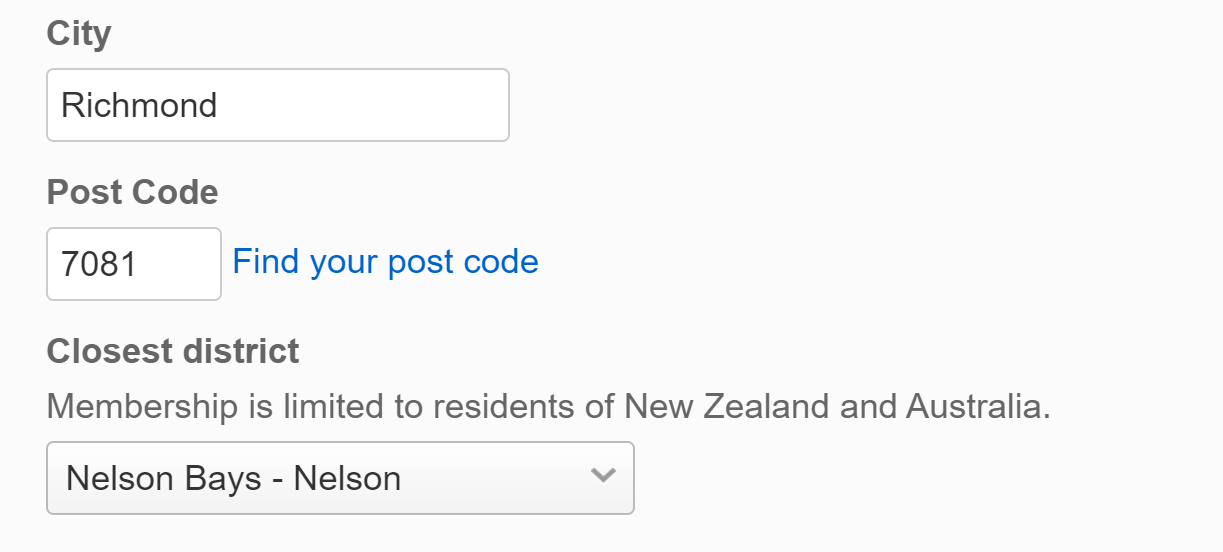 0
0 -
S Community Superuser
Thank you,😊
Yes! the Help page "Update your account details" sub category of "Managing your account" - is rather unfindable when Members search for "Selling Location Or Seller's Location". - These Key words Members search for would benefit greatly in being linked direct. - Members want and expect the answer returned rather than the Hunt. - Location of item is perhaps another beneficial tag. - I do agree the Selling Location & Item Location should be mandatory fields. - Cheers.
Kia Ora Michelle,
Thank you😊
0 -
Gary-NZStocked Community SuperuserEdited
Marc, it may pay to edit your listing to even just add a full stop somewhere. Yes, your listing does say Nelson, Nelson bays, BUT depending how you search it still shows when searching as being in the Murchison area rather than Nelson. Editing slightly may refresh the search location setting.
Just did a test. If you are changing to a completely different district your listings are updated immediately eg changing from Auckland - Pukekohe to Nelson Bays - Murchison.
If you are changing within the same district eg from Nelson Bays - Murchison to Nelson Bays - Nelson it is necessary to edit the listing and then the change shows.
I also verified that when searching and using the dropdown location search, the original location can be searched on eg Pukekohe, but when I click in the listing in the search results it still says Papakura. A quick edit refreshed things so the search matches the listing.
Hope that helps.
1 -
Gary-NZStocked Community Superuser
Good one Marc, that seems to have corrected things now for you. Your listing no longer shows as Murchison when searching and using the location filters, but now says Nelson, as you wanted.
1
13 comments
Date
Votes