Multiple relisting keep failing!
Resolved
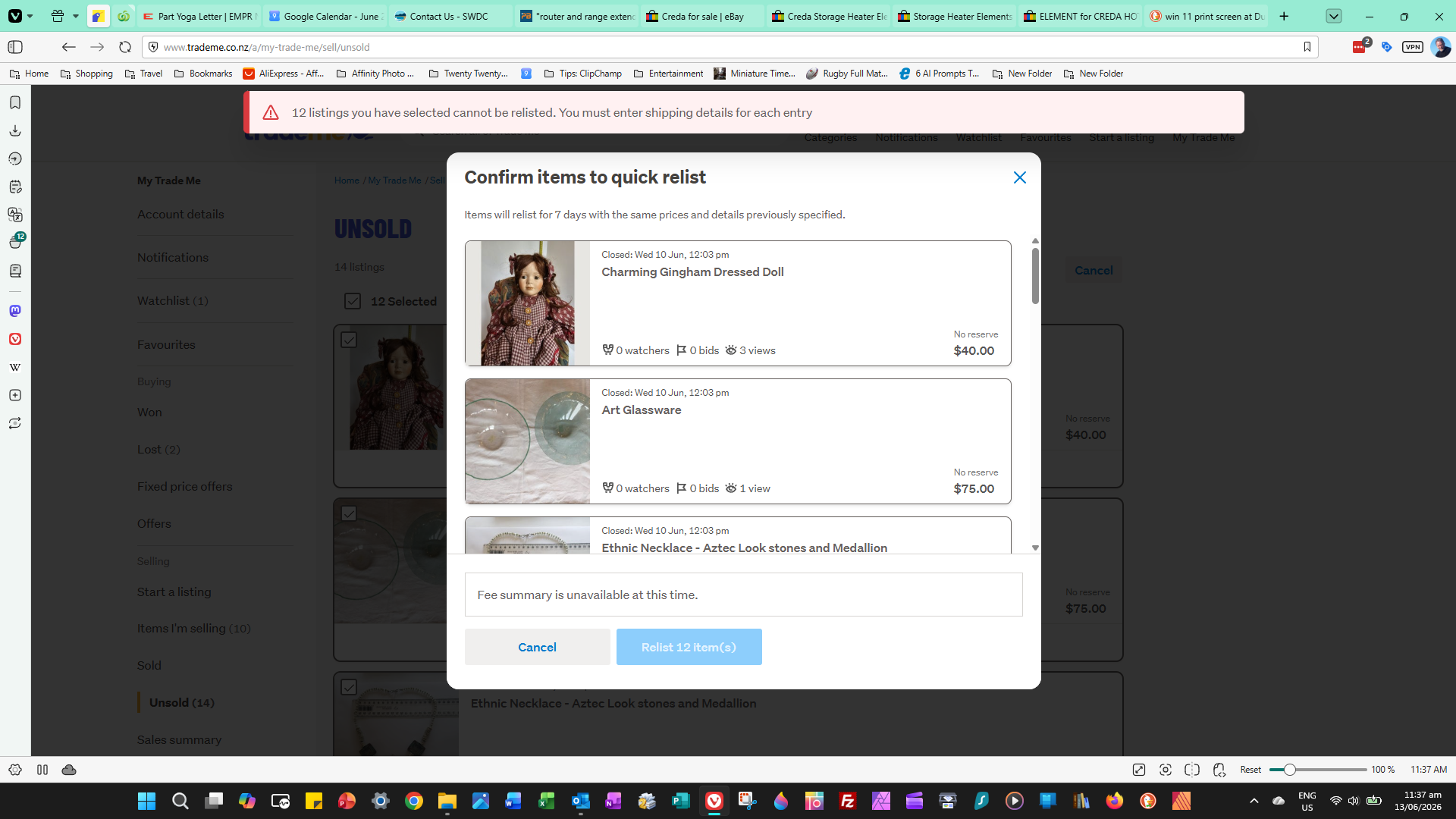
I am still having huge issues with multiple relistings. If I try to relist all expired listings, they fail, and I get this message "You must specify shipping for each item". Same message I got last time, when I did revisit each item and listed separately. Does this mean every time I want to relist multiple items I will need to do singly?? EVERY TIME?? If I click on a single listing and select 'Quick Relist' it works perfectly. I have checked all these listings and they have courier prices set correctly in each and every one. What to do now? Any thoughts appreciated!
-
I'm having the same issue. Really annoying.
5 -
Yes, I did report to Trade Me and they said, unfortunately I would need to revisit each listing and check the shipping. I did that, but still the problem recurs. Frustrating
5 -
 S Community Superuser
Kia Ora roger_269,
Sorry to read the process has not worked as expected for you,
If you send a report into Trademe staff with the screenshot of the error message and a few of your Listing numbers affected this will give the Tech team examples to work with in tracing back through the system what's happening with those. - Select the blue speech icon bottom right of your screen to Leave a message for the team and attach the screenshot as a file. - Cheers.
0 -
 flossy63 Community Superuser
This issue on Casual sellers, or Intade sellers that do not use my products, seems to be having a major effect on listings as for days now category I browse new listings daily, and has very little relisted or even new listings now, listing numbers have dramatically dropped, over 3/4 were my listings as of last night, it has gone quiet, and mine all closing Sunday, for a week?, so category listing numbers will be very low, unless people start using My Products,
It is definitely showing, It needs to be fixed asap,
I use my Products so having no issues, apart from a few nights ago, well over an hour some stuck as Active?,
2 -
 L Community Superuser
Hi flossy63. You are right this does need to be fixed asap. I know a few people who have just given up trying to list now. They won't use my products so are just waiting out the last of their existing trades.
3 -
I have now given a detailed case study of my experience3s to the tech people at Trade Me. Hopefully it will help them see the magnitude of the problem
6 -
S Community Superuser
Thanks willy1949,
That is very helpful and much appreciated - fingers crossed for a quick resolve - Cheers.😊
0 -
I'm hoping so too. Just had the same thing happen this morning!! Driving me nuts!
 3
3 -
S Community Superuser
Cheers willy1949,
I've also heard of Members who are down to Listing about half of their normal Listings as it's become too time consuming to List each one manually 1x1 - this will be being noticed on the platform.
1 -
Yes, I have given up trying to relist until this problem is sorted.
Someone suggested using 'My Products' but for one-off sales that is very time-consuming.
I actually do use My Products for a handful of my sales where I have large numbers of the same thing for sale, and it works well. Howver, it is not a solution to the current mess caused by the software 'updtate' - I hesitate to call it an upgrade :)
3 -
Am searching through all the posts to see if I can seee a solution to the issue I have. It is when I try to relist multiple unsold listings an error message comes up saying something like "Cannot relist. You must enter shipping details for each listing". If it helps understand the issue, have cleared cache, problem still happens. After clearing cache also cannot see the option to switch to mobile view in an attempt to solve the problem. Some people have suggested that, but I could not access it. If I go to the mobile app on my phone, I can still only relist items one by one. If a seller has a large number of listings to manage, the 'Relist All' option via desktop needs to be fixed asap.
1 -
S Community Superuser
Kia Ora willy1949,
TradeMe have placed the 'Confirmed Bug' badge on this Post & a second Post with your exact issue therefore it is a system fault. - As you can't see the Desktop/Mobile box at the bottom of your screen page this means you're already on the New System, the box only appears on the original old Desktop site pages - selecting the Mobile takes us to the New Desktop site, very confusing as it should be worded as such. - This fault does need resolving asap & I see you've asked Michelle for an ETA in a different Post thread, I'll keep my eye out for an acknowledgement there as well as any update for everyone. - Cheers.
0 -
Thank you S.
1 -
L Community Superuser
I just noticed a resolved badge has popped up on this post. Anyone able to test it out ?
1 -
Yes, I just tested now and the multiple listing process worked OK. Thank goodness!
1 -
L Community SuperuserEdited
Awesome :) My Mum just quick relisted a few and it worked too. Little edit, then later on it wouldn't quick relist an item in antiques and collectibles. Hmmm.
0


16 comments
Date
Votes