Option to Export Listings Has Gone
Answered
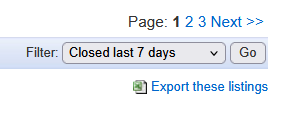
I don't seem to be able to find how to export listings on the new interface - I used to be able to go to sold, click "last 45 days" and export a csv. Now we have to contact Trade Me and request that this data is sent. Or have I missed something?
-
 Callum Community Superuser
I can't see it there either. Have you tried hitting "desktop" to get back to the classic view?
I can switch between new (mobile) and old by this method, but I believe some might be permanently switched over now.
0 -
 flossy63 Community Superuser
I am on the old desktop view, I still have it,
 0
0 -
Desktop view seems to have now gone. Clicking on the link for it doesn't appear to do anything. Yet another example of changing the system for the worse.
2 -
Unfortunately my old desktop view disappeared about a month ago so now I am stuck on the new downgraded interface which I hate so much.
Other issues I have is that I can't bulk quick relist - I select all, hit "Quick Relist", and the popup window shows all listings but confirms only one listing is to be relisted
I am not receiving notifications of sold and paid items on the iphone app, even though notifications for these settings are toggled on. I had to amend my notification settings a week or so ago as I kept getting annoying marketing notifications, but turning these off also seems to have turned off all other notifications
There is no way to see at a glance on desktop sold items whether an item has been paid for or not
Where someone purchases multiple items from me, I used to be able to book a courier on one listing, then attach the tracking number to the other relevant listings - this feature has gone
The courier tracking number used to appear on the sold listings page and it was a simple click to view the tracking status on Aramex / NZ Post's websites. Now the sold listings page shows "courier booked" and you then have to click into the listing and scroll down to find the tracking link, then click onto that
The sold page used to show whether feedback had been placed or received, now it only shows one or the other
There is no longer an option to add feedback to bulk listings - each listing now has to have feedback individually placed.2 -
 Gary-NZStocked Community Superuser
I posted this earlier, but it went to pending of course, as most of my posts do, so I deleted it. Have tried again and posting links in plain text to see if that helps. It probably won't but anyway...
You may want to try direct links.The desktop site link doesn't usually take you straight to the desktop site, but many desktop pages you have bookmarked that haven't been permanently deleted, after clicking that per session, still work. eg export sold etc.That is of course unless Trademe have blocked you access to the desktop site.Desktop site.export sold pages.Sold2 -
Thansk Gary! The export sold pages link worked! The other two took me to the new formats.
I've heard back from Trade Me on my query and have been advised that there will not be an option on the new page to export listings, and that I should try "My Products" instead.0 -
Gary-NZStocked Community Superuser
No worries. My post was pending for over 6 hours till it was released.
Usual way to do things is to click the Desktop link, then use your old format saved pages bookmarks to navigate through the pages you need. If you click the links on the new pages, it generally takes you to the new pages, but if you used saved old desktop bookmarks, it takes you to the old pages. It's sometimes a session thing too, so you may need to do it each time you log in.
I've got a bookmarks folder titled Old TM where I have saved links to the old pages I often use, although every now and again they delete access to one more.
0 -
flossy63 Community SuperuserYes, I use my old saved links, especially reviewing feedback, now Bidbud has gone, The new feedback page is terrible,in profile gives Trade Me user name in old desktop actually gives you Members actual name, which I have noted too.0

8 comments
Date
Votes