MQL isn't working
Answered
No matter what, even with buy now only, no offers, no reserve. MQL is just not on the Price and Payment page.
I'm trying to list multiples, which I have done for years. Two weeks ago I couldn't, using desktop.
-
 Callum Community Superuser
Hello classictrades. Yes, a well known issue if you are on the new system. While they are working on fixing it, in the meantime the only option is to use My Products. All is working well on there. It's worth checking out.
0 -
 S Community Superuser
Kia Ora classictrades,
Yes! TradeMe have applied upgrades to the Listing process which has seen the MQL feature not added back in however setting a quantity is available within the My Products Selling Tool which is TradeMe's own free listing tool available for both casual & In-Trade Sellers, if you'd like to give it a go through there, the tool hasn't been affected by the upgrades and has a few extra features. Many community Members use My Products who hold a wealth of knowledge and are happy to help others through. - In the meantime you could add a quantity amount in your description and ask Members to use the question & answer section to let you know their quantity required enabling you to set up a listing specifically for them. You can add your voice to the many requests for the MQL's to be reinstalled through using the 'Tell us what you think' link near the bottom of the New Look Desktop site. - We've not been provided with any information around whether MQL's will be reinstated at this stage. - All the Best.
0 -
@classictrades Beware My Products it is horrid to use. You'll waste hours learning how to use it as it is full of quirks. The guide was like a frigging novel. That tells you something! The shipping section is particularly crap. And then the filing system in there is utter rubbish. Oh and then it auto lists and auto offers which I find a pain.
-1 -
Callum Community Superuser
cor3063 Not sure what you mean by the filing system, and I find the shipping templates to be excellent. You can of course easily turn on or off auto relist and auto offers if you don't want to use those.
0 -
 AJ Community Superuser
Just to add, Ive been using myproducts for a number of years. Yes there is a small learning curve, but once you understand how it works, it saves significant time and frustration. The best thing is its largely unaffected by the changes, and listing items is all on one page and quicker - you can even just copy a current or old listing and adjust as needed. You can set it up so it automatically relist or do FPOs if you like (or not if you dont like). This is the one thing that can also save lots of time
1 -
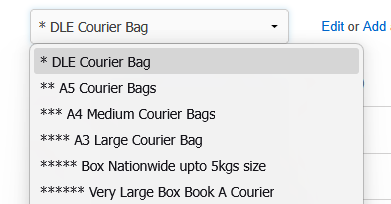
 flossy63 Community SuperuserMy products is far from being horrid to use, I have been using it from the beginning, and yes did not use manual, most of it was common sense when navigating yourself through it, same way we taught ourselves to use Excel, word, power point etc. at home, no computers when we were at school,as others have said all on same page, not multiple pages like on site, that is absolutely horrid,So many advantages of using my products, over the actual sight, create auctions in advance, can save them in folders to list when you are ready, by activating them, set them up to send out auto Fixed price offers etc. create shipping templates, so one click your shipping is done, yes I still use the old Templates, so do not know what the new ones are like, so cannot comment on new layout ones,But I have asterisks to keep them in order of size, as most of my items are only DLE size (Very Small), so they will always show first at top, but once you have set up your shipping templates, it is so quick, and you can edit them with price increases at anytime,
 Listings will never expire if you have not listed in last 45days, you have your sale history for 12 months in sold, and if you go to templates of sold items down the bottom shows history of same items sold if you have had multiples of same, date sold, Buyer, value etc. for 12 months, so you can see when did I last sell one of these in last 12 months etc. they do not drop off like they do in your sold pages after 45days,And easy if you do not want them to auto relist, once you have listed them, just deactivate them, need to close them early, just bring date and time forward in template and save done, not pages and pages to get to end to change date / time, where you maybe charged also,Before My Products back in the day a lot of us used the Auctionitis listing tool, which did help us out with knowledge to navigate My Products, But once you start using it you will never go back to the old way, and people here will vouch that and they ask themselves why did I not use / try this long ago,0
 -
 cor3063Edited
Thanks everyone for your comments, especially the common sense one! I know where to come for help now.
In NZ and overseas I've been user testing software at the design and testing phases for large corporates and governments for over 25 years, so I have a little bit of experience in using multiple products, before and after release.
I went back to using My Products last year after a few years break. I had no issues with it previously but the team I worked with struggled, so we went back to listing in My Trade Me.
When they were upgrading last year on the suggestion of the support staff I started using My Products but the experience was not great. I used Duplicate, presuming it was the equivalent of sell something similar. If I edited the listing at a later date it would revert back to the orginal text and photos resulting in multiple listings of the same thing! Took us a while to work out how it had happened so avoided that feature after. In new listings, the shippng template would lose data entered if you went back to change something during the process. In the end I got my partner who also works in IT to look at it and he had the same issues so we logged them as bugs.
The support person I dealt with said it was 'quirky.' If you didn't do something in particular order then it may not work!
I just tried the filing (filters and folders). I went in to hide sold listings using filters. I wanted to only see active listings on screen but they are still there. I am sure you will flood me with how to do it, however it's basic software and it should be logical and intuitive.
I used Ebay for 10 years while I was overseas and had none of these issues. I found one bug in all that time and it was fixed overnight.
I have flagged numerous issues to the support team this week so I will probably give My Products a go again.
0 -
Callum Community Superuser
Hello cor3063, I can answer to a couple of your issues
1. If you duplicate a product within My Products then edit it later ON THE LIVE LISTING it will revert back to the original when it closes and relists. If you want to edit an item and keep all the changes going forward you need to do it within My Products itself.
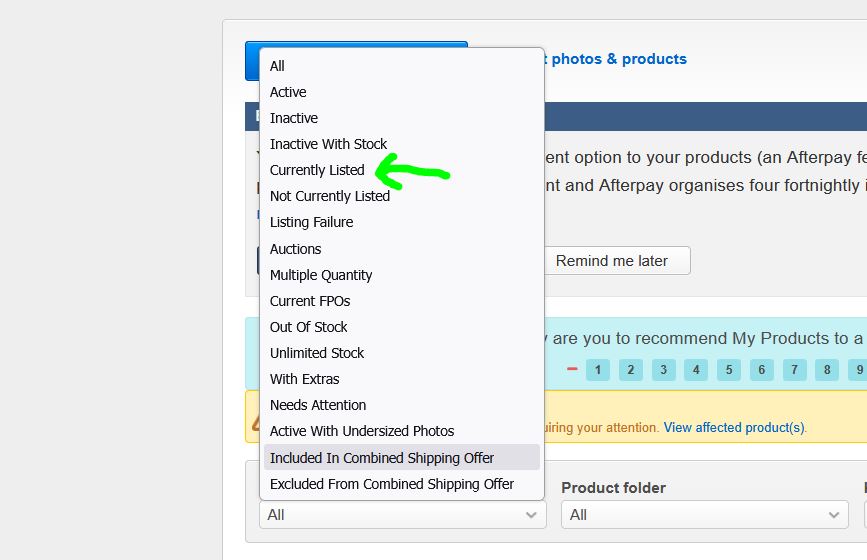
2. To filter out sold items (assuming they are one-offs, and not items with multiple stock that has been relisted) you would use the "currently listed" filter. Like this.
 1
1
8 comments
Date
Votes