Why can't I edit Start price and Buy Now price when relisting an item on desktop?
Confirmed bug
The box for those prices are greyed out and I can't edit or type in them.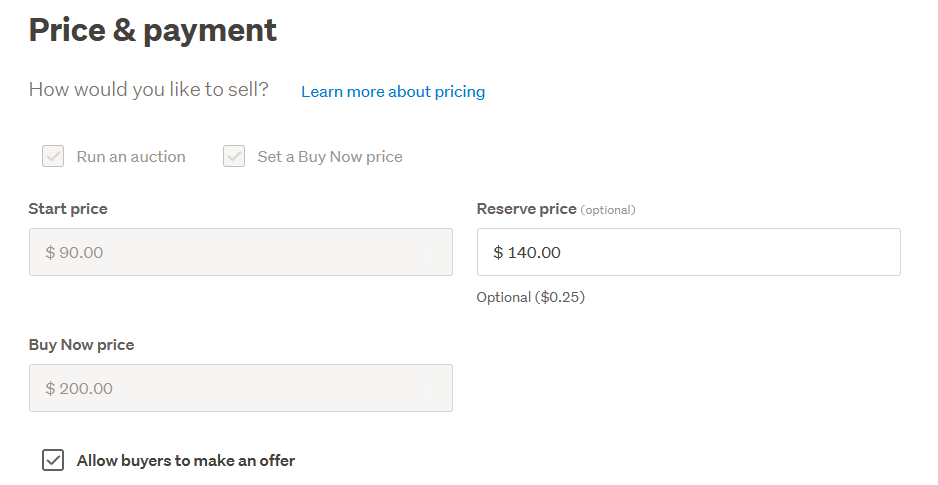
-
 S Community Superuser
Kia Ora Matthew,
Sorry to read you are having trouble editing,What type of Listing do you have?Editing a Listing is dependable on what Item(s) you have Listed and the Type of Listing that you are attempting to Edit - Auctions, Buy Now's & MQL's depend on whether previous sales have been made or bids have been made which meet the Reserve/Start price. - Refer to the Help section Editing a live listing to determine what, when & how you are able to Edit your Listing for your particular item.The greyed out boxes confirm you aren't able to edit these payment fields in which case you can add a sellers comment or withdraw the Listing, making your changes before Listing the item again. - Cheers.0 -
But I'm simply relisting an unsold item (Blu Ray). Surely I should be able to make changes to the price and then relist. Why does it have to be a whole new listing?
1 -
 Michelle
Trade Me staff - Community team
Kia ora Matthew, Sorry for the trouble here – our tech team is investigating an issue with some listings on our new system where sellers have reported issues editing while relisting.
Now that you've supplied us with another instance of the issue, the tech team will have more data to work with so thanks very much for letting us know. In the meantime, you can relist as is and then make your edits right after the new listing is live.0 -
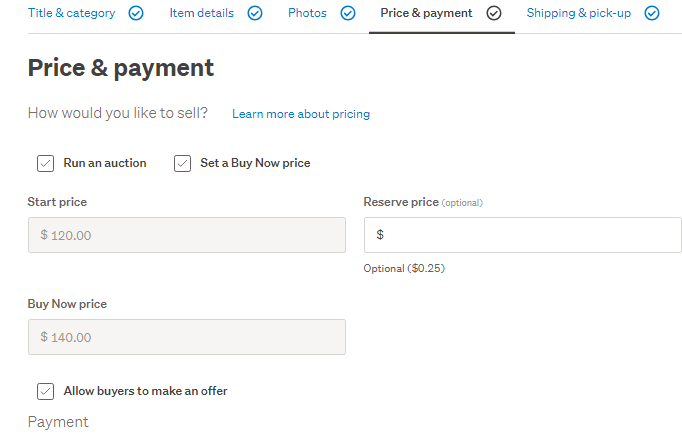
I have the same issue too. I want to adjust the start and buy now prices on one of my listings (which ends in 24 hours) to try encourage bidding to start (so no bids have been made as yet), but both those boxes are grayed out on the desktop app. On my Android phone, the Buy Now cannot be modified but the start price can, but then when I try to update the listing it tells me I can't change the start price. I've never had this issue before, so it's a new bug TradeMe. Please fix urgently.
1 -
 1
1 -
Hi,
When I list books and get to the shipping costs page I cannot add the options:
"Price required for combined post after first: $0.00 "
or: "Shipping to be arranged with seller: N/A "
as I have seen in Listing #5972923981 and Listing #5971703982I only get 3 boxes to fill: Cost/Region/Rural or Urban
If I click to add another option, I get the same 3 boxes to fill.
Why is this?
I used to be able to state: Request quote for combined shipping/ $0.00
as well as state costs for urban or RD delivery...0 -
S Community SuperuserEdited
Kia Ora nonnelj,
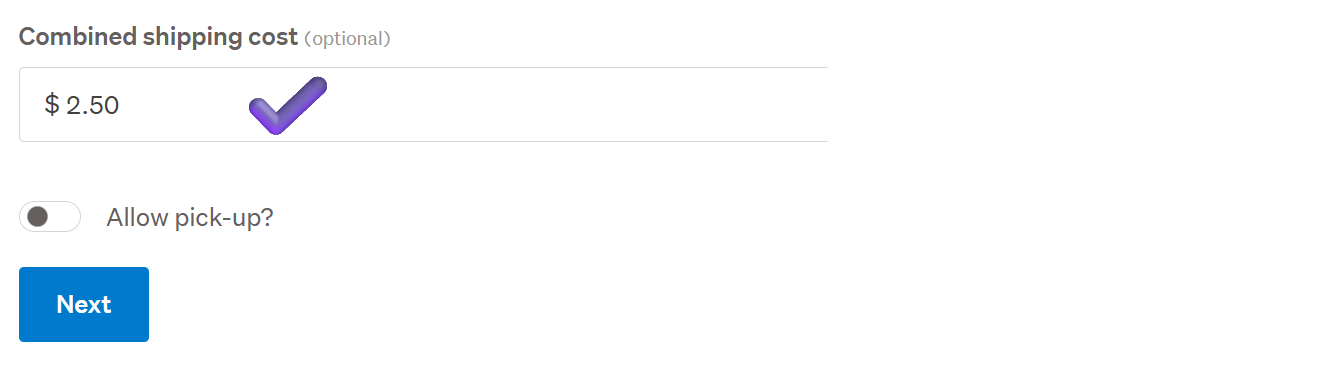
TradeMe have implemented a new shipping structure, scroll down the screen below those 3 boxes Cost/Region/Rural or Urban & you will find a free numeric entry field 'Combined shipping cost' box you can fill in, I've entered the amount in the example below to show you, the box is an empty field. - Cheers.
Example:
 1
1 -
Thanks for that.
I swear this box was not available last week or I would not have bothered you...!
Cheers.
J-P
0 -
Hi again,
Sorry, but I have relisted a book, found the new box and entered: "Quote required for combined post after first purchase".
However, the option does not appear on the new listing (Listing #5980594664 )...!!??
Is it only for NEW listings?
Cheers.
J-P
0 -
Nope. I have just tried again with a brand new listing (Listing #5980611247) and my filled box is not showing in the listing...
Another glitch I guess, one of many since the "improvements" from what I read here.
0 -
MichelleEdited
Kia ora nonnelj, we added the Combined shipping option late last week, so you're right you didn't see it there before. Try the troubleshooting tips, often a cookies and cache clear will fix things. The Combined shipping box isn't free text, you'll need to add an amount in there, which is why "Quote required for combined post after first purchase" won't show. If you're adding in just the dollar amount into the Combined shipping box and it isn't showing, first try the troubleshooting tips, often a cookies and cache clear will fix things. If you're still having problems reach out to the team using the blue speech bubble, bottom right of the screen, give them the listing
0


11 comments
Date
Votes