Deleting credit card details
Answered
How do I remove my credit card details from Trade Me
-
Go to my trade me/ping - manage ping - payment methods and then you can remove your credit card details. :)
0 -
Thanks, have done that. My husband was able to find the tiny print that I missed.
0 -
Give us a clue! I have followed these step and can only update my cc details by substituting another card. Where is the tiny writing to delete? Boy you make this hard TradeMe, get onside. Thanks
0 -
 Gary-NZStocked Community Superuser
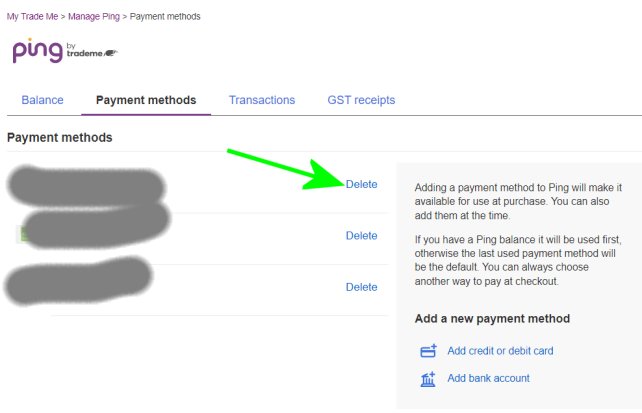
Pip, under Manage in your My Trademe - Ping account, there are options to manage saved cards.
On the std website..
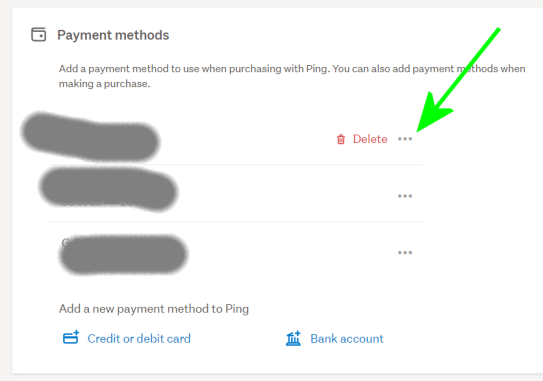
On the new website you have to click the 3 dots beside the card to reveal the delete link.
 0
0 -
I am trying to remove my old visa debit card number and put in a new one,and it's driving me nuts none what has been suggested on here works,so any help would appreciated,or may be out of here for good?!thanks Phil
0 -
 S Community Superuser
Kia Ora Philip,
Are you on the Desktop site?
If you're using one of the Apps type TradeMe.co.nz in your Browser to go to the Desktop site,
Manage Ping | Trade Me will take you to the image above where you select the 3 dots & the red Delete link appears. - You should be able to add a New Visa card without having to delete the old one first also. - You will need to be logged into the TradeMe Desktop site to select the link I've put here.
If you are on the Desktop site and can't action any of this you will want to contact a TradeMe staff member through "Live Chat" for assistance so they can see what is going on for you.
The Live Chat manned hours weekdays are 9:30:am - 5:00pm and weekends 9:30am - 4:pm- Cheers.0


6 comments
Date
Votes