Post changes

-
 flossy63 Community Superuser
If you use my products, it should up date live listings if you have the box ticked, when making
changes in Templates,
as about an hour ago I updated my Rural costs, and My Products was not updating them, so have to open up any listings in my products and just save, (open - save, open - save, open - save.....)
Same when changing listing duration's, it is is a hit and miss if my products updates them,
I had to go through and change a lot manually on the actually listings,
as I want all my listings to finish on Sunday,
1 -
 Gary-NZStocked Community Superuser
Flossy, I thought you would know how to bulk edit. Changing a shipping template only changes listings when they close and relist. If you want to force updates to current listings, you need to edit something else common like payment options, or the usual best way is to edit your common footer if you have one and make sure to tick the box to update current listings. That will update any you have selected.
0 -
flossy63 Community SuperuserEdited
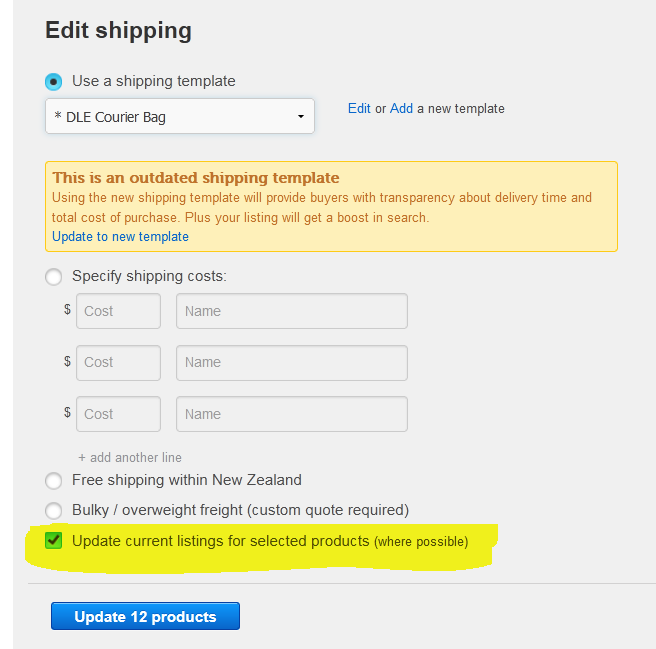
no, it should up date them, I edited the templates, and then go to do a bulk update,
it is not working, has worked in the past,
 0
0 -
Gary-NZStocked Community SuperuserEdited
Yes, I've never known that shipping template update to work, hence editing footer suggestion, as that does work. I know it should work, but have never known it to.
0 -
 AJ Community Superuser
It does update the auctions. I updated my shipping due to NZ posts 1/7 increases. I use my products and a template for shipping for most. I checked the actual auction where I had updated the template and it was changed instantly. The others that use the same shipping template can take a bit longer depending on how many listings use it
1
5 comments
Date
Votes