Re-listing historical items that were not sold
Answered
Can I re-list items I listed a while ago (approx 3 months) that didn't sell without having to start all over again?
-
 Gary-NZStocked Community Superuser
No, not directly as the limit without using My Products is 6 weeks, however you can go to the old auction, copy and paste description etc, and re-upload photos.
0 -
Hi, how can I view the old auction? I am having same issue. I want to relist a very old listing that did not sell at that time, and I can't even find my photos. Is there a way to recover the old listing?
0 -
 Lucy
LucyTrade Me staff - Community team
Hi Estefania! Because the old listing will have been archived, you won't find it in your Unsold folder. Have a search through your emails and see if you can find the listing number in a confirmation message from us. If you locate that you can pop it into the search bar on Trade Me to view the expired listing, copy it and start it again.
If you can't find the listing number or other identifying info for it, get in touch with us and we can help.0 -
I wish to relist item i m selling
0 -
I have the listing number, how do I relist?
0 -
 S Community SuperuserEdited
Kia Ora Mike,
How long ago did your Listing expire? - Listings are only kept in your Unsold Tab for 45 days of the Listing closing unless you List through My Products.
- If it has surpassed the 45 days you have to create a New Listing & the Listing details can be found by searching the Listing number for you to copy & paste into a New Listing.
- If it is less than 45 days since the Listing closed you will want to refer to the Help Search file Relist which shows you how to do this depending on which device you use.
- Car Listings are Renewed within 45 days of closing - outside of this you have to create a new Listing.
- Cheers.
0 -
Gary-NZStocked Community Superuser
Mike, As S has mentioned, you can relist if it closed within the last 45 days by going through your unsold folder. It's often a help to sort by listings you can relist to make this easier, as shown here..
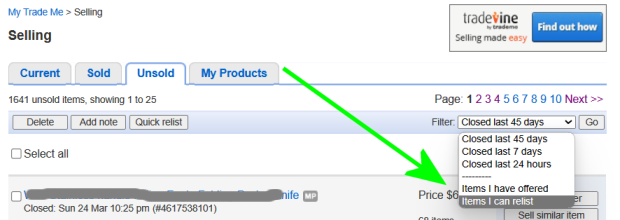
If you can't get there but you have the listing number like you have, you can put that in any general Trademe search box and it will take you to it, or you can simply type www.trademe.co.nz/500000000 replacing your listing number and go straight to it. You can see title, text, shipping etc, but not photos or relist, but it gives you something to copy and paste to a new listing if you don't have the original copy.
0


7 comments
Date
Votes