Can't add category when starting a listing
Answered
Trying to start a new listing and TM won't let me add a category, so I can't start the listing.
-
 Michelle
Trade Me staff - Community team
Kia ora waterb, what is it that you are trying to list? Some listings can only be created on the desktop site, like motors listings for example, try these troubleshooting tips. If you are still having problems let us know.
0 -
I can't seem to add an option once I've created a listing, to add 'quantity'? This was an option before, and now I can't add the quantity of plants I am selling or have available? This is highly annoying as buyers need to see that I have 20 or 25 plants that I have in stock, not just one plant which is currently what I have to list. This doesn't make sense now. Trade me - please change back to how it was before!!
I also can't add $0 for a combined shipping option!! This is highly important to add for my customers so they don't pay for postage two or three times on my listings.
Please amend these options Please!!
0 -
Michelle
Kia ora ciscorusty, we are making changes to the site which will make it easier for us to introduce new tools and features to make the site better. These changes are being rolled out gradually, while this is happening some features are temporarily unavailable for some listings. You can find more info on the changes here. The team are working incredibly hard and you can use 'Tell us what you think' to give us feedback. In the mean time My Products is unaffected, so you may want to give it a go. It's easy to use and lots of help here on Community if you need it.
0 -
Trying to start a new listing and TM won't let me add a category, so I can't start the listing. This bug is still there. Can start listing, specify title, get sent into a series of pop-ups to drill down to the category, select a category, back to where I was with no category selected.
Website, laptop, same issue under safari and firefox.
Desired category was TM Motors > Car parts and accessories > safety. The "search all categories" for safety also failed to find it. Something wrong with your indexing.
0 -
It worked in a different category. Seems you can sell snow chains as a sporting accessory but not as a car safety feature. The "select a category" list seems to include categories where listings are not allowed.
0 -
 S Community Superuser
Kia Ora abjv,
I'm on the New Look Desktop site using the Edge Browser and can select the same categories you've supplied with no issue of the Safety category being selected on return to the front page.
Do your 'Start a Listing' 2 pages look like the 2 below...
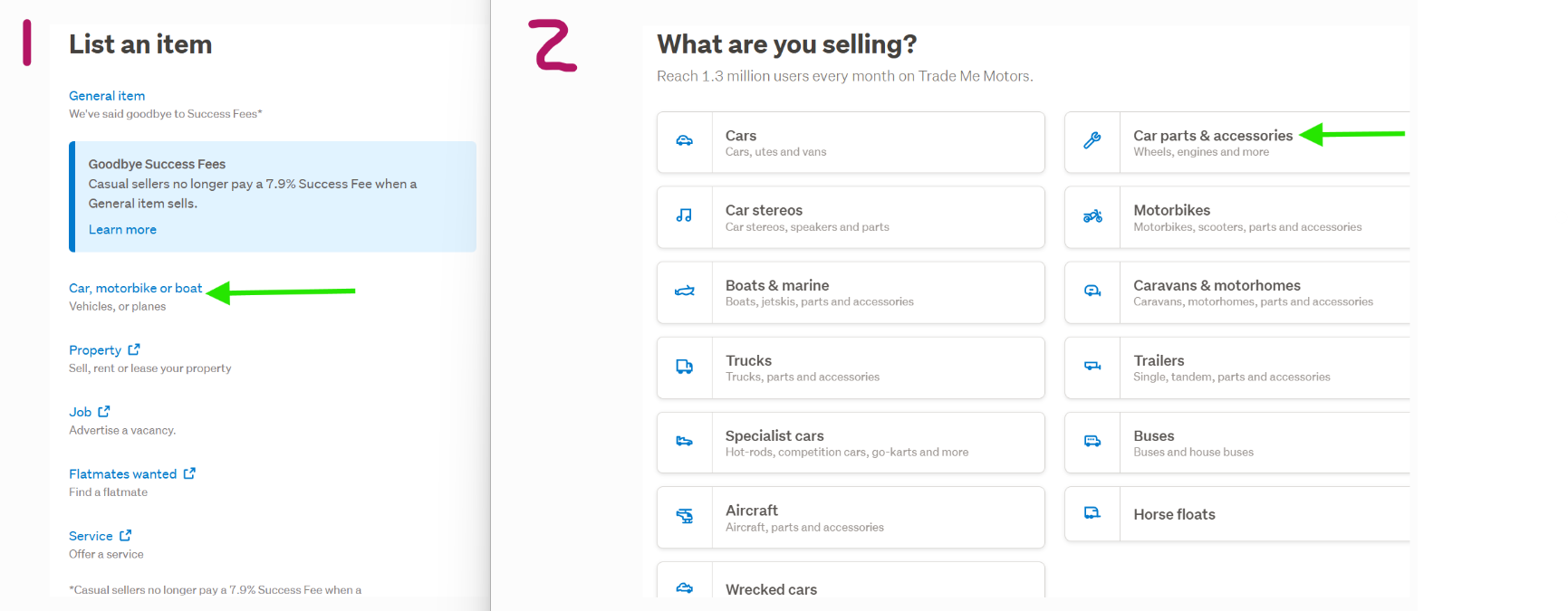
Which then return my Safety selection categories ready to enter my Listing Title as below...
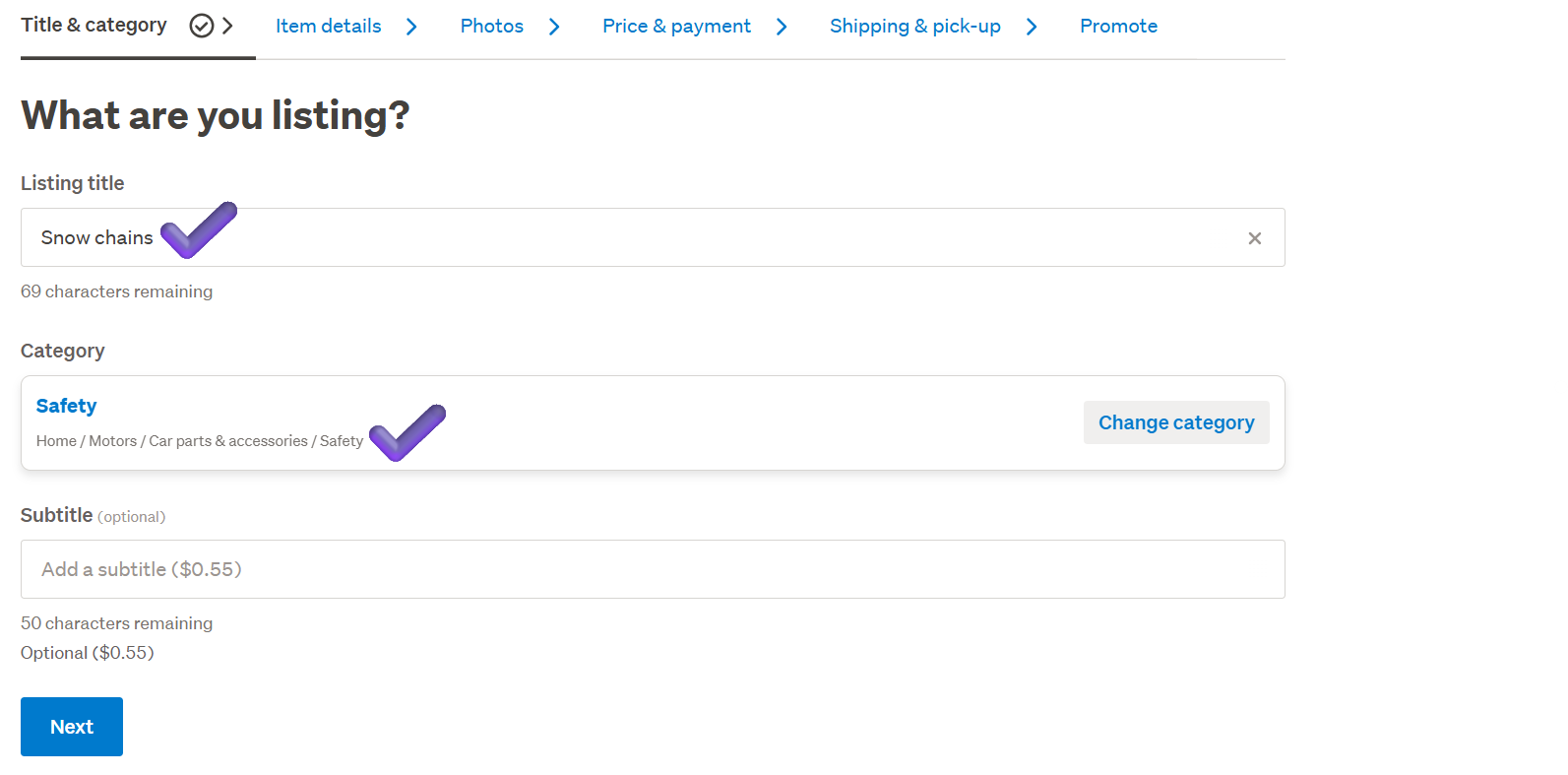 0
0 -
We need to distinguish between the two attempts, I also think there are several issues.
First attempt I picked “general item”. I asked for a listing title and a category. When selecting the category, I ended up in a pop-up like your #2. I drilled to Safety. Selected it then got sent back to the start, with the listing title as I had input but without a category. It was a loop I could not get out of.
Bug 1: The “what are you selling” list should not include categories not available if you have picked “general listing” at the first step i.e. all the car stuff.Bug 2: The category selection pop-up is missing a “back” button.Bug 3: “Start new listing” goes to the wrong place. It has the effect of “start new listing of the same type". Once I had specified :"general listing" I couldn;t get back to where I started. Opened a new browser window and went to "start a listing" in the ribbon.Second attempt, list an item, selected “car motorbike boat ” as in your #1, then drilled down as per your #2. Tried to select it, but the UI ignored me and I ended back where I stated.Bug 3: The process did not start to create a listingI managed to get out, throw away most of this input, go into a different browser on a different PC, and list the item as a sports accessory. So my immediate problem is solved.While recording the screen shots that I have been unable to send you as your Helpdesk doesn't accept emails, I have a found a draft listing in the cars > accessories > safety classification. So it got there, the UI just couldn't tell me at the time.The screen flow is a mess, I do software QA for a living. It pays my bills. I’m reluctant to debug the TM website for free any more than I need to, particularly when the only way I'm allowed to engage with TM support is through ZenDesk, I'm not feeling much "zen" at the moment. I’m quite happy to go through all of this in a controlled and logged way to diagnose all of this for TM, but as a paid engagement.0 -
S Community Superuser
Thanks abjv,
I'm not TradeMe staff I'm a Member same as yourself, - Yes! voluntary Not paid.
I'm pleased you've managed to get this listed though it sounds like there is still an issue with your second attempt with the UI not allowing you to drill down & select it in phase 2 and not starting to create a listing for you.
Given your knowledge you will have assured you're running the latest up to date Browser versions and cleared your cookies/cache, some extensions are also known to interfere with the site. It will be a good day when these multi platforms we're working within become one and act & behave as such. Screenshots can always be Posted within a Post or sent as an attachment through selecting the blue speech icon bottom right of your screen to engage with staff that way Otherwise with suggestions we use the New Look Desktop site 'Tell use what you think' pop up link near the bottom of most Buy/Sell home site pages, it also appears through the creating a new listing process.
All the Best for your Sale - Cheers.
0


8 comments
Date
Votes