Shipping label PDFs not always being emailed through
Answered
What is the issue?
After booking a courier a confirmation email comes through with the PDF label attached, lately and random emails do not have this attachment, NZPost and Aramex bookings have this issue so it's not related to that. I've attached a screenshot to show what is happening.
Why is it an issue?
I use a script to automatically download these from my email and print the label, this is causing me to miss packages and have to manually print them.
Who does the issue impact and how often?
Anybody who uses the emails, it requires a manual check to see when this happens, but 1-2 are missed every batch of 5-10 couriers booked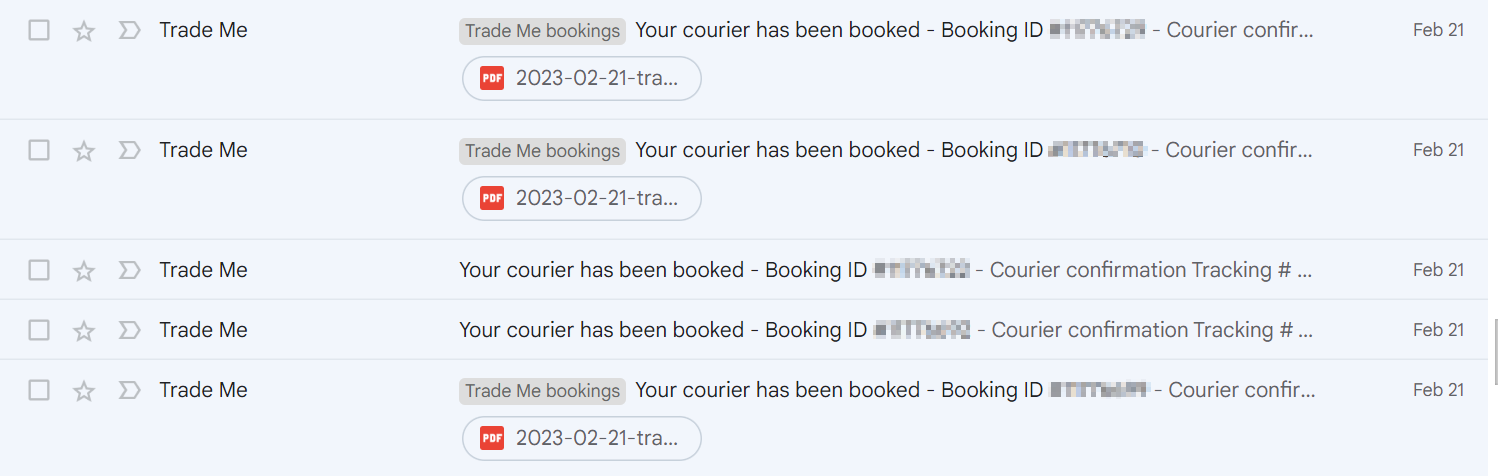
-
 Lucy
LucyTrade Me staff - Community team
Hi everyone. This is currently being investigated and worked on. I'll be sure to update you in here when there are any developments.
1 -
Hi Elijah, I have lodged this issue with Trademe a week or so ago, you are not the only one this is happening to, they have told me they are investigating. Would love to know what script you use, that sounds handy!
2 -
Hey I'm glad someone else has reported the issue!
It's actually a custom script I wrote with Python, it's probably quite adaptable but it's very basic, if you'd like it I'm happy to send the code I wrong somewhere
1 -
Yip this has been happening to me too, I can book a courier ticket within minutes of each other and some have attachments and some don't....thanks for logging the issue
0 -
 Gary-NZStocked Community Superuser
On the other side of the coin, I just checked and all the emails I have for book a courier and all 5,500 have the pdf label attached, going back 4 1/2 years. I use a gmail account and EmClient.
0 -
Thanks Elijah, I would love to see the script however I don't think I can share contact details on the community board, cheers though.
0 -
I will just delete my thread - I just requested an individual service with Aramex and need a barcode for the agent I drop off to (they will not accept otherwise…not printed or handwritten tracking detail). I just want the PDF but cannot even find where it is…NZPost I believe alllows reprints via TM but Aramex was just on the email attachment. Really annoying as I have to drive some distance to the agent and this will mean an additional drive.
0 -
Gary-NZStocked Community SuperuserEdited
Ingy, the PDF copy by email is usually just a backup. The usual way to get a PDF label is to go to the booking page and click on Print label and it will give you an option to save it to your computer, or open it in your pdf viewer from where you can print it. Until the item is collected, you can usually go back to the booking page either through your sold items by clicking on the Courier booked link, or via the Manage bookings link in your My Trademe page.
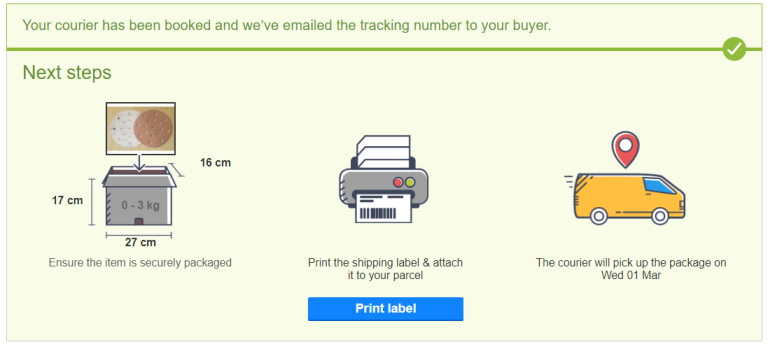
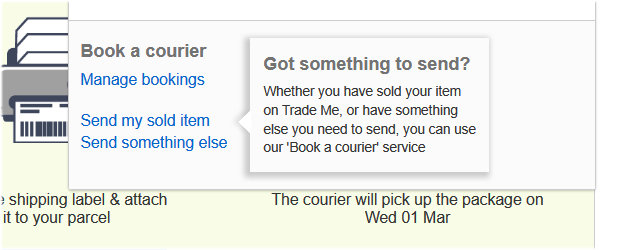
Here's a quick link to Manage Bookings in case you can't find it.
https://www.trademe.co.nz/MyTradeMe/Shipping/ManageBookings.aspx
0 -
Hi Gary - I looked at that last night. NZPost gives that option but not Aramex. Aramex just says write the tracking number on your parcel. I am on a mobile device though so that may be the difference…might have to find a desktop site that is useable in my house. Certainly in the past I have only seen the PDF for Aramex on the email and TM would have suggested accessing via your option if that was possible (at least you would think that). NZPost you can download the PDF from the TM screen - Aramex doesn’t do that from what I have seen.
0 -
 tintin4Edited
I just phoned Aramex directly and apparently they can email the PDF barcode label to me. I checked the ‘manage bookings’ page on both desktop and mobile and my Aramex bookings do not show a ‘print label’ box. They only suggest writing the tracking detail.
0 -
Gary-NZStocked Community Superuser
Oh ok, maybe it's changed. Like you say, It is there for NZ Post to print or reprint, but not sure about Aramex as I haven't used them for a while. When I have used them many times over the years it was always there and that's how I printed labels most times. Sounds like from what Lucy says, there's a glitch that needs to be fixed.
0 -
For anyone coming across this issue using Aramex and definitely need the barcode…you can either ring your local Aramex depot and request a label be emailed (mine took a bit over an hour to turn up). Or the other option is request a refund and credit for the difference in cost from Trademe (using chat) and rebook with NZPost as NZPost offer download labels from TM courier manager. (Aramex is emailed PDF only with only option to contact them directly and wait).
0 -
Arrrgh!!! happened again this morning, booked two Aramex courier tickets within minutes of each other, one email has the attachment to print the label, the other doesn't
I am having to write the address and tracking number manually so I can manage, but it is annoying
0 -
Yes it happened with me last night and this was with 2 NZPost bookings, I was unable to get the labels because I booked these from my phone. Very frustrating :(
0 -
tintin4Edited
Hi Cheryl- I phoned my local Aramex depot and they emailed a label within 1hour. Elijah - NZPost is different to Aramex in that you can download your label from the courier booking manager ( you can switch to desktop view even with a phone / mobile device). So as you can download from TM you can then print or email..whatever because the PDF is downloaded to your device.
Aramex is the hassle because their PDF is only accessible on the email (download access from the email). Several drop off agents with Parcelconnect network (Aramex) NEED a barcoded label to validate the drop off so a written tracking is not acceptable.Note you can go into TM live chat and see if they will consider extra TM account credit and cancellation of the Aramex booking so you can then rebook with NZPost and access the download PDF pathway. NZPost is usually more expensive thus the offer of extra credit….
0 -
Hi Ingy, normally I have the download option but I booked this one on my phone and this is what came up on the desktop website, am I in the wrong place?
 0
0 -
Gary-NZStocked Community SuperuserEdited
Elijah, that screen is the one you get when you choose I will write the tracking number on the parcel, rather than selecting I will print a label, from the 2 options you are given to choose from, as below. Maybe the app is preselecting the incorrect option.
 0
0 -
Funny how no two members seem to see the same screens. Maybe TM in the infinite wisdom of what can be have changed the process while addressing the issue of this known bug. As Gary suggests you usually get a blue download box or the above grey box with NZPost. Aramex doesn’t give those options it just says write the tracking and emails the label. I would phone the service provider directly and ask them to email the label.
The manage your bookings list usually gives you ability to download the label with NZPost….I will see if I can get a screen shot of what I mean.0 -
As a footnote - in the past when I have written or printed the tracking number on both NZPost and Aramex parcels the drop off agents will not accept them. Maybe it is a small town / rural issue but without a barcode there is no accepting of the item. I used to try and say surely you as the agent can print a label and at both locations (noting one is an NZPost shop) been told a flat NO.
0 -
I've done the labels the same way for years with no issues so there is definitely a gliche somewhere.
Emailing Aramex for the label and waiting an hour is not a solution when you offer a same day service and are trying to get parcels out before the 9am cut off.
I have always received the attachment in the booking email confirmation and am not now so....0 -
tintin4Edited
Same for me Cheryl…I know it is not good enough. I live rural and drive 20km to an agent so need to co-ordinate drop off but I HAD TO HAVE a barcoded label.
It appears the manage my bookings portal is disabled. Maybe a positive sign a solution is nearby.
I suggest using TM live chat - but it may mean rebooking with NZPost. Their process enables two options to access the PDF over Aramex that only emails an attachment.
TM have admitted they are dealing with a bug so yes the ‘gliche’ is real 🙃
Your situation if involving a physical Aramex driver arriving to collect probably means they can print a label for you if you put the tracking number on the parcel. Agents however NEED barcodes….providing a written or printed tracking detail means nothing other than a 20km drive back home.
0 -
Another issue I have come across is PDF has slightly different addresses being selected. For example address on TM request says Rangiora 7400 but PDF says Ashley 7400. So confused how a label is not identical to information loaded in TM!
0 -
this is still happening..just booked two couriers, one has the attachment to print, the other does not...grrrrr
0 -
Just wondering if there is an update on this issue, as it is ongoing...
0 -
It's still happening, nothing has been resolved and been no correspondence from TM since
0 -
I've noticed if I pay for courier via Ping I get a pdf if via any other means no pdf
0 -
Lucy
Thanks Emma. I'll add that detail to the case.
0 -
Just wondering if this issue is getting worse for anyone? Last night half my bookings didnt have the pdf attachment, generally it has been around a third.
?0




28 comments
Date
Votes