Help needed: Trying to de activate both my listings...
Answered
I have two current listings selling water lilies. I want to deactivate them both for a few months. I want to be able to simply push a button, or two in a few months time to re-activate them both, without changing anything major. I have gone to the My Products page a few times now, both listings had that yellow icon saying 'product needs attention'. I clicked on deactivate for the two listings and the second listing now shows deactivated but the listing above, its icon remains yellow telling me 'product needs attention', still. And...both listings are still showing (active). Frustrated I am...
-
 Gary-NZStocked Community Superuser
To find out what in the product needs attention and fixing, you need to go inside the product individually and read the error message, then fix the problem.
1 -
Thank you. But what do you mean exactly when you say 'go inside the product'? What do I click on? Where?
0 -
Gary-NZStocked Community Superuser
In my products, click on to the product as though you were going to edit it.
1 -
Thank you. I have now done that. But, in attempting to update it races me back to the top where it says, in red...' Please correct the following issue(s):
- Provide valid shipping option
Now, I haven't changed the shipping option anywhere/any time. Why would it be saying this now?
0 -
Gary-NZStocked Community Superuser
There could be lots of reasons why but best option is to go in to the product and look carefully at the shipping section to make sure you have things set correctly. If this is an older product you have not updated to the new template system you need to do that. Did the message when you went in to the product to fix the product needs attention message give you a clue what was wrong? Did you edit something else to clear the message? Do you have free combined shipping set up in the Settings tab of My products? Check the Shipping tab too in case there is a clue in an invalid shipping template in case there has been a systemwide change.
0 -
O.M.G. Thank you for your answer/s. I am and will keep going through that shipping option piece...and I am just clicking on all the selections...wish me luck.
0 -
No luck so far...'If this is an older product you have not updated to the new template system you need to do that'. Please define 'older product'? I have been advertising these plants since early September...this year.
0 -
Gary-NZStocked Community Superuser
That should be fine. The templates changed a few years ago.
So, you have this message for 1 or 2 products?

When you go in to one of those products, you see an error message that says Provide valid shipping option
Is that correct? is that in one product or 2?
And you have double checked all the shipping options and they are all good and correct?
Do you have allow pickups, or buyer can pickup options set?
If everything is set right and looks correct, I would delete ALL shipping options you have, set to buyer must pickup, save without updating lave listing and see if that fixes the error, then edit again to add back shipping options and change back to buyer can pickup. Might just be a stray character in there somewhere.
0 -
 flossy63 Community Superuser
Is your item set to Multi quantity (Buy Now only), as reason I stopped Multi quantity ( list as Buy Now only) as did not want to update to the new Template, I wanted to keep my free form shipping templates,
so if you do not want to update your shipping template, you need to change it to List as Auction
So is this the error you are getting?
 0
0 -
 0
0 -
Gary-NZStocked Community Superuser
Stock is zero, which will cause an error. Make stock 1 or more then you can fix the other problems, if any.
0 -
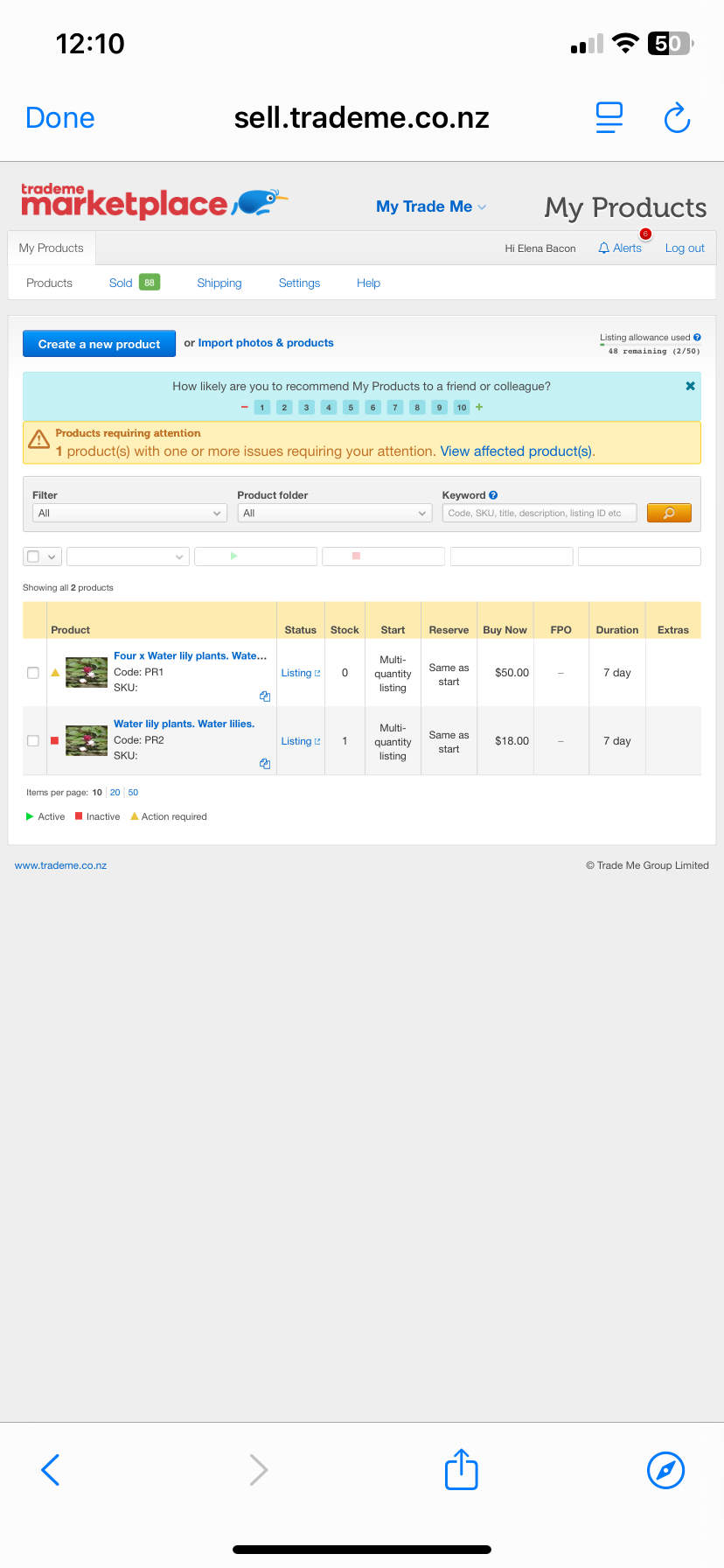
Have been trying to send this screen shot all afternoon. I only got it here after I shifted it to my laptop, as a photo which I then copied and pasted... This is the original page on 'My Products when I was initially trying to deactivate both listings. It all comes down to this, the initial fail, I believe, not this 'Provide valid shipping option' second thing. That only came up at a later date when attempting to update something secondary.
0 -
 S Community Superuser
I can confirm both of those Listings are Live on the Desktop site - the 4x is showing a quantity of 5 and the single listing is showing a quantity of 10+
Hope this helps the support you're being given - Cheers.
1 -
Yes, it does help. Thank you. Thing is both my wife and I did searches both for water lilies and water lily plants and neither of my listings showed up. Weird...
0 -
S Community Superuser
Cheers lenuta,
Yes! You have a big Feature Listing at the top of the category page - Members need to select 'Featured first' for the Listing to show at the top though. - If you Log out of the system and run a search you will get the same results as a Buyer sees. - I searched water lily plant & water lily - Cheers.
 1
1 -
Oh, ok...good info. but bad timing LOL. I am seriously considering doing the opposite approach and putting both listings on the lowest 'rung', the free, no price listing for say, 40 days then relisting, again the same free- no cost listing for another 40 days, and so on until September 2026.
Why? Because the whole aim of what I am trying to do is (simply) to DEACTIVATE both my listings for nine months approx and then simply push one single button (its called ACTIVATE, if I recall correctly) and i'm 'back in 'business' again'...It worked perfectly this September just gone...
Why, do I want to do this? A. to avoid the nightmare of reconstructing the whole of both listings again. I AM NOT GOOD AT COMPUTERS. Having to find all of those those photos again would be horrible.
0 -
Why do I want to deactivate my listings and do nothing with my water lilies for the next 9 months or so? A. Because Trade Me emailed me Wednesday just gone, saying I should consider going 'In Trade' on both my listings...
Advertising my pond plants and goldfish is a pastime pleasure...or at least it was meant to be...
Can someone please help me deactivate my two listings, please?
0 -
Gary-NZStocked Community Superuser
Your 18 dollar listing already shows as being Deactivated Lenuta as it has a red square beside the product photo in your My Products screen. The red square means it is deactivated, so won't relist when the current listing closes. If you want to withdraw your current listing, then go to the listing by clicking on the Listing in the status column and click the withdraw button. There is no charge to withdraw a MQL listing. You can also withdraw the first listing in the same way. You can also deactivate that one by clicking the tick box beside it and then click the deactivate button at the top of the columns once you have ticked it.
Has the error message cleared from within the listing now you have removed the shipping option then put it back again? I see you made it pickup only with no shipping, then put it back to having a shipping amount and buyer can pickup, as I suggested to try.
1 -
Ok. Thank you for this. One question, though. I now see the term 'withdraw' coming up. We're talking computers here...if I 'click the withdraw button' is that different or the same to clicking the deactivate button somewhere?
Have gone to the listing in the status column and have clicked on the deactivate button...still the 'Products requiring attention' message comes up. There was no withdraw button as far as I could see.
Why was it so simple to deactivate the first, $18.00 listing but not this $50.00 one? Confused and angry emoji.
Hey, have gone back to the Product page and have seen this.
Please correct the following issue(s):
- No listing rules selected
FilterNeeds Attention All Active Inactive Inactive With Stock Currently Listed Not Currently Listed Listing Failure Auctions Multiple Quantity Current FPOs Out Of Stock Unlimited Stock With Extras Needs Attention Active With Undersized Photos Included In Combined Shipping Offer Excluded From Combined Shipping Offer0 -
This is a freaking nightmare. I will stick it out, though. I have to. Am hoping to have both listings deactivated by Christmas (laughing emoji). If I can't, then I will go to plan B, and that is: list both listings under basic and 'refresh' listing every 40 days or so...for the following 9 months or so.
0 -
Gary-NZStocked Community Superuser
The items in MY products are like templates, they are not listings. When you activate a product, MP creates a live listing for you. If you deactivate a product, MP stops a new listing being created once the existing live listing closes. Withdrawing a live auction is done on the live listing page by clicking the withdraw button. You can't withdraw a live listing from within My Products, you need to do it on the individual live listing itself. Withdrawing a live listing is very different to Deactivating a product.
Click the Clear filters button to see the 2 products and clear those product viewing filters you mention.
Until you fix whatever is wrong with the product that has the product requiring attention beside it, just deactivate it. ie click the box to select it in the left column and then click the deactivate button. This will stop it from relisting when the current live listing closes.
In some month's time or whenever you want to and the live listing is closed, before you reactivate the listing you will need to fix whatever is wrong in it. You may find it easier to click the duplicate icon to make a duplicate of it and edit that before activating so you have a backup, or duplicate the product that is working correctly and edit that so it's now a replacement for the original one.
0 -
Gary-NZStocked Community Superuser
Hi Lenuta. I see you have edited those 2 listings and relisted, presumably that was what you wanted to happen? Would be good to know if you were able to find and fix the problem you had, in case someone else has the same problem and comes across these posts.
0 -
Hi there, Gary- NZStocked. Firstly, apologies for my late reply. This whole episode had been a bothersome experience. To be frank, I just gave up in the end... I seemed to be going round and round in circles, and there's only just so much time one wants to spend on a computer...well, for me anyway. I cannot say that the direction I was going in was the right one... A kind and straight-talking Trade Me help person helped me after I opted to 'revive' (relist) my two listings and carry on as before. Not my initial aim in all this, but I have adjusted and am carrying on ok. Thank you.
0
23 comments
Date
Votes