Unable to add tracking details since recent change
AnsweredYo, I recently sold a item and have shipped it independently like usual. When I went to upload their tracking details, the middle tab is now replaced with "Book a courier". I cannot figure out how to add it like usual without just sending an email. Any help would be appriciated
-
Update: found a way to add it, through loading to old site interface.
Am not impressed, feels like TradeMe is trying to railroad me into using their in-site adjacent courier service while I got my own system
1 -
I really miss that function too. I now just add it into the note. Makes checking if it has been delivered so much more complicated.
2 -
 S Community Superuser
Kia Ora All,
Use the 'Tell us what you think' Link on the New Look Desktop site when you're in that page to send your reports directly through to the correct Team of staff who look into this specific section of the system. - Cheers.
0 -
S Community Superuser
I'm a Member same as you, I'm not TradeMe staff - the quickest way to report what feature/function is missing is to report it directly to the TradeMe Team through the Link.
1 -
 flossy63 Community Superuser
That may help you out, but does not help the buyer as they cannot see it, so you will still have to manually send the tracking link to buyer so they can track it, so Trade Me need that tracking Link back, as a seller I use it for when I have Standard NZ Post Parcels, as a Buyer I hate having to keep asking for tracking numbers to track my parcels, so I know when they are onboard with courier in mornings to be delivered, so am here to receive them,
also the buyers should be tracking their own parcels, and only need to contact you if there is an issue,
That is why Book a Courier is good, they get an Automated E-Mail via Trade Me to track their parcels once it has been booked, Link will also be on their won auction but do not know if it still shows on the new platform?
Sellers then do not need to send manual E-Mails with tracking links,
1 -
 ThomasEdited
...
Or just have the ability to add the tracking number like it's always been...
This is why it has come an issue now Flossy. I do NOT want to use the Book a Courier service!!
1 -
Thanks all for your comments, I have mentioned to the 'tell us what you think' link.
It just was so much better and easier before. why change something that works well for everyone?
4 -
flossy63 Community Superuser
You do not have to use Book a Courier, never said you had too, it is a personal choice, But I was just saying the advantage of using it, Tracking is automatically sent to Buyer and added to your sold Auction,
So cuts out all that manual work of having to add it manually to your sold auctions and manually sending E-mails to your buyers with the Tracking numbers, and then buyers do not have to E-Mail you asking, if you don't send them an E-Mail with it, just makes life a lot more simpler, and saves you time,
-1 -
Yes I miss that function too. (I don’t use the Book a Courier preferring to use a local depot). I have buyers contacting me now to see if goods have been shipped. That is when I realised that adding it into the note field cannot be seen by the buyer. The new site that Trade Me thinks is an improvement is hindering the former smooth process. I have been shown a work around but it is an additional step for the seller. It worked so well before that I cannot understand why Trade Me got rid of it.
3 -
Can I ask what the work around is? Because I cant find it and I need to use it as I also dont use the 'book a courier' , I use a different courier whom I prefer. This situation is crazy.
0 -
Hi, When you are in "My Trade Me" mode, scroll right down to the very bottom of the page and on the left side there is ":Desktop site" click on that and it takes you to the old site. This allows you to put in the tracking # which shown on the new site.
2 -
If you open trademe through the browser. Go to your Sold tab. At the very bottom of the page, there is a link titled "Desktop Site". From there you should see an older-looking interface that has the Add tracking reference option.
Hope this helps Tracy :)
1 -
thanks for that, I did try a couple of times but the old site wouldn't appear for me. It seems to appear for me now. If we enter the tracking info into the old 'desktop' site, and the buyers are on the new site with no window for the tracking info, does the tracking info then appear on the new site when there is no space for it? Curious where it would sit or do they have to go to the old desktop site as well to find the tracking info for the listing we add? Does anyone know? cheers
0 -
The tracking # does show on the new site. It pops up in a window like before. I assume buyers see this and I was told they would. I haven’t had any queries. My concern is how long they will keep the old site, surely someone will see sense and put the provision on the new site!
2 -
flossy63 Community SuperuserEdited
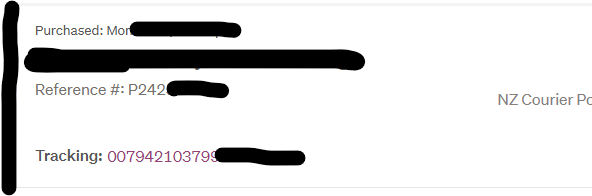
This is how it looks on the new format on your won page when seller has added it, on a P number, but I have never had one on auction with the new KP numbers, and I have more of those KP numbers in my won than the Pnumbers, so I think they says something, There is an issue,
as I have been continually chasing up sellers for tracking numbers,
 1
1 -
thanks. Like Margaret said, surely they must realise the function is needed on the new site. Leaving it off is nuts. I can't believe that was someone's bright idea.
3 -
I noticed just today it was taken away. But from changing to the desktop version, I was still able to add the tracking number and it carries over to mobile version. Just another case of fixing what wasn’t broken and now it is broken
0


17 comments
Date
Votes