Print Shipping Label not downloading label
Answered
Hi, I've booked multiple parcels t oday. When I click: Print Shipping Label, nothing downloads. I've tried closing the browser etc and mulitple things like opening it in a new tab and window. Help!!!
-
 Gary-NZStocked Community Superuser
I've booked some just now and label downloaded just fine. Maybe something has changed in your browser settings and it's not displaying the download window anymore. You can view downloads in Edge using Ctrl - J or change your settings so it shows the download window again.
If all else fails, just open the pdf label from the email copy that Trademe sends you.
0 -
Are you attempting to print from the new mobile page - because labels don't seem to print from there - try swapping back to the desktop site - absolutely nothing to do with browsers, caches and the like. Just another non-functioning feature.
1 -
Gary-NZStocked Community Superuser
I have never used the new mobile page for a booking. I just use the sold items page on my usual desktop site.
I did a test just now though and used the new mobile site to create a booking. Everything went as normal, however, when I clicked on print label, I had to do an extra step to allow the download of the label as it's not secure. I'll try another tomorrow and see if it's remembered my settings to allow the download. Not sure if you get this same security message or not, but depends what browser you use and what settings you have for it.
0 -
Yes Gary you can make a booking from the mobile site, but as I stated you cannot print it - I have to go to my emails and print from there. I don't get any security message. Why can't I just print from the mobile site as I can from the desktop site, or why don't they just fix the thing?
0 -
Gary-NZStocked Community SuperuserEdited
Hi Yvonne. Like I said, I AM ABLE to print the label from the mobile site and in fact can go back and print it again this morning like below, but, I get a security warning that I needed to allow as the button link is only www.trademe.co.nz instead of https://www.trademe.co.nz
You can see the info here..
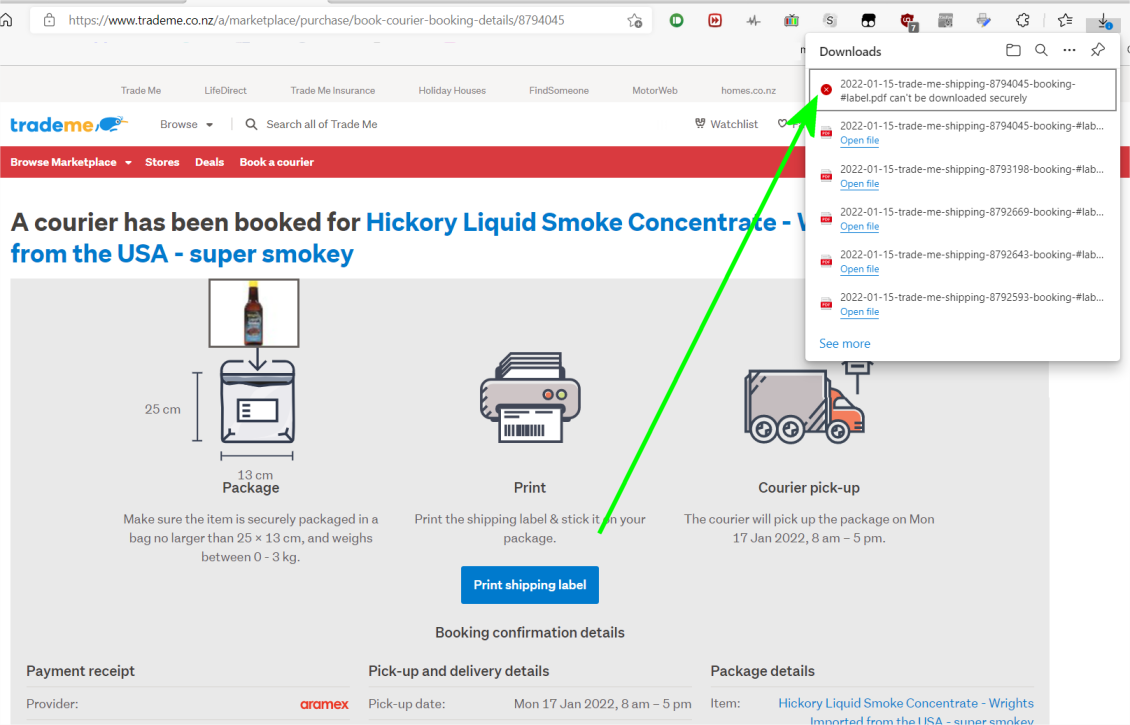
In fact, if you copy the http url and change the http to https , the label downloads correctly.
I will email Trademe to let them know of the error to fix. I was still able to print, but not without allowing the download each time.
0 -
I only use the desktop site. The labels are not downloading.
0 -
That is really strange. Can you do it from the confirmation email?
0 -
Gary-NZStocked Community Superuser
Hi Diana. Do you see the same red cross error as above in your downloaded files list when you click the Print Label button?
Not sure what browser you use but to open downloads in Edge or Chrome use Ctrl - J
Something else to try. While on that booking page where you see the blue Print Label button, BEFORE you click it, Hold Ctrl key and press F5. This does a hard page refresh that reloads the code that handles the label download, then try clicking the button to print label. Once it's done it correctly it should stay like that (for a while). I get a similar problem often when manually adding tracking numbers on my sold page, as in nothing opens for me to put numbers in. A hard page fresh always fixes it, for a while.
0 -
Thanks Garry. It just started working again. I'd shut down and restarted a couple of times. I wonder if they fixed a bug and then it worked. But it's all good now.
Cheers
Diana
0 -
I can't get beyond the 'print shipping label' button - it just sits and sits - I then have to go to my emails and book from there - a bit more faffing around...
0 -
Hi, I had the same problem a few days ago, I got round it by clicking on the download button at the top right, then left clicking on the file, then clicking on " show in folder " Then double click on the highlighted PDF file and print from there. A longer process but it works for me.
Cheers.
0 -
I have tried to print a label after pressing the Print button but the words come out as Korean etc - it didn't happen when I first download a parcel label last week.
0 -
Gary-NZStocked Community Superuser
If you open a previous label from last week, copy from your email, if it's Korean too, then it's something changed or mixed up in your computer and I would initially try shutting your computer/device down, then restarting and see what happens. No need to print every time, just open the PDF copy up and see, then try printing.
0 -
Hi all ...can somebody tell me what is the label printing device that you all use....cheers
0 -
Gary-NZStocked Community Superuser
Hi Dave, I use a thermal transfer label printer and rolls of labels as that's just what I had, but most people use a smaller direct thermal label printer although some also use a std laser or inkjet printer and just cut down the label, or they print on a 2 labels per A4 sheet template.
Basic requirement is a Direct thermal label printer that can print on 100mm x 150mm direct thermal labels.
0 -
Thanks very much for your reply Gary…I will look at a smaller direct Thermal label printer as you mentioned, any particular models that you could suggest … a real newbie to this but keen to get the correct printer to start with.
Regards Dave0 -
Gary-NZStocked Community Superuser
No particular models, but something like a Honeywell PC42, TSC DC2700, Zebra GK420, Datamax DMX series. If buying 2nd hand, make sure you see a test print and pay attention that there are no missing vertical lines in the machine direction as this usually means the printhead is damaged and the printhead often costs half the price of a new printer. If there are missing lines, barcodes may not be readable. These style printers usually take rolls of 250-300 100 x 150mm labels.
0


17 comments
Date
Votes