Trade Me Tip – My Products listing templates don’t disappear
Pinned
The product templates you create in My Products won’t expire or archive. Usually you have 45 days to relist manual listings but with My Products, you can keep your auction details safe for when you want to relist at any point in the future. To have a go at using My Products, you can start by importing your current, sold, or unsold listings.
-
Explanation on how I go on importing current sold or unsold
0 -
 Hamish
Trade Me staff - Community team
Hi Dave, when logged in to My Products you need to click Import photos & products, then on the next page click current, sold or unsold listings - once on the below page, you can select the listings you want to import
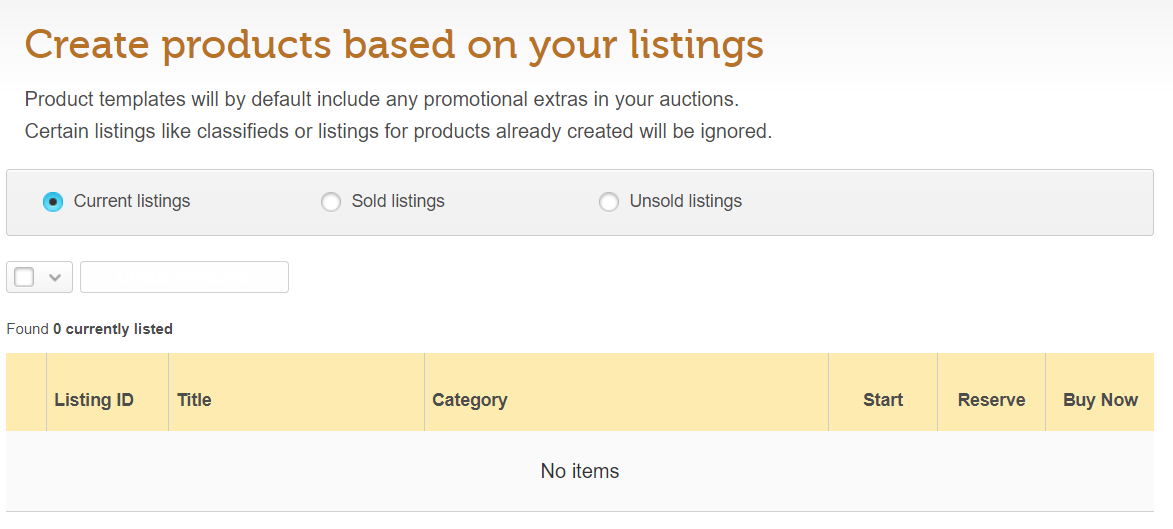 -1
-1 -
My Products dissapeared and are not saved at all.
I have lost hours of work and there appears to be no reason for it.
It all started with an Error Message
The most recent attempt to list this product failed:
- Ping is not a valid payment method. TradeMeListing.ExternalListingID has not been supplied
I hit the x button on my remaining listings as advised. yellow arrow remains .
When I try to activate the listings they dissapear!
-1 -
 Gary-NZStocked Community SuperuserEdited
You don't by chance have the display filter set to something other than ALL do you? eg if you had the display filter set to inactive, then you activate some, they will of course not display with filter set to inactive. Usually the Clear search button shows everything, without filters.
Also, try logging out of My Products using the My Products specific logout link - top right, the log back in again.
0 -
My issues ws sorted by the Help team.
Thank you!
0 -
I cannot get rid of a product I looked up and bought 3 years ago
About to cancel trade me altogether unless removed
Binoculars Nikon
Fed up
0 -
Gary-NZStocked Community Superuser
Not quite sure where you want to get rid of the product from Dale. Where is it that you want to get rid of it from? Items disappear from your items I won page after 45 days, but feedback stays forever unless you ask the seller to delete it. If it's somehow stuck on your watchlist, have you tried to delete it, although it should disappear by itself when it closes and moves to your items I lost folder. If it's somehow stuck in one of these folders, you may need to contact Trademe and ask them to have a look for you.
0 -
except pointless keeping old sold products because you get a warning that they dont adhere to the new shipping policy and if you dont fix it before september watch out - my products
0 -
Items I am selling listings using Products do not appear to have a REFINE function, therefore I cannot click on to whats got bids , questions etc. With 400 odd listings , I cannot take the time to scroll .Am I missing something ?? The listings are virtually useless to me without this function ???
0 -
Gary-NZStocked Community Superuser
Wayne, the filters are still there on the old Desktop version I use so if you don't have that one bookmarked, try using the link at the bottom of the page for Desktop site, although some members seem to have been locked in to the new site and can't get out of it.
0 -
Cool Thanks for the quick reply ... .at the risk of being ignorant..what does that link look like ? I cannot find anything that points to that function ?
0 -
Gary-NZStocked Community SuperuserEdited
At the bottom of this page and all pages on the new site...

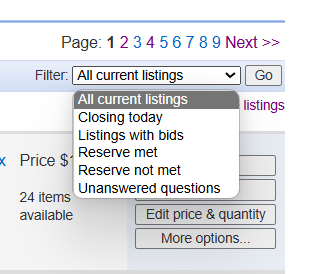
The selling page I have is this one..
https://www.trademe.co.nz/MyTradeMe/Sell/Current.aspx
which has the filters like this...
 0
0


12 comments
Date
Votes