Trade Me Tip – Save your Favourites

A great way to be notified about listings you might be keen on is to save a Favourite. You can do this for particular categories, sellers or searches that you want to know about. You can also set how frequently you’d like us to contact you about those – daily, weekly, or fortnightly.
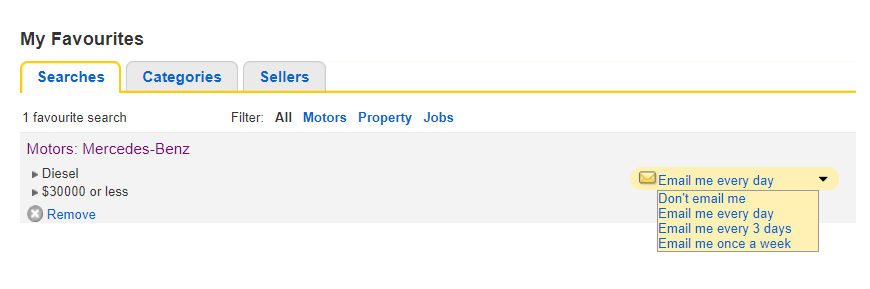
-
 Gary-NZStocked Community SuperuserEdited
No Favourite sellers listings emails received this morning. This seems to be a reoccurring problem that either Fav seller or Fav search or Fav category emails are not being sent, that needs to be fixed. It's not much point sending advertising emails to members reminding us to add this member to your Favourites so we get emailed latest listings, to then have regular problems sending those emails. This has been a regular ongoing problem for several months now.
Update: 9:30am, just received one fav seller email
A few more slowly coming in now, so looks like delay sorted.
1 -
I’m having the same problem. Not getting emails for favourites.
0 -
Same here. Getting the ones for jobs but not rental properties. Have deleted them & redone the search & saved it several times but still not coming through. Know there are places advertise cause I've checked. Just want my favourites with the properties search sorted........
0 -
I’m trying to find out how to do it not just be told it can be done!
2 -
Lucy
Trade Me staff - Community team
If you are searching by typing into the search bar (best match search), on the results page click on 'Save this search':
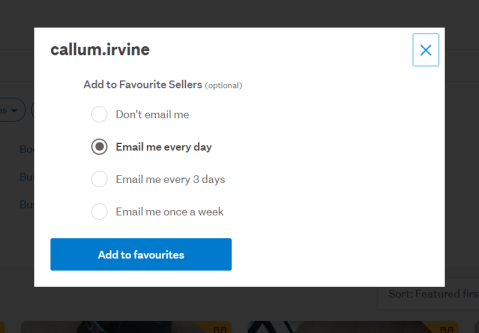
If you are looking at a particular seller's item and want to add them as a favourite, click on 'Add to Favourite Sellers' which you will find just under their details on a listing:

If you are searching by category, when you get to the results via the category and sub-category search, click on the 'Save this category' option:
 0
0 -
Gary-NZStocked Community Superuser
Hi Team. A few suggestions.
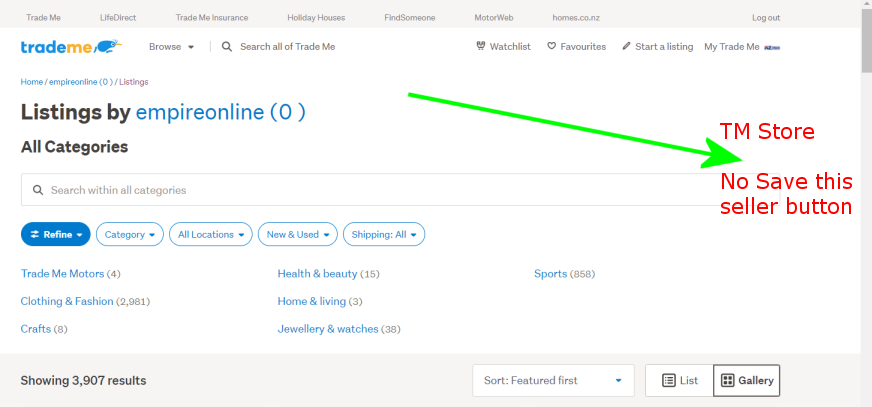
When viewing a Trademe Store page on the new site, there is no indication they are actually a Store as the traditional Store Landing Page with Store graphics etc does not yet exist on the new site. This is a major turn off for deciding on moving to a Store as it forces buyers to flip between old site and new site constantly when looking through a Stores listings, and it's this flipping between old and new that causes a lot of slowdowns.
There is also no favourite seller management on a Store page on the new site or the old site, like there is with general everyday members on the new site. eg this comparison between a regular member and a TM Store.

It would also be helpful if the functionality of the Save this seller and Forget this seller/ Remove seller from favourites buttons in listings was the same. If we can choose to add a seller as a favourite on their listings page and get all the choices as to how often to be emailed, why can't that same function be added to the Save this seller button on the actual auction page.
Also, the Kazam! message is probably not really appropriate, and not sure why it would be a different message dependent on which button you click to remove the seller from favs.
 0
0 -
 Hamish
Hi Gary, thanks very much for the feedback and for pointing these out! I'll take these to the team and see what we can do
0 -
Gary-NZStocked Community Superuser
Hi Hamish. I was pointing someone to this thread for some help in saving searches. I see there is still no Save this seller option for a Trademe Store on their listings page on the new site, where there is for any other member. I'm not a TM store anymore, but if I was I would be a bit miffed this hasn't been addressed yet.
0 -
Hamish
Hi Gary, the option to save a store as a favourite seller does appear when you go on to their Store page (example) - however the option still doesn't appear when navigating to a Store's listings through member search. Our Tech Team are aware of the discrepancy, but I'll check if there are any updates
0 -
Gary-NZStocked Community Superuser
Yes Hamish I know that, although that one on the old site and the one in each of the stores listings doesn't have the full functionality like it does for all other members on each members listings page. Not sure what you mean by member search, but I was just meaning when you are in an actual listing and click on the stores logo/name to see their other listings that takes you to their listings but with no save seller button.
0 -
With push notifications so easy to program in why can't you push to the app every time a product is listed from your favourites
0 -
Is it just me or has the 'save this search' option disappeared from the header bar when using the trade me app. I can't see it at all now.
0 -
Oh I know what Ive done I wasn't using any search term just selecting through the categories. It's there when I type something into the search bar only. I would have thought I could save the search either way, it would be good to be able to.
0 -
Gary-NZStocked Community SuperuserEdited
Hi Julia, I still see the save search heart icon when using the android app just now. The regular new look Trademe has the Save this search button too, but you only get it when you search. If you are not searching but browsing, you don't get the save this category button until you drill down in to sub categories rather than higher level categories.
Edited - Ah, I see that was the case. Good stuff.
There is a fuller explanation in this thread...
0 -
I want to be notified of any listings by a particular seller but they have no current listings. If I add their ID as a favourite search, will I be notified when they list something please?
0 -
Gary-NZStocked Community SuperuserEdited
Not sure what you mean by entering their id, but if you go to their listings page even if they don't have any listings, you will see a save this seller button to click and then choose the frequency of how often you want to be emailed. This option is not available for Trademe Stores though, just in case you were trying to save a TM Store like this.
0 -
Can you tell me how to navigate to their listings page please? I have their member number
0 -
Gary-NZStocked Community Superuser
Sure, just put their member number at the end of this url.
1 -
Amazing, thank you
0 -
I have this problem. Is it the tm site, or is there some other problem. Thanks.
0







20 comments
Date
Votes