No longer have my original email address
Answered
-
 S Community Superuser
Kia Ora Josh,
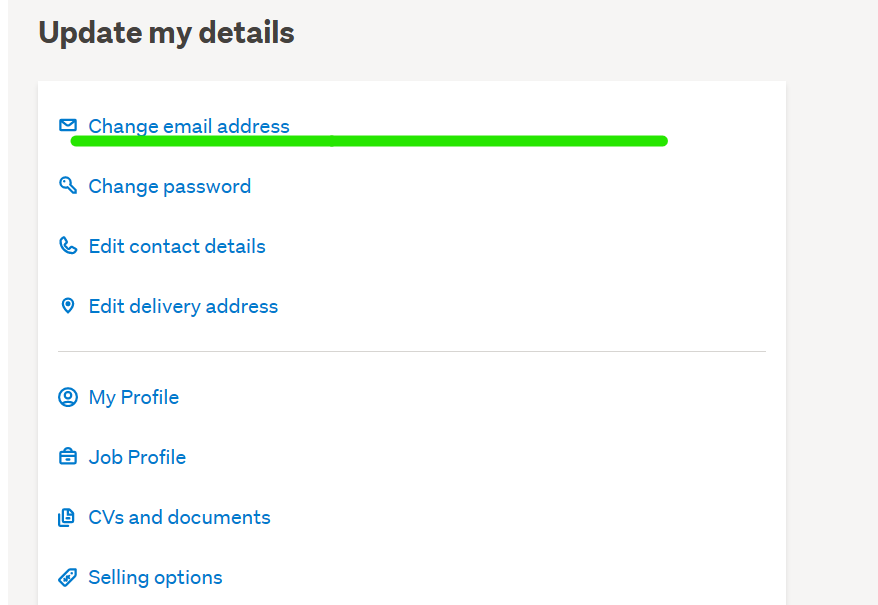
If you click on My TradeMe top right of screen - then select Account Details under My Trade Me on the left hand side menu - Scroll down to Update My Details you will find the change email address link - once selected you will see your old email address TM holds & you will be able to input your new email address - confirm new email address, enter your TM password & select Update Email Address - 2 Example pics below ... - Cheers.
1)
2)
 0
0 -
That's a great answer, but what do u do if you are in that same situation but you also don't remember your tm password to log in. So now you can't go to my trade me and go to the change email link. So no tm password and no access to original email what do I do plx
0 -
S Community SuperuserEdited
Kia Ora Khan and Thank you,
At the Login page you Select the Forgotten password blue Link and you get taken to pic 2 below where you enter your Email address - from there Follow the instructions you will be Emailed from TradeMe and you'll be back making successful Trades in no time - Happy Easter 🐣🐇
Pic 1.

Pic 2.

- Cheers.
0 -
S Community Superuser
Khan,
You need your TM password to enable you to place a Comment here in Community - The password you used to ask this enquiry is the same password you use to Login to TradeMe - unless you are not Khan but asking a question using Khan's Login? - Cheers.
0 -
S Community Superuser
Final scenario ...
If you don't have your Email & Password to Login to TM you will need to 'Live Chat' directly with a staff member through their Contact Us Link at the very bottom of any TM page so they can verify you are the correct account holder to your suggested Member name - wait a few seconds here for the 'Chat' Tab to Pop up in blue at the bottom right of your screen - there is a slight delay.
The 'Live Chat' manned hrs Monday - Friday are 8:am - 6:30pm & Saturday - Sunday 8:30am - 4:pm. - Cheers.0
 -
S Community Superuser
This is the 'Live Chat' Staff Support window that comes up after selecting the blue 'Chat' Tab so you can see how easy it is to get assistance from TM with this to get you back online & Happily Trading again - Cheers.
 0
0 -
the "Change Your Email Address" form is not working for me.
I am getting a 500 website error with the trademe "Opps, there was a slip up!"
message referring to a "banana error 500".I have tried this in Chrome, Firefox and Edge, same problem
0 -
 Lucy
LucyTrade Me staff - Community team
Sorry to read that Glenn. Get in touch on Live Chat and we'll be able to help with that email change. The agent can also look into why you're getting that error.
1


8 comments
Date
Votes