CSV uploads just freeze part-way through - anyone else experiencing this?

-
I've even tried changing browsers, but as soon as I log in and go to "upload products and photos", the process starts again immediately ... and stops again at exactly the same point.
0 -
 Gary-NZStocked Community SuperuserEdited
Hi Martin, not sure how you are preparing your CSV file but a stop at a repeatable point could indicate a problem in one particular field. Since you only have 8 lines, I would split the csv and upload one line of the csv at a time to locate what line is causing the problem. This may point to an invalid character that is not being caught by the MP error handling routine and just giving an undocumented failure.
Not sure when TM will be updating the spec on csv fields, but no doubt they will be making some changes before next month when the 2 fields payment_bank_deposit and payment_other will become invalid, or maybe they will simply block the display of anything in those fields if the seller is In Trade.
0 -
 translateltdEdited
Thanks, Gary. Problem is, I can't stop the attempted upload of this file in order to try uploading something else - it's stuck in a loop. As soon as I select the link to upload products and photos, it starts uploading again, without giving me the chance to pick what I want to upload.
The file itself is the nth overwrite of a csv template I've used successfully many times over.0 -
Gary-NZStocked Community SuperuserEdited
Ah. A logout from MP then browser cache clear should fix that.
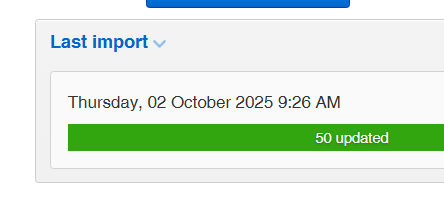
I just did a test import from csv of 6 items and they imported fine and behaviour was quick and no probs, other than the message saying 50 updated, when there were only 6 items in the list.
 0
0 -
I'll try the cache clear, thanks. I've logged out and rebooted with no joy, and tried an entirely different browser, though, and it still happened - shouldn't have been anything cached in the other browser program. Will report back shortly.
0 -
Gary-NZStocked Community Superuser
You may also want to disable any adblockers if you use any on the MP page as TM often change things and adblockers can sometimes give unexpected results. In saying that, I use Ublock origin on most pages, but just checked and I have it disabled on the MP page.
0 -
Cache cleared, now signed out from every tab on Firefox (what fun!), opened up TM, went to Products, clicked the upload... link, and the file upload began again automatically with no input or options, as above.
At least it's only eight items, which I can create manually by editing existing products, I guess.0 -
 Michelle
Trade Me staff - Community team
Kia ora Martin, sounds like you might need to get in touch with the team for help cancelling that upload. Use the Contact us link at the bottom of the page and type 'talk to a person'. Once that's been cancelled you can follow Gary's excellent advice.
0 -
Sorted, with the aid of a real-live person on the chat system - thanks, Michelle!
0 -
Michelle
Kia ora Martin, great to hear!
0 -
It's happened again - the third time in three months now. 70 items in the CSV this time so I don't fancy having to make all the changes manually this time. I "talked" to the contact bot last night so hopefully the message will be passed through to a human soon.
I've logged out and logged in again but as soon as I go back to My Products the upload starts - and jams - automatically, so there's no way to stop or bypass it. The chap I spoke to in October said the easiest thing was just to contact the help desk. Curious to know, though - has anyone else ever experienced this? It can't just be me, surely.
0 -
I'm experiencing the exact same thing.
1 -
There's something magic the help desk people can do to fix it in a trice - just finding a straightforward way to report it is the hard bit!
0 -
I'm glad I found your post! Did you call them or just use the online help chat? Cheers!
0 -
From memory I "talked" to the help bot thingy with the speech bubble at the bottom right of the page and asked it to get a human to contact me. Less than ideal but it works. Sometimes someone will see the comments here but that's a bit hit-and-miss.
0 -
I am experiencing this exact problem right now. The upload bar goes 8 clicks and then freezes. I tried everything but to no avail. Even in a new "clean" browser, the upload starts immediately. I have reached out to TM for help.
0


16 comments
Date
Votes