The value of End date is greater than maximum allowed duration of 7.00:00:00
Confirmed bug
I can't relist my item because of the below error and nothing I do will change, even bringing the duration down to 1 day.
"The value of End date is greater than maximum allowed duration of 7.00:00:00"
-
 Gary-NZStocked Community Superuser
That message is about the time, not the date. If the closed listing was close to time to expire from your unsold page, it might trigger that if when you relisted it had just gone from your unsold page, or, can you change the time as you are relisting to another time. The time should default to either the time you had previously set, or the time of relist. If the time shown as you relist doesn't match one of those, there may be a corrupted cookie that may clear if you refresh the page when you can see that time. If I refresh the page on that last tab where it shows the duration, it automatically updates the time to match the time now. Another thing to try might be using the Quick relist option rather than the Edit option when you first try to relist the item, then edit after it's relisted.
0 -
FYI - Listing #5245965737
- Original listing closed only this morning so it was not about to expire from the Unsold Page
- Doesn't matter if I try to change the time or date or both, I still get the same error message and cannot proceed
- I have tried refreshing the page, does not help
- I have no 'quick relist' option, only 'relist'. I actually just want to send out a Fixed Price Offer but I can't do that due to TradeMe website upgrades taking place. Hence I can't start a new listing as I will then not reach those who were watching it
0 -
Gary-NZStocked Community Superuser
So on an unsold item in my unsold folder I click in to the listing and get this

When I click Relist, I then get this...
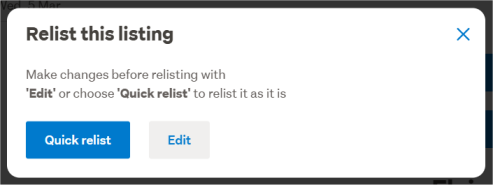
Do you get these same options, and have you tried the quick relist one?
0 -
Nope, it just goes straight to edit listing page
0 -
Gary-NZStocked Community Superuser
Oh dear. You might have to ask Trademe for some help then.
Only other thing I could suggest is the usual clear browser cache, try a different browser or device.
0 -
Thanks for your help.
0 -
 S Community Superuser
Kia Ora Dave,
Sorry to read of your trouble there,- Are you using the Desktop site or an App? - Have you tried through both?
- Are you on the latest up to date version of the Browser or App? - App updates are rolled out quite frequently so it pays to check.
- Try clearing your Cookies & Cache then reconnect to TM with a fresh start.
How to Clear Your Browser Cache & Cookies: On Any Browser
There is a possibility of the Daylight Saving settings causing an issue therefore if the above doesn't clear the message, allowing you to proceed in Relisting, take a screenshot of the error on the page to report this through to staff for investigation.
To contact TradeMe staff through "Live Chat" for assistance, If you select the Contact us Link at the very bottom of any TradeMe page the Chat Tab will Pop up in blue at the bottom right of your landing page screen. - Enter in the Chat bot which comes up once opened in a New conversation - Talk to person - and you are taken to entering a few details before arriving at the window to Chat with a Real Person/Staff.The Live Chat manned hours weekdays are 8:00am - 5:30pm and weekends 9:30am - 4:pm- Cheers.0 -
Update - I have managed to relist using Trademe app on my phone
1 -
S Community Superuser
Thanks for letting us know Dave,
All the Best for your Sale! 😊
0 -
Hi TradeMe,
I have this same issue.
I have tried on the APP and on Desktop - same problem.
I have tried clearing cache on browser - sample problem.
1 -
 DaniEdited
I had the same issue yesterday and in the end I had to message TradeMe support about it. They refunded my fees so I could start a whole new listing. You'd think they could have fixed an issue like this which has obviously been going on for quite some time.
1 -
Same problem here. We're still within the timeframe to relist, but only by a day so will lose it as the 'real person' helpdesk is now closed. Annoying that this hasn't been fixed still.
1 -
 bargainhunter4Edited
Same problem. Please fix it Trademe.
I paid for 2 relists that I can not use.
Can you refund this Trademe?
0 -
S Community SuperuserEdited
Kia Ora Jason,
I'm a Member same as you, I'm not TradeMe staff,
Yes! if you get in touch with a staff member directly with your Listing number I'm sure they'll help you so you only pay once for your Listing & Relists, as in the comment from Dani just above.
How to contact TradeMe staff is in instructions above also & here for you,
https://help.trademe.co.nz/hc/en-us/community/posts/12410634167951/comments/12411008272271
- Cheers.
0


14 comments
Date
Votes