Changing Feedback
Answered
Does anyone know how you can change the feedback? You use to be able to change it but there doesn't seem to be an otption for this any more??? My orginal feedback was asking the buyer to check their spam folder because they weren't responding to my emails and now that the transaction has taken place I would like to give proper feedback. Tks.
-
 S Community Superuser
Kia Ora Mark,
Congratulations on the successful sale😊
A couple of ways to get back to the Classic (Old) Desktop site Feedback pages which have the Edit & Delete Feedback Fields as below...
If you go through the Member profile search, enter the Username, you arrive in their account profile > select Feedback should take you to the Classic site page > scroll to that you placed, - Feedback can only be edited once, if you delete it this can't be replaced.

Otherwise In my Won items I scroll to the very bottom of the page & select the Desktop in fine print - this takes me to my TradeMe Account details page However if I scroll down the Left hand side Banner menu & select Won again I am taken to the Classic site - I enter the Username & select members from the scroll down menu & I'm taken to the Members page on the Classic site where I have the Edit & Delete tabs.

If you still need help to get to the Classic site Feedback page contact TradeMe staff through "Live Chat" for assistance - Cheers.
0 -
Cheers,
Thanks for that:)
1 -
Ive tried everything. Nothing is worked
0 -
 Michelle
Trade Me staff - Community team
Kia ora Gerry, we're making some changes to the site and some features are temporarily available for some listings. If you're unable to edit your feedback you can get in touch with the team and they can give you a hand.
0 -
S Community Superuser
Kia Ora Gerry,
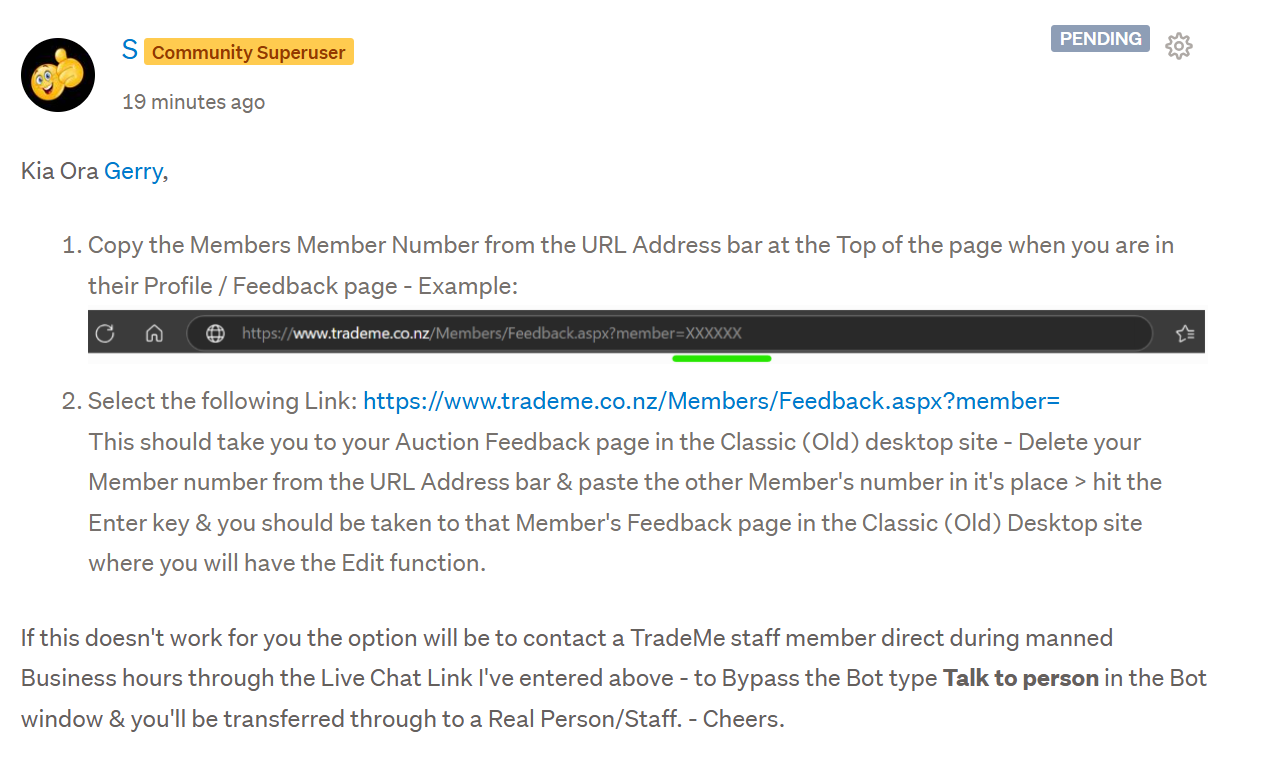
- Copy the Members Member Number from the URL Address bar at the Top of the page when you are in their Profile / Feedback page - Example:

-
Select the following Link: https://www.trademe.co.nz/Members/Feedback.aspx?member=
This should take you to your Auction Feedback page in the Classic (Old) desktop site - Delete your Member number from the URL Address bar & paste the other Member's number in it's place > hit the Enter key & you should be taken to that Member's Feedback page in the Classic (Old) Desktop site where you will have the Edit function.
If this doesn't work for you the option will be to contact a TradeMe staff member direct during manned Business hours through the Live Chat Link I've entered above - to Bypass the Bot type Talk to person in the Bot window & you'll be transferred through to a Real Person/Staff. - Cheers.
1 - Copy the Members Member Number from the URL Address bar at the Top of the page when you are in their Profile / Feedback page - Example:
-
I wish i could get in touch with them. They make it so difficult you need a rocket science degree to actually get through
1 -
S Community Superuser
Kia Ora Gerry,
I have a 3rd workaround for you though it's gone into Pending status awaiting release - Meantime this is how it reads & you'll be able to select the Link then - Cheers.
 1
1 -
I tried that already. No go.
0 -
S Community Superuser
Cheers Gerry,
Have you cleared your Browser cookies & cache?
0 -
Yes, ive exhausted every option available
0 -
S Community Superuser
Cheers Gerry,
Contact TradeMe staff direct when the Chat is manned tomorrow 13 May 2025 8:am - 5:30pm
0 -
Will do, Thats a whole other nightmare in itself
0 -
S Community Superuser
Remember to type Talk to person in the Bot window to be transferred through to staff - Cheers.
0 -
Cheers, will do
0 -
Whatever happened to the good ole days when you could simply hit a tab and contact customer service direct
0 -
S Community Superuser
Kia Ora KP,
Thank you for confirming you found Success through changing the Member number in the URL Address Bar - that's encouraging for all Members - Much appreciated😊
0 -
I tried dozens of ways and only that method worked
1 -
Thank you very much! It's remarkable how not user-friendly the new TradeMe site is, especially with basic functions like this.
1 -
S Community Superuser
Thanks Aksinia,
Yes! Feedback is such an important feature for all Members. - It's great you've found a way which works for you. - Congratulations on your Successful Sale! - Cheers.☺️
0


19 comments
Date
Votes