Deleting feedback

-
 Gary-NZStocked Community Superuser
If you go back to the page where you edited the feedback, you will see a delete this feedback option.
 0
0 -
Thank you but no delete option.
0 -
 S Community Superuser
Kia Ora K,
On the Desktop site if you enter your Seller's User name in the box which comes up through the Link below you should be taken to their Profile & Feedback page on the Classic (Old) Desktop site where you can Delete your placed Feedback - if this doesn't take you to the Classic site initially your second attempt at entering your Seller's Feedback page should take you to the Old site - Cheers.
0 -
Thank you but still no luck. No delete option
0 -
 Callum Community Superuser
Hello K. Perhaps you could show us what you ARE seeing?
If you are being forced onto the new feedback page, and the instructions from S or hitting "Desktop Site" at the bottom of the page don't get you to old page the only way to delete it might be to contact Trade Me via Live Chat and get them to do it on your behalf.
0 -
Can’t get onto ‘live chat ‘ comes up ‘error’ which is why I entered community. I’m not the sharpest knife in the draw’ but I think I followed your instructions.
I get onto sellers profile, enter their user name (billyb206) chose feedback. Shows my feedback & theirs but no options to delete. Can we do this via email ?0 -
Callum Community Superuser
Live chat is out of hours at the moment so there won't be anyone there. It is staffed over the weekend though.
Another thought, are you definitely logged into Trade Me? You won't get the delete option if you aren't actually logged in.
Are you trying to do this on Desktop or on the App? If it's not working one way you can try the other.
0 -
S Community Superuser
Kia Ora K,
Are you on the Desktop site or using one of the Apps?
Ensure your Browser/App is running the Latest up to date version.
Try clearing your Cookies & Cache incase you have a redundant cookie which isn't allowing you access to Chat or to change the Feedback.
How to Clear Your Browser Cache & Cookies: On Any Browser
Once your updates & cache are cleared type TradeMe.co.nz in your Browser to go through to selecting the Desktop site to try the Member Profile Link & the "Live Chat" again. - The Live Chat manned hours weekdays are 8:00am - 5:30pm and weekends 9:30am - 4:pm. - To bypass the Chat bot type - talk to person - in the window - I occasionally have to type this twice to get transferred to a Real Person/Staff. - If you can't get through what is the Error you're getting? - Are you able to upload a screenshot of this error?
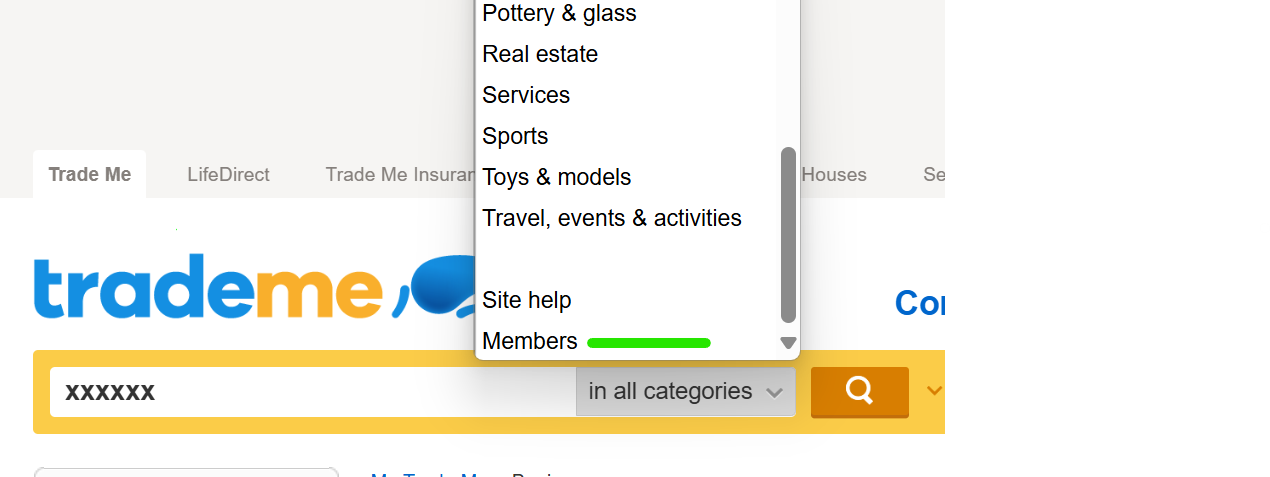
Another option to try to access that Feedback from within the Desktop site, if still required - In my Won items I scroll to the very bottom of the page & select the word Desktop in fine print - this takes me to my TradeMe Account details page However if I scroll down the Left hand side Banner menu & select Won again I am taken to the Classic (Old) Desktop site - I enter the Username & select members from the scroll down menu & I'm taken to the Members page on the Classic site where I have the Delete tab.
Unfortunately TM only have the Chat line to start email conversations - they don't have a direct email contact outside of having an SR ID # number.
You will want to select the cog wheel across from your name in your comment to delete the other Member's name - Identifying other Members is prohibited from this Public Community Forum.
Let us know how you get on with this & if you require further Help there. - Cheers.
0
8 comments
Date
Votes