What's happened to my watchlist & reminders?
Confirmed bug
So a while ago now things changed with my watchlist & I can't work out how to fix it. There seems to be a bug/glitch that when I put items on my watchlist & set a reminder for 12 hours, when I exit out of the listing it defaults back to "no reminder" all by itself. And as a result I no longer get email reminders telling me an item is due to close, so I'm missing out on potential purchases.
Any ideas on how to fix it?
Thanks
-
 Callum Community Superuser
Hello Marion. Are you setting the reminder on each individual auction?
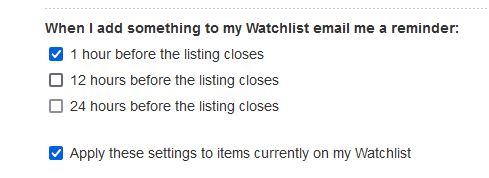
You could try doing it on your email notifications page instead.
You might have it set incorrectly there, which would cause the issue.
Don't forget to also tick the watchlist button to apply it to the items currently there.
 1
1 -
Thank you Callum, I'll try that I see what happens.
I've been setting the reminder on each individual auction (as I've always done).1 -
I have exactly the same problem. It doesn't matter how I change the settings. It used to work fine, now it doesn't work at all.
1 -
But following your instructions, I found that for some reason in my email preferences, 12 hours wasn't ticked, so presumably that was over-riding what I was doing on auctions. Perhaps this is a new thing?
1 -
It's been so annoying Fiona, it must have happened when TM did an upgrade.
But following Callum's very good advice I've received my first email reminder in months. :)1 -
Same problem here. I do not have the option "Apply these settings to items currently on my Watchlist". There is only the option ""Always use this option". I tick it, plus my time preference. When I leave the page, the setting goes back to None".
0 -
Callum Community SuperuserEdited
Alta that's the option you get on an individual auction page. You need to go to your email settings page and change it there.
1 -
 S Community SuperuserEdited
Kia Ora,
For those having trouble finding your Email Preference page this is found in the Desktop site of TradeMe - if you are using one of the Apps type TradeMe.co.nz into your device Browser to go to the Desktop site - Select My TradeMe > scroll down to & select the link Settings in the Left hand side banner menu > select "Update email preferences.' > Scroll down the page to 'When I add something to my Watchlist email me a reminder' - Cheers.
1 -
Thank you. Finally managed to work my way through this maze. Question to Trademe: Why change the original way of setting email reminders, which worked perfectly fine and was uncomplicated. If it ain't broke...
2 -
Ok, so this morning I went to add something to my watchlist & all by itself my settings have reverted back to what they were before Callum's help. I've had to go right back through the settings to re tick the reminder boxes again & apply them to my watchlist.
What's going on? There's clearly a glitch in the system because nothing has changed at my end since I fixed it 3 days ago!0 -
 Michelle
Trade Me staff - Community team
Kia ora Marion, I've sent you an email so we can look into this
0 -
I've been having this problem for several months now and it's meant I've missed a number of auctions. I've updated my email preferences several times, always choosing to apply it to all items currently on my Watchlist, but it just doesn't apply the change. I can change an individual item on its auction page to my preferred 1-hour reminder, but when I go back to it it's reverted to 'Set email reminder: None' and 'Always use this setting' does absolutely nothing. Infuriating.
1 -
I have the same problem. I used to get reminders emailed to me 24 hours before the auction ended and 1 hour before the auction ended, now my reminder settings have reverted to "none" I can manually add a reminder but it only allows me to select either 1, 12 or 24 hours before the auction ends. How do I get my reminders back again?
I have read and followed the above instructions but I cannot find "Update email preferences.' > Scroll down the page to 'When I add something to my Watchlist email me a reminder'
0 -
Callum Community Superuser
Hello Mr
On the top right of this page you will see "My Trade Me." Click that.
Then on the left banner you will see "Settings" near the bottom. Click that
This brings up all your Trade Me settings. The first option is "update email preferences"
Here you will find all your email settings, including when you want your reminder notifications.
Or use this direct link https://www.trademe.co.nz/MyTradeMe/EmailOptions.aspx
0 -
I have since set up the email preferences as discussed above in "Settings" and set them for 12 hours and 1 hour before the bid closes and it has since been working fine with receiving emails.
However now it no longer works this morning though it was yesterday.
I have rechecked my Settings and they are still the same Settings 1 and 12 hours.
I do notice that individual items I have watchlisted now no longer show the 1hour, 12 hour email times
0 -
Michelle
Kia ora Graham, Mr and Honey, if you've followed Callum's advice and you're still not receiving the notification emails, hop on to live chat so we can have a look into this for you.
0 -
Hi Michelle,
It would appear that when you set your email preferences (in my case 1 and 12 hours) and then tick " Apply these settings to items currently on my Watchlist" and then most importantly click "Save Changes" at the bottom of the Email Preferences, it seems to work for those items already in your Watchlist.
If you add a new item to your Watchlist then the " Apply these settings to items currently on my Watchlist" tick box becomes unticked..
I have just tried this on a new random item and this is what actually happens. The original items in my watchlist still show the 1 hour and 12 hour email times but the new item in the watchlist shows "None". This means that whenever you add a new item to your Watchlist you must go into email preferences and the tick " Apply these settings to items currently on my Watchlist" and then "Save Changes" at the bottom of the email preferences.
I have tried this and it works, a rather convoluted method of setting the email times.
0 -
Hi everyone, I've just sent this to Michelle, but I'm posting it here as well. I'm having some success in altering my settings via PC, but they appear to revert when logging in on a mobile device (in my case an iPad).
I was on an iPad using Firefox (both up to date) and updating my email preferences (Settings > Email preferences > 1 hour before closing + Apply these settings to items currently on my Watchlist > Save changes) or via the items on the Watchlist directly (Auction > Set email reminder wasn't working > 1 hour + Always use this option > Close) wasn't working. I have had success over the weekend updating email preferences (Settings > Email preferences > 1 hour before closing + Apply these settings to items currently on my Watchlist > Save changes) via PC, again using Firefox, and I have been successfully receiving closing notification emails. However, having just logged on again via my iPad and without having changed any of my settings, my Watchlisted auctions are now showing 'Set email reminder: None'. This shows the same on PC & iPad. Updating the settings on PC has successfully applied them again and browsing on iPad is not causing them to revert.
0 -
I have now tried adding an item to my watchlist on my phone and have to go through the same scenario of ticking the tick box on "Apply these settings to items currently on my Watchlist" and because it is on my phone I need to 'Update" my preferences This is all found under "Settings" under "Profile & Account
If I check on my PC I can see the new Watchlist item has been updated with my 1 hour 12 hour email preferences.
This whole email preferences needs to be simplified as many people will have the same problems as I have.
0 -
I'm not sure why Trade Me changed this.
1 -
I have now found that if I view current listings of any one of my favourites and then click on the upper right side of an item to add it to my watchlist I dont get any email reminders unless I set up the email preferences in Settings after this.
If however I open (or display) a current listing from my favourites and then add it to my watchlist it shows that I will get email reminders.
So it seems the better option is to open an item and then add it to the watchlist, seems to work every time
0 -
S Community Superuser
Kia Ora Aaron,
If you look at the top of this Post it has a badge tag which says Confirmed Bug which means there is a fault in the system which will be worked on for a fix resolve - Cheers.
1 -
Hi o-magnus, do you have any update on the status of this bug?
0 -
S Community Superuser
Kia Ora Michael,
I've not heard any update on the status of this though I'm a Member just like you, I'm not TradeMe - perhaps a staff member maybe able to give us an update through this thread on Monday - 3 February 2025 please. - Cheers.
0 -
Michelle
Kia ora everyone, I've had a look into this but don't have any updates for you at this stage, sorry.
2 -
I've also been unable to fix this issue
0 -
i have had none since October its a bug in there system they know about it but don't seem to know how to fix it!!!!!!!!!
3 -
Has there been any update to this bug that anyone is aware of? This must actully be costing trademe a large amount of money given there revenue model, I have missed out on heaps of items becuase I no longer get the reminders.
0 -
No updates I'm aware of Matthew, & I'm still having the exact same problem. Also missing out on items because I'm not getting reminders.
Periodically I go back & update my settings, but it only lasts a short while before I'm back to not getting reminders.
It's incredibly frustrating, but TM can't seem to resolve it.0 -
I am having the same issues for a few months now. There is no way of contacting Trade me and advise them of the issue. Very poor customer service.
0


31 comments
Date
Votes