Creating a $1 reserve listing
Answered
It would be really helpful if Trade Me added an explanation of how to list somethign as a $1 Reserve in teh email advertising for the special fees or as a topic under Help. I want to create several today to take advantage of the reduced fees offer, and was looking for a $1 Reserve category, but there wasn't one. Yet, there is a $1 Reserve search listed under Stores in the Browse. I am guessing if you list and item for $1 with $1 reserve that would work?
-
 Gary-NZStocked Community Superuser
Yes Amanda, if you list an item and have the start price set at $1 and no hidden reserve, then it will show in the $1 res search category. The listing will still be in it's regular category, but the $1 res section is not a category as such but a search/browse only category like filter. You can still also have a Buy Now on a $1 res listing too.
0 -
I think it would be useful for TM to put a link to those T&Cs they mention too??!!! What is actually free? Listing fees or success fees?? The app has a notification popping up with the promotion but then says 'success fee may apply' and also no link to check the T&Cs?? What is free????
0 -
Gary-NZStocked Community Superuser
Fiona, most of the T & C are in the email,
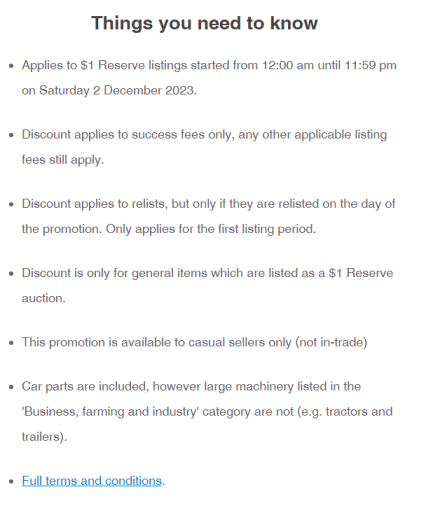
plus there is a link in the email (copied just above) to the full T & C here...
Success fee and listing promotional extra discount terms and conditions – Help - Trade Me
0 -
Thank you so much. Didn't get the email, just the notification in the app. Thanks for taking the time to reply! :)
0 -
 Lucy
LucyTrade Me staff - Community team
Thanks for the suggestion about a how-to, Amanda. I'll pass that on. 😊
0

5 comments
Date
Votes