When listing a 'Sell similar' item, is there a way to delete the photo's quickly from the previous listing..
Answered
Hi.. haven't listed anything new for a while.. I'm listing books in the same category as current books I have listed, and wanting to keep some of the listing info from the previous listing, editing to change to the new book.
I'm opening each photo from the last listing, then deleting them, one by one, however hoping there's a way to delete them all quickly, as there was with the previous listing method Trademe had.
Is there a way to delete them all quickly please, so I can upload the photo's for the new listing?
Thanks for help. :-)
-
 Gary-NZStocked Community Superuser
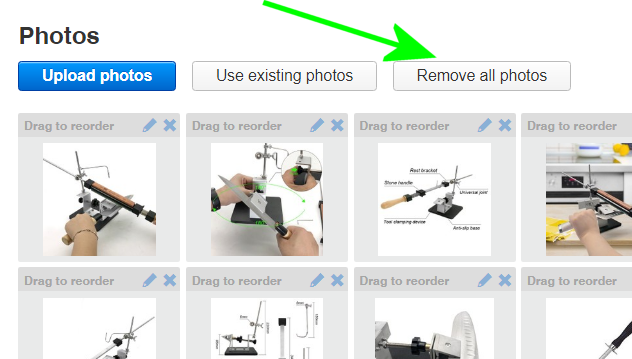
Best use My Products. Everything to edit is on one page and there is a remove all photos button.
 0
0 -
 Callum Community Superuser
No. Not if you are using the traditional way to list items. The delete all photos option is gone. You have to select each one and delete it, as you have found out.
However I suggest you look into My Products. Then you can list one book, duplicate it each time you want to list another one, then change everything that needs to be changed all on the one page without messing around going through pages and pages with all the wait time that entails. It will also allow you to delete or add photos in bulk.
0 -
Hi.. thanks for your info.. wonder why they've left it as such a slow option when needing to delete 20 photo's, when it makes sense to have a quick removal option.
Isn't My Products for businesses?0 -
Gary-NZStocked Community Superuser
My Products is free for anyone to use.
https://sell.trademe.co.nz/myproducts
0 -
Ok.. thanks Gary, will have a look at it.
0
5 comments
Date
Votes