Can't save changes to postage costs on an existing listing
Confirmed bug
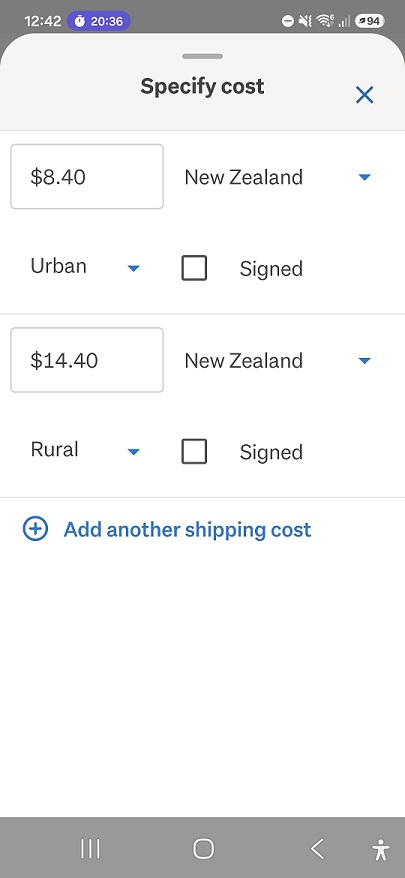
Since NZ post increased their rates I wanted to update my listings but on the app I can't save the changes. There is a DONE button on the keyboard that appears when you are typing in the new postage cost but it disappears as soon as you click on RURAL or URBAN and the only option after that is to close with the X
-
 S Community Superuser
Kia Ora dimples11,
Any chance you have a bid on your Listing?
Both the iOS & Android Apps were updated 2 days ago - 6 July 2026, check if you're running the latest version. - You could try uninstalling & reinstalling the app - If no go and you're on the Latest update you could try rolling back to the previous version in the interim. - You could also access the Desktop site through your phone Browser to see if the change takes hold through the Desktop site in the interim. - Cheers.
0 -
Thanks, no bids on it. I uninstalled and reinstalled and the issue is the same. How do I roll back to previous version?
0 -
S Community Superuser
Cheers dimples11,
It will depend on which App you're using,
The trusted Android App versions are found on the APKPure.com site.
The iOS App doesn't have an Official roll back site though Callum has provided this can be done from a previous back up - the Post discussion can be found through the Post https://help.trademe.co.nz/hc/en-us/community/posts/13125028978447/comments/13130310603535
Remember to untick auto updates until this is resolved - All the Best.
0 -
S Community Superuser
dimples11,
https://apkpure.com/trade-me-property-jobs-shop/nz.co.trademe.trademe/versions
0 -
Thanks, I decided to move onto my PC and do it from there. I can complete the postage update there but very annoyingly if I then change anything else with the auction it has wiped the postage info completely (even if I have saved the changes and the listing has fully updated.
0 -
 Michelle
Trade Me staff - Community team
Kia ora dimples11, sorry to hear you're having trouble with this, it is a known issue the team are working on, it happens with some listings when they are moved across from the old to the new system. You can try this workaround for the app, when editing the shipping options if you tap back inside the postage text box after choosing Rural/Urban, typing or selecting the input field again, it can reload the keyboard, and allow you to hit "Done" properly. If this doesn't work you'll need to create a new listing with the updated shipping options.
0
6 comments
Date
Votes