Disappearing Listings

5 new listings done last week , have gone without a trace , not showing in items i am selling, not showing in unsold , also a sale is not showing in sold, so, lets work on the assumption that everything was done correctly, we can not find a trace of the 6 listings or transaction, a pointer or clue would be helpful, i have been listing and selling since 2005 so have a reasonable idea of how it all works
-
 Callum Community Superuser
Hello fab-ric.
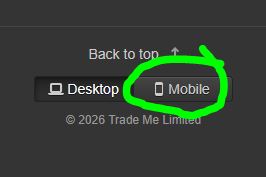
Hit "mobile" at the bottom of the page, and they will re-appear
 0
0 -
 S Community Superuser
Kia Ora fab-ric,
TradeMe have started moving categories through to the new system, items in the new system can only be viewed on the new look desktop site or the apps, selecting the Mobile link at the bottom of your page will take you through to this view. - Cheers.
0 -
HI,
I having the same issues with disappearing listings) and they have only recently been listed, have no restricted words or items, and are def not 45 days old etc.
I can not find where this Mobile option is? Is it on the homepage of the Desktop? I can’t find it, nor on my phone app…This change over of Trademe’s seems incredibly inefficient, slow and full of issues. (And as for options of brands? .. absolutely antiquated and out of date (other sites allow you to add a brand if it is not listed). Personally, I feel whoever is in charge of their IT needs to be fired.
0 -
Callum Community Superuser
Hello liss9
You currently have 30 items listed. The desktop/mobile switch is found at the bottom right of your "Items I'm selling" page.
If you want the ability to add your own brands, you certainly can do that using Trade Me's free listing tool My Products. You have a few items listed so it might be good for you to check that out.
PS: Your YOYOSO mini hair straightners are illegal to sell. Can't sell items in New Zealand with foreign wall plugs.
0

4 comments
Date
Votes