Can't relist a car with Firefox browser - Why are trademe making this impossible?
Answered
i have tried three windows 7 computers (no, don't tell me to use google chrome browser, google can stick their phone-home browser where the sun doesn't shine) and three android phones - all with the same incredibly annoying result: the gray car page "the number 1 place where kiwis sell cars", and then it directs to a blank page that doesn't load:
[link removed, since it appears to be user specific]
yes, i cleared cookies and disabled enhanced tracking protection, disabled all addons, turned off my firewall, and tried countless versions of firefox including the latest one.
-
 Callum Community Superuser
Hi Bret. Have you tried the method Gary suggested on the other thread you posted on? If that is a no go then probably best to contact Trade Me via live chat.
PS The link you provided probably won't work for anyone else but you, as it is specific to your account. Better to do a screenshot if you want to show what is happening. Trade Me might ask to see a screenshot as well so grab one and save it ready for when you contact them.
1 -
 Gary-NZStocked Community Superuser
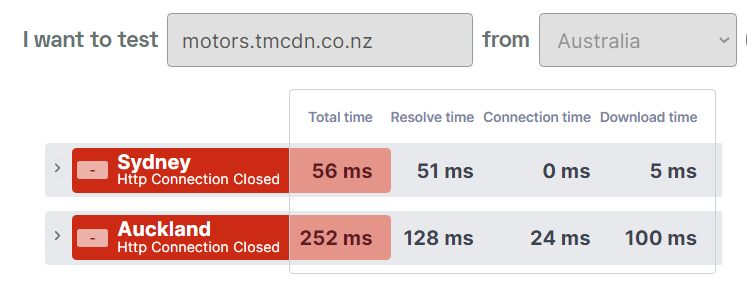
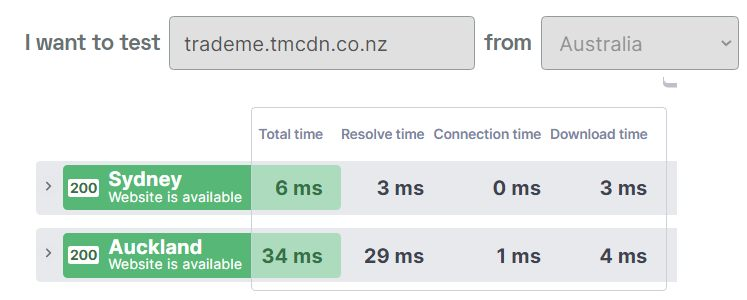
Not sure if it's connected, but the Trademe motors cdn server has been down all day and the motors login page uses that cdn and throws up errors vs the std trademe.tmcdn.co.nz
 0
0 -
antisthenesEdited
Hi callum, thanks for the reply
if i recall correctly, that other thread is for a new listing
i started to do it, and it seemed to be OK, but i don't want to create a new listing as i already have paid for the current one
i have wasted two more hours of my time on this todayno need to take a screenshot, because i already said what happening:
the gray car page "the number 1 place where kiwis sell cars", and then it directs to a blank page that doesn't load:0 -
antisthenesEdited
Solved:
Windows time service was not running under admin tools > services
And i had to enable "synchronize with an internet time server" in "date and time settings"
Seems like that has to be running in order to relist a vehiclei now get two grey car pages, one after another, and then it goes to a page/pages where i can relist it.
Seems like an unnecessary dependency though
0 -
Can anyone clarify, Bret said he had a firefox issue. I also have a firefox issue viewing T/M pages.
Bret said he solved problem with windows time service was not running under admin tools. Did Bret abandon his firefox isue and resolve problem by using windows ?
0 -
Gary-NZStocked Community Superuser
Anthony, Firefox is a web browser where Windows is an operating system. Very different things. What Bret means is that to get things working on Firefox browser he had to enable the time server sync in Windows, then Firefox worked correctly.
0 -
Ah, yes. He was operating firefox in windows ! I am operating firefox in Linux.
Thanks.0

7 comments
Date
Votes