Link to my selling pages
Answered
How do I send a link to my selling pages to friends? Want them to be able to see all my items for sale.
thanks
-
 S Community Superuser
Kia Ora Terri,
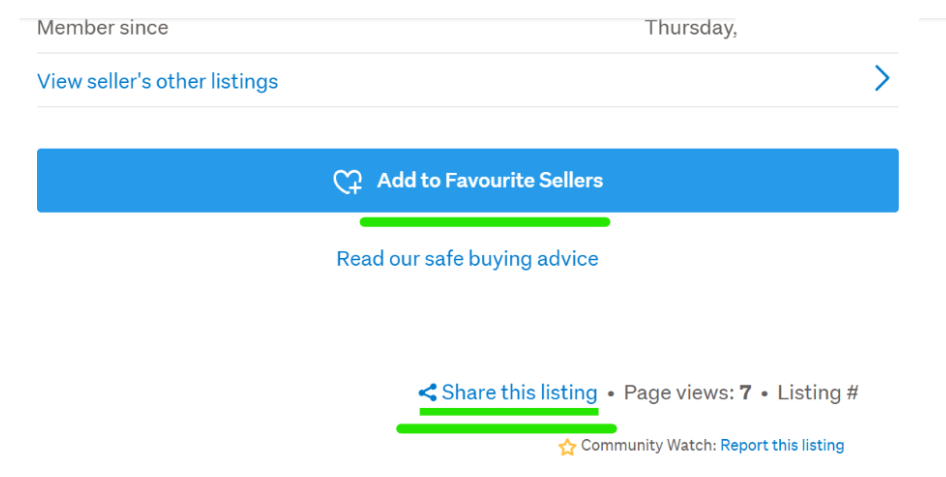
You can share a Link to one of your Listings which is found at the bottom of all Listing pages - if your friends are Members of TradeMe themselves they can save you to their Favourites so they are emailed with your New & Relisted Listings on a daily basis if they choose to, From within that 1 Listing they can select 'View sellers other Listings' - Otherwise you can give them your username to search for through the Members Profile Link which I'll put below for you - Cheers.
Trade Me Member Profiles | Trade Me
Example: Listing Share Link
 0
0 -
 Gary-NZStocked Community SuperuserEdited
The link to your own listings to share with others is as below example. This example is for a different account, but your membernumber at the end will of course be different. You can get the url by clicking in to any of your listings closed or current, then click View sellers other listings link under the description and profile eg
https://www.trademe.co.nz/a/search?member_listing=18
You can also preselect filters eg latest listings or closing soon and copy the url to capture those options.
Once you have the url link you can email or post it in a social media message, or on your own website etc etc.
0
2 comments
Date
Votes