TM App on Android having difficulty showing photos within listings
Confirmed bug
Hi team
This week my TM Android app started playing up. I can see the listing main photo, but when I select a listing there are no photos at all. Strangely for any listing I have added to watchlist I can see all the photos.
To date I have - restarted phone, changed from Wifi to data and back at multiple locations, uninstalled and reinstalled latest version of the TM app, optimised my device (cache etc).
On my computers TM is working fine.
Device is a Samsung S21 with latest versions of android. All suggestions appreciated.
-
We are having the same problem as you are, where some auctions/classifieds on the watchlist, can only see the main photo then absolutely nothing when you go into the listing. This only happens to some listings, not all, so would like to know why this is the case. We are using Samsung Galaxy A22 and Galaxy A10. Can see everything on PC, etc but not on the Android phones for some reason. Even uninstalled and reinstalled TradeMe, cleared cache, etc and still not able to view photos on phone. Frustrating really, when you use your phone as a PC.
1 -
Either a coincidence or someone got the message......TM almost back to normal service on my phone now....although one of my saved searches ifs still not showing photos nearly all the rest are. Dwayne - thanks for the confirmation that I was not going mad(er).
0 -
No photos posting from My Samsung 3 hours ago. Had to load them from My Laptop. Soooo annoying.
0 -
Having the same issue on my new samsung. Any suggestions on hpw to fix have done all the usual tbings to try and update the app etc.
0 -
I was a bit quick thinking my issue had fully been resolved. As Dwayne commented it is a bit hit and miss with some auctions/classifies having it and others not. A work around may be to add the item to watchlist as that always works for me....but a pain. Clearly TM developers and UI testers only use iPhones.
0 -
 Michelle
Trade Me staff - Community team
Kia ora everyone, is this still an issue? If it is can you get in touch with us please, include screen shots and listing numbers of affected listings so that we can have a look into it.
-1 -
It's definitely still an issue. I can't see any pics on many different listings. I feel like TM need to step up their debugging game and there need to be refunds given!
0 -
Samsung Galaxy A51 user still not displaying photos for all listings. Ok for majority of listings but not for when I search for "baler". I have updated the software for my phone, deleted & reinstalled Ap, changed from WI-FI to mobile data, still joy. When I log in on the computer there are no problems.
0 -
Michelle
Kia ora Garry, there is currently a bug with the Android app affecting some listings.
0 -
I have the same issue too on an older android phone. Can see all the photo's of vehicle's and property, but no other general marketplace listing photos, except the listing photo prior to opening the listing.
0 -
I have this exact issue too on Galaxy S20.
0 -
Painful experience at the moment. Frustrating not being able to see pictures when you click on listing.
Samsung S210 -
Yes I'm having the problems described above, that is how I found this thread! Would be pointless sending screen shots of which auctions they are because its very hit and miss. Although more miss at the moment. Its a shame because the app used to work really well.
0 -
Same problem with my phone, s24, today. Hope they can fix it.
0 -
Yes same problem as everyone else, although this is the first time it's happened as previously I've been able to view all photos of auctioned items. Im using a S22
0 -
Yes same problem with me. Galaxy S22. Just happening a few days ago. Some auctions work. Some don't. Tried reinstalling app 3 times and cleared cache and data. No fix.
0 -
 Gary-NZStocked Community Superuser
Same for me, Oppo Find X5, latest Android, latest TM app v 201.0, cleared cache and data. Can see pics in watchlist but some listings don't show any photos when I click in to the listing.
Update. Uninstalled and went back a couple of versions to version 200.0 and voila, all my missing photos from watchlisted items are back, including the ones that were previously not there.
1 -
Awesome Gary thanks, you would have thought trademe would notify customers of this issue but they just hide from their issues (NOT MY PROBLEM)
1 -
Still the same problem. You would think that it should've been fixed after a month. Trade Me seems to have thrown customer service and support out the door.
0 -
Same issue here on all android devices.......very frustrating.
0 -
Love trademe when they say please contact us, im sure everyone is aware you can't contact trademe as they have made impossible to do so, worst customer service i have ever experienced, Sam Morgan would have been horrified to see the mess they've made of his site.
0 -
Ive been having the same problem for over a week. A right pain. Any solution suggestions??
0 -
Gary-NZStocked Community Superuser
Gus, only fix until TM fix the problem is as I mentioned above, go back to version 200.0
You can get previous versions on Apkmirror.
https://www.apkmirror.com/apk/trade-me/trade-me/trade-me-200-0-release/
1 -
Dave
Cheers Gary, Brilliant fix.
Definitely shopping at your site.
Thanks again. Dave0 -
Gary-NZStocked Community Superuser
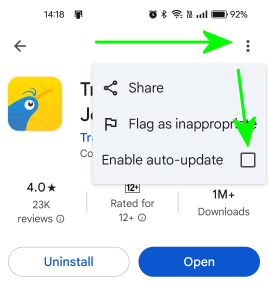
If you don't have it set already, it pays to set the Trademe app not to auto update too, otherwise it simply updates to latest version. Next year or whenever Trademe advise it's been fixed, you can turn auto update back on. How to do this may vary from phone to phone depending on what Android version you have, but on my Oppo Find X5 I open Play store, click my account icon top right, Manage apps and devices, Click the Manage tab, find Trade me in the list and click it, then click the 3 dot menu top right, then untick the box that says Auto update.
 0
0 -
Same problem on my Note 9. As soon as i select an auction, there are no photos.
0 -
Same problem ...
0


27 comments
Date
Votes