Some listings not showing quantity or plus minus quantity symbols, other of my listings do
AnsweredHi There
Some of my listings will show up with number available of items and the + - symbols. Other product listing don't. I can't see the difference between the listings. Any ideas why?
Thank you
-
 Gary-NZStocked Community SuperuserEdited
Listings that are NOT MQL (Multi Quantity Listings) ie they are standard auctions with a start/reserve/Buy Now, will not show a qty box, as the auction is just for one. Also, if the listing is a MQL but the stock level remaining is 1, then again, the qty box will not show as the listing is for 1 only.
1 -
 CrispinEdited
Thank you for your reply. I suspected that at first too - But it not the problem in this case. Checked under my products and they are all as multiple quantity listings All are buy nows and all have enough stock for it. All have the same shipping templates. Maybe something in that area is not working on those listings.
0 -
Gary-NZStocked Community Superuser
Are there any outstanding fpos maybe, as stock is allocated to them until they close.
1 -
 Callum Community Superuser
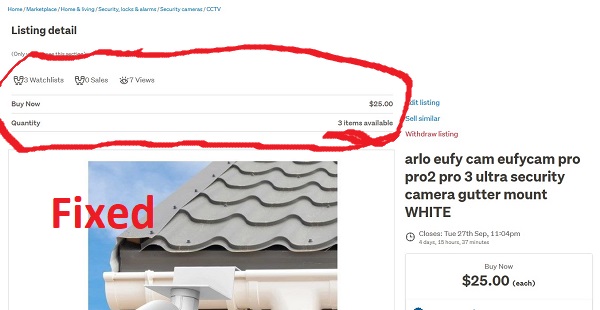
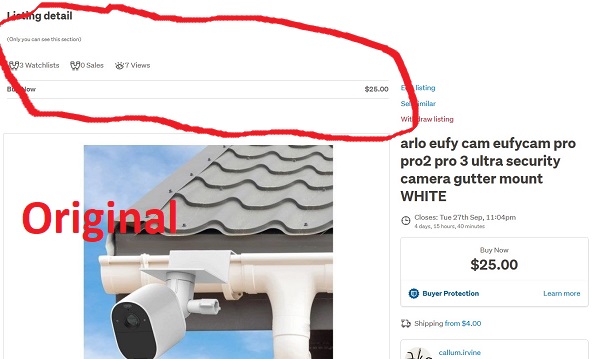
Yes. I have noticed this happening a bit lately. Someone asks how many I have, or asks to buy 10 of an item. Makes me curious because the stock level should be right there. However when I check the stock level is not showing. The fix (using My Products) is to just open the auction, save, and it fixes itself. You don't have to physically change the stock level. It is correct, just not showing. In another thread that I can't find now, someone suggested it is to do with the shipping templates somehow that this is happening.
Additionally people seem to struggle to find items that this has happened to. If I have a normally great selling item that suddenly drops off, sure enough the stock level has gone. Open it, update it, and it's back to selling again.
Tested just now on a random auction of mine and sure enough. No stock level showing. Opened it, saved it and it's fixed. See screenshots. If you have an item that has stopped selling check that stock it is showing properly.
 1
1 -
Gary-NZStocked Community Superuser
Yes, like Callum says above. Sometimes stock is not updated correctly. I just exported my current listings and compared stock levels vs current listings in My Products, and some were quite different. I did a bulk edit to my listing footer and that did correct and updated all my current listings. It's something I do quite regularly to refresh things. Initially my stock difference between what it was and should have been was over 1000, but after update went back to less than 300, which probably allows for outstanding FPOs.
Something to watch as well is products that you have set for infinite stock, only list with 900 and seem to sit on this 900 no matter how many sell. Also, items with more stock numbers > 900 also list as 900 in stock. Seems the stock counter doesn't change in active listings until under 900. Had one 2 weeks ago which is set at infinite where a buyer bought 150 and stock dropped down, then when it relisted from the product it went back up to 900.
1 -
CrispinEdited
Thanks Gary. One of the above did work. Just took a while to be visible. Thanks heaps :)
0
6 comments
Date
Votes