Log in issue when using Community Watch

Hi everyone, there is an issue when reporting a listing through Community Watch from both the apps and website, where you won't be logged in on the help page causing some issues with submitting the Community Watch report. Our Tech Team are aware of the bug and working on getting it fixed up.
In the meantime, there is a workaround - when you click the 'Report this listing' link, a help page will open up in a new tab. If this new tab doesn't say 'Hi, (Your Name)' in the top right-hand corner you'll just need to tap log in, or enter your email address if prompted: 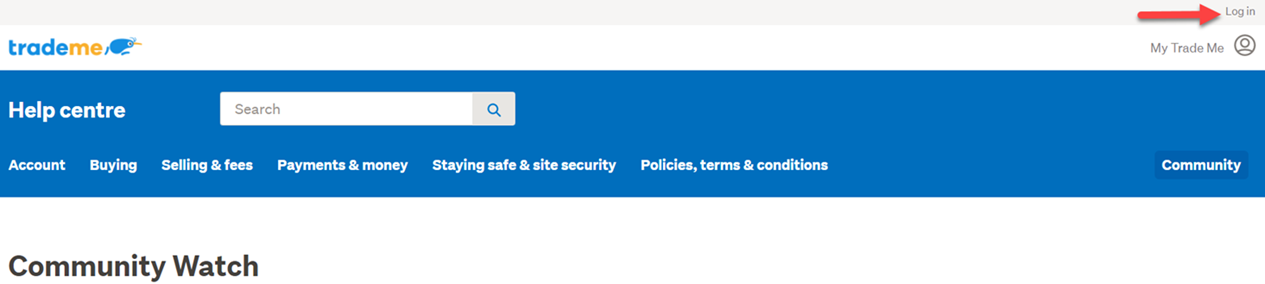
This will refresh the page and log you back in, allowing you to submit the Community Watch report. Any questions, just let us know in this thread. Otherwise, we'll keep you updated on the fix.
-
Can you make a change please. The only thing wrong with your site. Is the Courier Number.? once fulled out and entered. Should be an automic Email to buyer.
1 -
How come trademe is now allowing buyers who habitually do not honor their purchases to stay on the site and continue to trade. I think the standards are slipping and these low life's cost you you success fees as I have not received a refund. Also there is now no way to contact TradeMe to report these violations. Come on get this right like it used to be,
1 -
Hamish
Trade Me staff - Community team
Hi Ivor, you can use Community Watch at the bottom of every listing, or report these members directly to our friendly Customer Experience team to follow up - you can contact them via email, or Live Chat when they are available, from our Contact Us page
0


3 comments
Date
Votes