SORT BY CLOSING SOON

QUESTION
how can i see closing soon on my watchlist in trade me NZ
To see the items ending soonest in your Watchlist on Trade Me, simply open your Watchlist and change the sort option to Closing soon. [1, 2]
On the Trade Me App:
- Tap the Watchlist tab at the bottom of the screen.
- Look just below the search bar or above the listings and tap the Sort (or Refine) dropdown menu.
- Select Closing soon. [1]
On a Desktop Browser:
- Log in and click on Watchlist in the top navigation bar.
- Above your items, look for the Sort by dropdown menu (usually set to 'Date listed' by default).
- Change it to Closing soon.
Would you like me to show you how to set up email reminders for specific watchlisted items so you don't miss out on an auction?
-
Tips for finding the perfect Trade Me listingSort – choose 'Most Bids', 'Highest or Lowest Price' or 'Closing Soon' to sort listings in a methodical order. Condition – toggle ...Trade Me
-
Question About Viewing Auction Items on Trade Me App – Help1 year ago. Kia ora sang hyeok, listings in the app can be sorted differently, for example you can change to 'Buy Now' only listin...Trade Me
You said: change it where
On a desktop browser, the dropdown menu is located on the right side of the screen, just above your very first watchlisted item. It usually says "Date listed" or "Highest price" by default.
Click that text to open the menu and choose "Closing soon".
If you are using a mobile phone or the Trade Me app, look directly below the blue top banner and above your items. You will see a small dropdown button that says "Sort". Tap that to change the view.
Are you looking at the desktop website or using the mobile app right now? I can pinpoint the exact button for you.
-
 S Community SuperuserEdited
Kia Ora shinefashion,
Have you used an AI search to gain the answers you have above?
AI isn't 100% correct, the answers given are when searching for an item, same as the 2 sites answers which you have above, they relate to searching for an auction item - Not searching within the Watchlist itself.
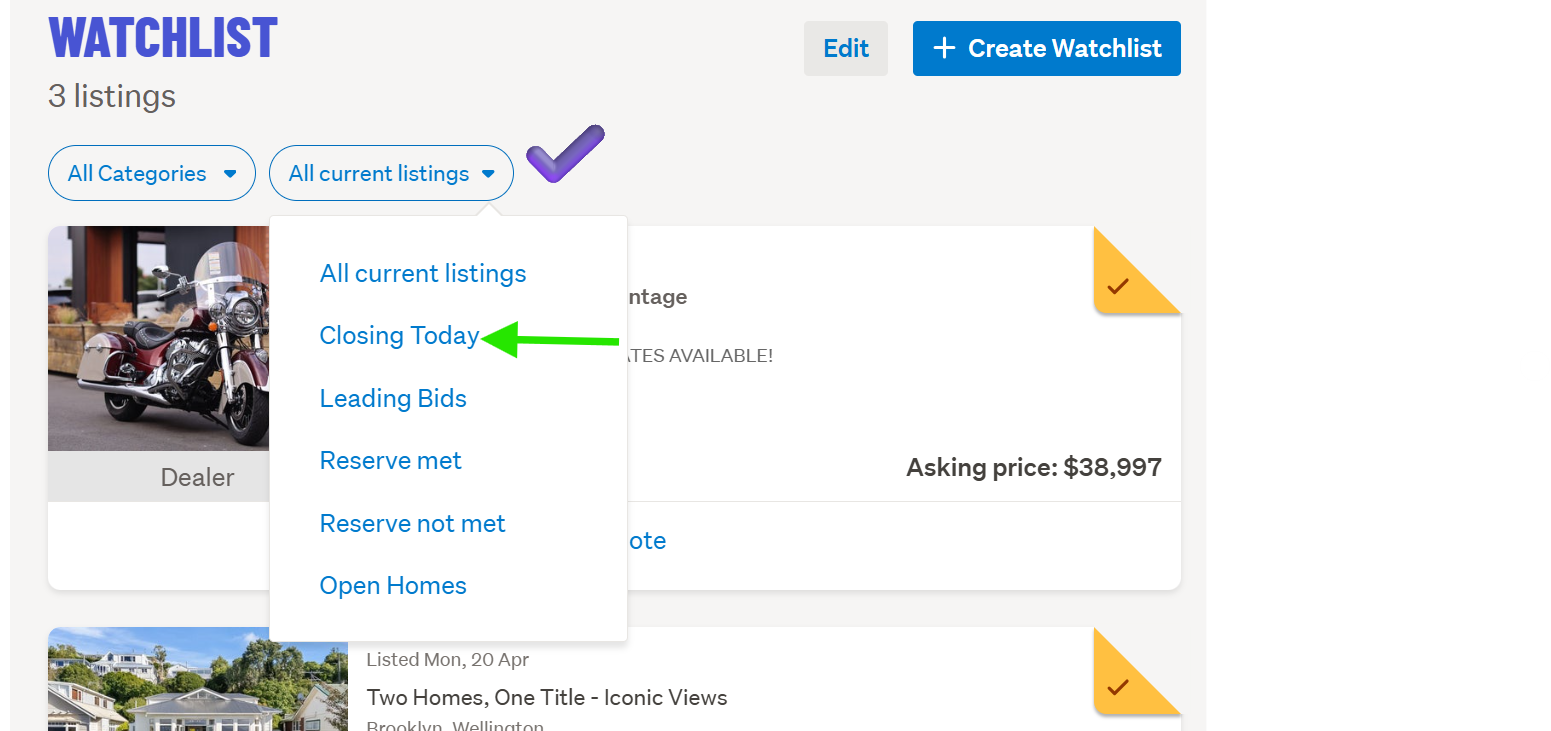
Currently on the Desktop site, New Look, the Watchlist drop-down menu's are on the Left side - there is no 'Closing soon' option, this is only an option when searching the site for an item. - Watchlist items are shown pre-ordered in their closing dates/times - from the 'All current listings' you can select to view 'Closing today'. - See the example below for further options within that Watchlist drop-down menu...
Example:
 0
0
1 comment
Date
Votes